
Julius

One AI workspace for data analysis, slides, dashboards and websites

Beginner
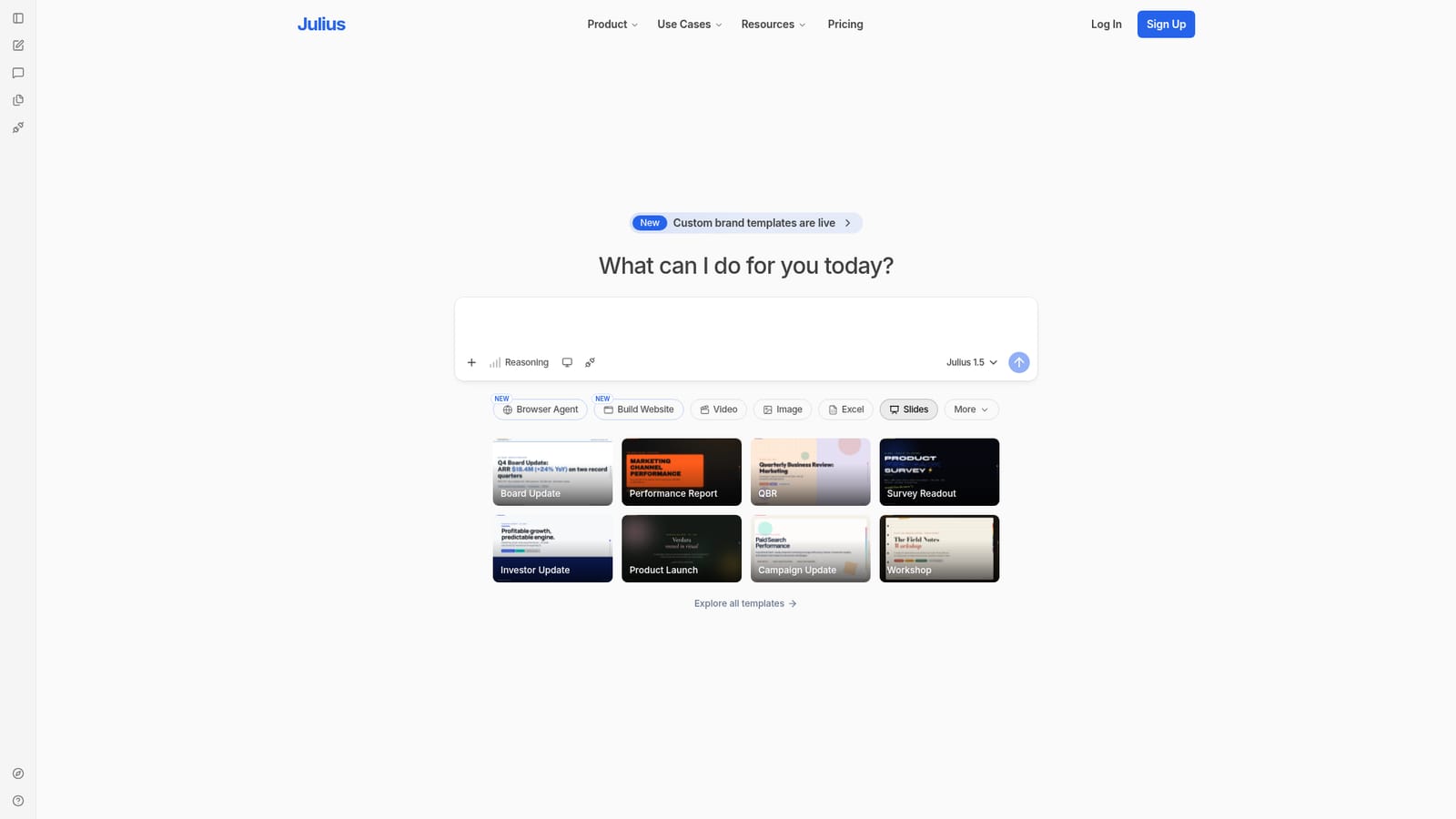
Screenshot of Julius, One AI workspace for data analysis, slides, dashboards and websites

What is Julius?

Julius is an AI workspace that turns a single prompt into data analysis, slide decks, dashboards, websites, images and video. Its template gallery targets board updates, QBRs, investor updates and campaign reports, making it a fit for analysts, founders and marketers who need finished business artifacts rather than raw chat.

Julius is an AI workspace built around a single prompt box. Rather than splitting analysis, deck building and web work across separate subscriptions, it puts them behind one conversational interface: a user types a request such as "build a professional slide deck" and the assistant produces the artifact. The homepage frames the product as a place to research complex topics, analyze data, and generate presentations, dashboards, websites, images and video without leaving the tab. The visible toolset is broader than pure charting. A composer strip exposes Browser Agent, Website, Video, Image, Excel, Slides and More alongside the Julius 1.5 reasoning model, which suggests the assistant handles both the thinking step and the deliverable. The slide side is where Julius is most concrete: a template gallery ships ready-made formats for board updates, performance reports, quarterly business reviews, survey readouts, investor updates, product launches, campaign status updates and workshop outlines. Custom brand templates are also promoted at the top of the site, pointing at teams that need output to match an existing visual identity rather than a generic theme. In practice this suits operators, analysts, founders and marketers who already have the data or the question but not the hours for formatting. Someone can ask for a quarterly review, have Julius reason over the material, and land on a deck shaped like the QBR template instead of a blank canvas. Because the same workspace covers websites and video, it also fits people producing a launch package rather than a one-off file. The trade-off is positioning. Julius sits between spreadsheet-side AI assistants and dedicated presentation tools, and it competes with general chat assistants that also write code and render charts. Its differentiator is the bundled output types and the template library, not deep specialization in any single format. Buyers who need pixel-level design control or strict spreadsheet parity should check the generated output carefully before standardizing on it.

How do you use Julius?

  1. 1Open the workspace and start a session
    Go to the Julius site and use the signup or submit field on the homepage to begin. The composer box is the entry point for every task.
    Julius — Open the workspace and start a session
  2. 2Choose the output type from the composer
    Pick from Browser Agent, Website, Video, Image, Excel, Slides or More before or while writing your prompt. Selecting the format steers the assistant toward the right deliverable.
  3. 3Start from a slide template
    Browse the template gallery for board updates, QBRs, survey readouts, investor updates and campaign reports, then adapt one instead of prompting from scratch.
    Julius — Start from a slide template
  4. 4Describe the deck or analysis you need
    Type a request such as a professional slide deck for a quarterly review. Julius 1.5 reasons over the request and drafts the structure before generating slides.
  5. 5Review, refine and reuse the output
    Check the generated slides or charts in the workspace, then ask for revisions in the same thread. Save the result or reuse the structure for the next reporting cycle.

Pros and cons

Pros

  • Single prompt box reaches analysis, slides, websites, images and videoAI
  • Ready-made deck templates for board updates, QBRs, investor updates and campaign readoutsAI
  • Julius 1.5 reasoning model handles the research and thinking step before outputAI
  • Custom brand templates keep generated decks aligned with company stylingAI
  • Browser Agent extends the assistant beyond the generation tools themselvesAI

Cons

  • Homepage does not state pricing, plan limits or what each tier unlocksAI
  • No integration list is published, so connecting existing data sources is unverifiedAI
  • Breadth across slides, video, sites and spreadsheets invites shallow output in eachAI
  • Competes with general chat assistants that already generate charts and decksAI
  • Custom brand templates and newer tools have no documented quality benchmarksAI

How much does Julius cost?

Features

The workspace bundles data analysis and research with output generation across slides, Excel, websites, images and video. A composer strip exposes Browser Agent, Website, Video, Image, Excel and Slides tools, powered by the Julius 1.5 reasoning model. The slide template gallery covers board updates, performance reports, QBRs, survey readouts, investor updates, product launches, campaign status updates and workshop outlines, and custom brand templates are available.

Frequently asked questions about Julius

  • How do you use Julius?
    The walkthrough on this page covers 5 steps: 1. Open the workspace and start a session 2. Choose the output type from the composer 3. Start from a slide template 4. Describe the deck or analysis you need 5. Review, refine and reuse the output.
  • What platforms does Julius support?
    Julius is available on Web App.
  • What are the limitations of Julius?
    Homepage does not state pricing, plan limits or what each tier unlocks. No integration list is published, so connecting existing data sources is unverified. Breadth across slides, video, sites and spreadsheets invites shallow output in each.

Status

StatusActive
Views0
Outbound clicks0
Added10/21/2026

Platforms

Web App

Pricing

Freemium