Pageon AI

AI agents that build interactive pages, not just static slides

Beginner
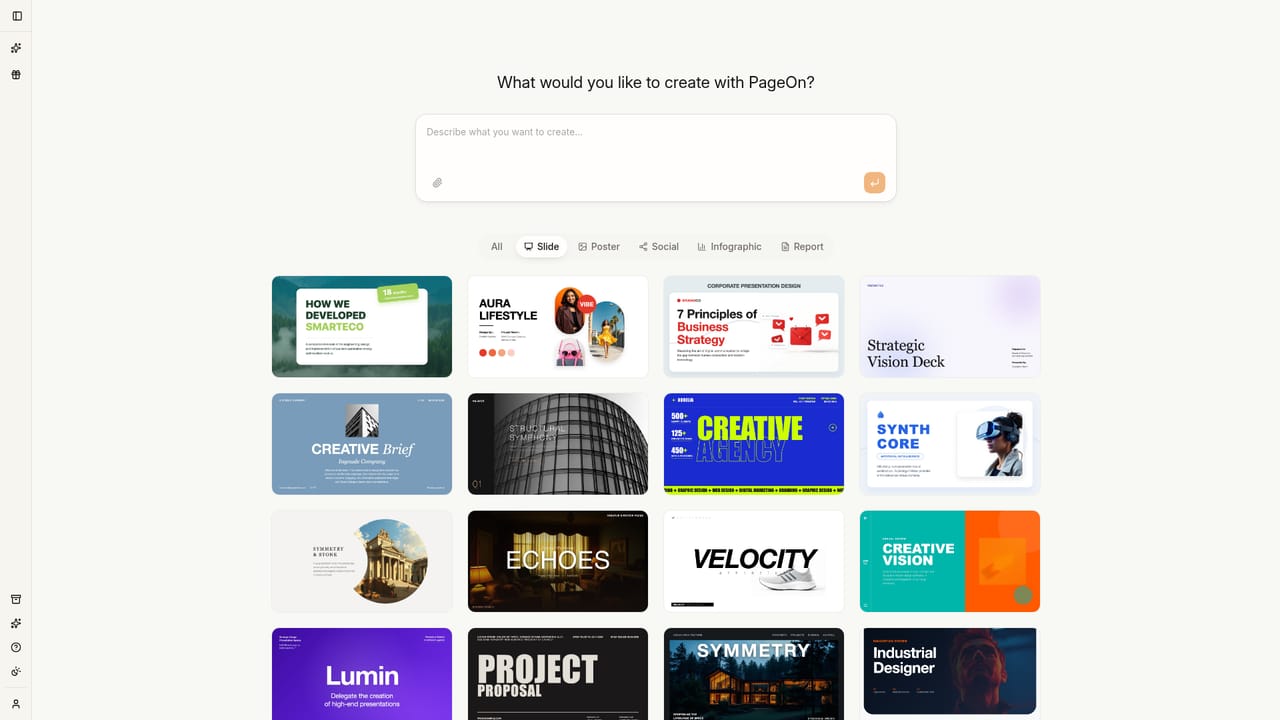
Screenshot of Pageon AI, AI agents that build interactive pages, not just static slides

What is Pageon AI?

Pageon AI is an AI slideshow maker tool. PageOn.AI uses AI agents to research a topic, plan a structure and design interactive presentation pages with live charts, maps, embedded media and animated SVG graphics. Brand settings apply automatically across decks, infographics and social posts.

PageOn.AI is a visual communication platform built around AI agents that take a stated goal and turn it into a finished page or deck. Instead of handing you a template and leaving the layout work to you, the agents research the topic, plan a structure, and design the pages themselves, pulling in visuals and supporting data as they go. The output is pitched as living documents rather than slideshows, which is the core distinction the product leans on. The building blocks are modular components the company compares to Lego bricks: text, media, interactive charts, diagrams, 3D models, SVG graphics and embedded video or audio. Those are assembled through drag and drop plus slash commands, a pattern familiar to anyone who has used Notion. Data visualization runs on interactive Plotly charts, so a dashboard in a deck stays explorable instead of being pasted in as a screenshot. Maps handle geographic stories, and vector graphics can be animated, which pushes the format past what a traditional slide editor supports. Brand consistency is handled once rather than per file. A logo upload lets the AI extract colors and style, a website URL captures an existing identity, or a written description generates a palette from scratch. Fonts and colors can then be adjusted by hand, and the resulting setup is applied across presentations, infographics and social posts. The product sits closest to AI deck builders such as Beautiful.ai and Pitch, and to design suites like Canva, but its agent-driven planning and interactive output target people who want a shareable web page as much as an exported file. It suits founders, marketers, consultants and educators producing pitches, reports and infographics without a designer on hand. Export to PDF, PPTX and images is available on paid plans, and free files carry a badge. The free tier allows a single file with usage limits on AI features. Pro removes the file creation cap and AI usage limits, unlocks exports and interactive elements, adds priority processing, and costs $9.99 monthly or $89.99 annually. The company reports creators across more than 120 countries and real-time team collaboration.

How do you use Pageon AI?

  1. 1Describe what you want to present, visualize or pitch
    Open the app and type your goal into the prompt field. The intake supports a mix of formats, so you can ask for a keynote deck, a vertical infographic or a poster in the same place.
    Pageon AI — Describe what you want to present, visualize or pitch
  2. 2Attach source material such as a spreadsheet
    Add files like a quarterly sales spreadsheet and specify the aspect ratio you need. The agents use the data when planning charts and page structure.
  3. 3Review the agent's plan and generated pages
    The agents research the topic and design pages on their own. Check the structure and content, then adjust the prompt if the direction is off before editing detail.
  4. 4Edit with blocks, slash commands and drag and drop
    Swap components, drop in charts, diagrams, video or maps, and animate SVG graphics. Text, media and interactive blocks can be recombined freely on each page.
  5. 5Apply your brand
    Upload a logo, paste a website URL or describe the brand in words to generate a palette. Fine-tune fonts and colors, then let the system apply them to every page.
  6. 6Export or share the finished page
    Send the work out as PDF, PPTX or images, or share an interactive web link. Removing the PageOn badge requires a Pro plan.

Pros and cons

Pros

  • AI agents handle research, structure and layout from a single stated goalAI
  • Interactive output includes live Plotly charts, maps, embedded video and audioAI
  • Brand kit built from a logo, website URL or text description applies across every formatAI
  • Block-based editing with drag and drop and slash commands feels familiar to Notion usersAI
  • Real-time collaboration supports team work on the same pageAI

Cons

  • Interactive pages are a web-first format, so the PPTX export likely flattens the most distinctive featuresAI
  • Free plan caps you at one file and adds a Made with PageOn badgeAI
  • No API or integration details are published on the siteAI
  • Pricing tiers and AI generation limits are not spelled out in detail beyond the credit-free claimsAI
  • The template library leans heavily on visual style variety, which can slow down choosing a starting pointAI

How much does Pageon AI cost?

Pricing

Free plan at $0 with one file and AI features under usage limits. Pro removes file creation and AI usage limits, adds PDF, PPTX and image export, interactive charts, media embedding, SVG animation, maps, priority processing and badge removal. Pro costs $7.49/mo billed annually at $89.99, or $9.99 billed monthly.

Learn more

Features

AI agents plan, research and design pages from a stated goal. Output uses modular blocks including interactive Plotly charts, animated SVG graphics, 3D models, embedded video and audio, and interactive maps. Brand colors, fonts and logos can be captured from a logo upload, a website URL or a text description and applied across presentations, infographics and social posts. Real-time collaboration is supported.

Frequently asked questions about Pageon AI

  • How much does Pageon AI cost?
    Free plan at $0 with one file and AI features under usage limits. Pro removes file creation and AI usage limits, adds PDF, PPTX and image export, interactive charts, media embedding, SVG animation, maps, priority processing and badge removal. Pro costs $7.49/mo billed annually at $89.99, or $9.99 billed monthly.
  • How do you use Pageon AI?
    The walkthrough on this page covers 6 steps: 1. Describe what you want to present, visualize or pitch 2. Attach source material such as a spreadsheet 3. Review the agent's plan and generated pages 4. Edit with blocks, slash commands and drag and drop 5. Apply your brand 6. Export or share the finished page.
  • What platforms does Pageon AI support?
    Pageon AI is available on Web App.
  • What are the limitations of Pageon AI?
    Interactive pages are a web-first format, so the PPTX export likely flattens the most distinctive features. Free plan caps you at one file and adds a Made with PageOn badge. No API or integration details are published on the site.

Status

StatusActive
Views0
Outbound clicks0
Added10/22/2026

Platforms

Web App

Pricing

FreemiumSubscription