Free trial
The trial offer is a free founding-member place for the first 100 households, no card needed. It is a capped launch offer rather than a time-limited trial.
Learn moreTurn saved recipe videos into a planned week and one grocery list
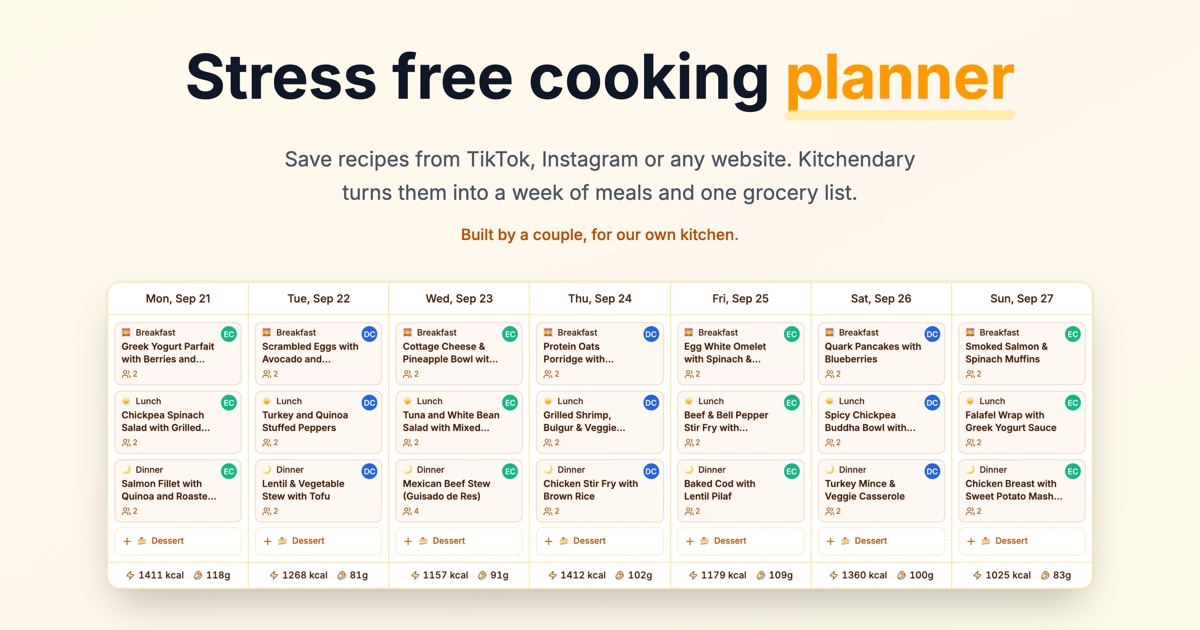
Kitchendary is a chore list tool that turns saved recipe videos into a planned week and one grocery list. A browser-based meal planner that imports recipes from TikTok, Instagram and any website, builds a week of meals by hand or with AI Chef, and turns everything into one grocery list grouped by aisle.
Kitchendary is a browser-based meal planning app built around a simple problem: recipes live in saved TikTok and Instagram videos, the week gets decided at 6pm, and groceries get bought twice. The tool imports a recipe from a TikTok, Instagram or any website link, or from pasted text, and AI pulls out the ingredients and steps. From there the recipe becomes something you can actually cook from and plan with, instead of a video you pause every few seconds. The weekly planner covers breakfast, lunch, dinner, dessert and snacks, with servings set per meal. Planning can be done by hand, dropping recipes into days, or with AI Chef, which fills the gaps around the meals already picked rather than overwriting them. AI Chef takes goals, cuisines and diet into account. A separate idea generator turns a description of what you feel like, or what is already in the fridge, into a full recipe with ingredients and steps. Every planned meal rolls into a single grocery list, with amounts added up across recipes and items grouped by aisle. Calories and protein are shown per serving and per day, and daily targets can be set for weight loss, muscle gain or maintenance. A shared household calendar lets everyone add recipes and plan meals, with changes appearing straight away, and the cooking itself can be split between people by day. It suits households of one or several people who collect recipes from social media, anyone who wants a week planned without a spreadsheet, and cooks tracking protein or calories without a separate nutrition app. Against general recipe managers, Kitchendary leans on import from social video and automatic list consolidation; against dedicated nutrition trackers, its macro view is a lighter layer on top of planning rather than the core product.
The trial offer is a free founding-member place for the first 100 households, no card needed. It is a capped launch offer rather than a time-limited trial.
Learn moreFree for the first 100 households as founding members, with no card required, and 83 of the 100 spots shown as remaining. No subscription tiers or prices are published on the homepage, and cancellation terms are not stated.
Learn moreA contact support route is listed on the site, and the product is run by its two founders. No response times, help centre or documentation are described in the homepage content.
Imports from TikTok, Instagram and general recipe websites by link, plus pasted recipe text. No other third-party integrations are described on the homepage.
Recipe import from TikTok, Instagram, any website or pasted text with AI extraction of ingredients and steps; weekly planning across breakfast, lunch, dinner, dessert and snacks with servings per meal; AI Chef meal plans that respect your picks, goals, cuisines and diet; AI recipe ideas from a craving or fridge contents; grocery lists with amounts summed and grouped by aisle; shared household calendar with live updates; calorie and protein tracking with daily targets.
 AI Angels400+ customizable AI girlfriends for NSFW chat, voice calls, and roleplay
 Candy AIExperience the future of companionship with AI friends who chat, role-play, and connect with you on a human level.
 ourdream.aiA vast AI roleplay platform with millions of characters for chat, images, video and voiceAI Angels400+ customizable AI girlfriends for NSFW chat, voice calls, and roleplayCandy AIExperience the future of companionship with AI friends who chat, role-play, and connect with you on a human level.ourdream.aiA vast AI roleplay platform with millions of characters for chat, images, video and voice


