
Kuvu AI UGC

Turn a product image into a 9:16 UGC-style video ad

Beginner
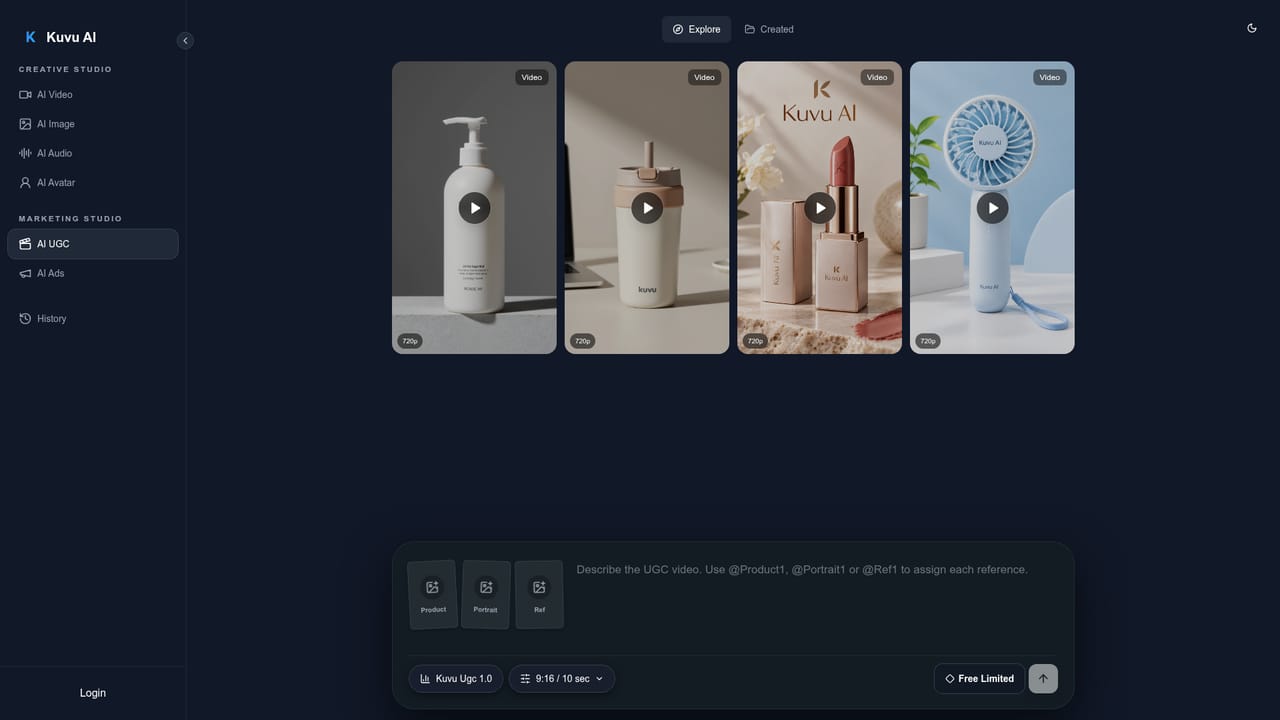
Screenshot of Kuvu AI UGC, Turn a product image into a 9:16 UGC-style video ad

What is Kuvu AI UGC?

Kuvu AI UGC is a marketing tool that turns a product image into a 9:16 UGC-style video ad. Kuvu AI UGC generates short vertical creator-style product videos from a reference image and a detailed script. Part of Kuvu AI's Marketing Studio, it suits e-commerce sellers and social marketers making TikTok-style ads.

Kuvu AI UGC is the user-generated-content generator inside Kuvu AI's Marketing Studio, which sits beside a broader Creative Studio for video, image, audio and avatar work. It is aimed at e-commerce sellers, social media marketers and ad teams who want short, creator-style product clips without hiring talent or arranging a shoot. The workflow starts from a reference product image and a written brief. The examples shown on the page are detailed: a timed nine-second script with visual, model action and voiceover columns, followed by a director's script covering camera, character, action rhythm, product consistency, voice and subtitles. Sample outputs include a body lotion, a travel tumbler, a lipstick and a portable mini fan, each rendered as a vertical 9:16, single-take, selfie-style video at 720p. The briefs stress that the product's shape, label and logo should stay unchanged, that hands remain anatomically plausible, and that the tone feels like a casual recommendation to a friend rather than a formal advertisement. Each example has a Recreate option, so a visitor can reuse a finished brief as the starting point for their own product. Kuvu AI frames the wider platform as an all-in-one studio that draws on several third-party models, including Seedance 2.0, Veo 3, Kling, Runway, Nano Banana, Seedream and Flux. The UGC tool is one of two marketing modules, the other being AI Ads, and generated work is kept in a History tab after login. Compared with general text-to-video tools, the appeal here is a ready-made structure for short-form selling content: the brief format, the subtitle rules and the product-consistency constraints are already laid out. Compared with avatar-only UGC services, it relies on prompt-driven generation, so results depend on how carefully the brief is written and how well the model preserves the product.

How do you use Kuvu AI UGC?

  1. 1Open the AI UGC tool
    Go to the AI UGC page under Marketing Studio and sign in, since generation and the History tab require an account.
    Kuvu AI UGC — Open the AI UGC tool
  2. 2Upload a product reference image
    Add a clear photo of the product. The video is meant to keep its shape, colour, label and branding consistent with this image.
  3. 3Write or recreate a brief
    Describe the script, camera, creator, action timing and subtitles, or press Recreate on an example such as the lotion or lipstick video and edit it for your product.
  4. 4Generate and review the video
    Run the generation and check the product label, hands and lip sync. Adjust the brief and regenerate if details drift.
  5. 5Find finished work in History
    Open History to revisit created videos, then explore AI Ads if a static or promotional format is also needed.
    Kuvu AI UGC — Find finished work in History

Pros and cons

Pros

  • Structured brief format covers script, camera, character, voice and subtitles in one placeAI
  • Built around product consistency, with explicit rules to keep labels, logos and shapes unchangedAI
  • Recreate option lets users start from a finished example brief instead of a blank pageAI
  • Sits in a wider studio with video, image, audio, avatar and ad tools under one loginAI
  • Draws on multiple named video and image models rather than a single engineAI

Cons

  • Sample outputs shown are 720p, which may fall short of higher-resolution ad requirementsAI
  • Results depend heavily on long, carefully written briefs, which takes prompting skillAI
  • Pricing, credit costs and free allowance are not stated on the pageAI
  • Product labels and logos remain a known weak spot for generative video, even with consistency instructionsAI
  • Examples focus on one nine-second female-creator style, so range of looks is unclearAI

How much does Kuvu AI UGC cost?

Features

Generates vertical 9:16 UGC-style product videos from a reference image and a timed script, with director's notes for camera, character, voice, lip sync and subtitles. Examples include a Recreate option. Part of a studio with AI video, image, audio, avatar and ads tools.

Learn more

Frequently asked questions about Kuvu AI UGC

  • How do you use Kuvu AI UGC?
    The walkthrough on this page covers 5 steps: 1. Open the AI UGC tool 2. Upload a product reference image 3. Write or recreate a brief 4. Generate and review the video 5. Find finished work in History.
  • What platforms does Kuvu AI UGC support?
    Kuvu AI UGC is available on Web App.
  • What are the limitations of Kuvu AI UGC?
    Sample outputs shown are 720p, which may fall short of higher-resolution ad requirements. Results depend heavily on long, carefully written briefs, which takes prompting skill. Pricing, credit costs and free allowance are not stated on the page.

Status

StatusActive
Views0
Outbound clicks0
Added10/18/2026

Platforms

Web App

Pricing

Paid