UGCVideo.ai

Turn a script or product URL into realistic AI UGC video ads

Beginner
Screenshot of UGCVideo.ai, Turn a script or product URL into realistic AI UGC video ads

What is UGCVideo.ai?

UGCVideo.ai is a generative video tool that turns a script or product URL into realistic AI UGC video ads. UGCVideo.ai generates realistic AI influencer videos and ad creatives from a script or product URL, with adjustable skin imperfections, lip-sync and gestures, aimed at e-commerce brands and agencies running TikTok and Meta ads.

UGCVideo.ai is a web-based generator that produces user-generated-content style video ads without actors or a film crew. A marketer types a script, uses the built-in script writer, or pastes a product URL, and the platform renders a talking-head video featuring an AI influencer. The output is an MP4 meant for TikTok, Instagram and Facebook or Meta ad placements. The central design choice is realism. Instead of smooth, polished avatars, the tool lets users add skin texture, pores, redness, blemishes, tired eyes and dark circles, and choose skin tone and ethnicity. The idea is that ads featuring relatable, imperfect faces read as authentic, which suits skincare, supplement, lifestyle and men's grooming campaigns. Avatars can be built from a text description or an uploaded photo, in framing from bust shots to full-body, and gestures and lip-sync are applied to the spoken script. In practice the workflow has three stages: pick an avatar and a template, supply the script or URL while setting voice, language and gestures, then generate and download. A library of ready-made templates and influencers shortens setup, and a feature for cloning the structure of high-performing TikTok and Reels ads lets teams reuse pacing and storytelling patterns. Creators, videos and other assets live in one workspace that also tracks credit usage. Pricing runs on monthly credits across four tiers, from a free plan with watermarked output and non-commercial use to a high-volume plan with an advanced video agent workflow. The homepage says it is used by more than 5,000 e-commerce brands and agencies. Among alternatives, it sits with AI avatar and ad-creative platforms, and its distinguishing points are the focus on imperfect human looks and the product-URL-to-ad path. It targets e-commerce sellers, performance marketers and agencies who need many creative variants quickly rather than filmmakers seeking fine editing control.
How do you use UGCVideo.ai?

  1. 1Create a free account
    Sign up or log in to reach the workspace. The free plan includes 50 monthly credits, enough to try a couple of videos.
    UGCVideo.ai — Create a free account
  2. 2Pick an avatar and template
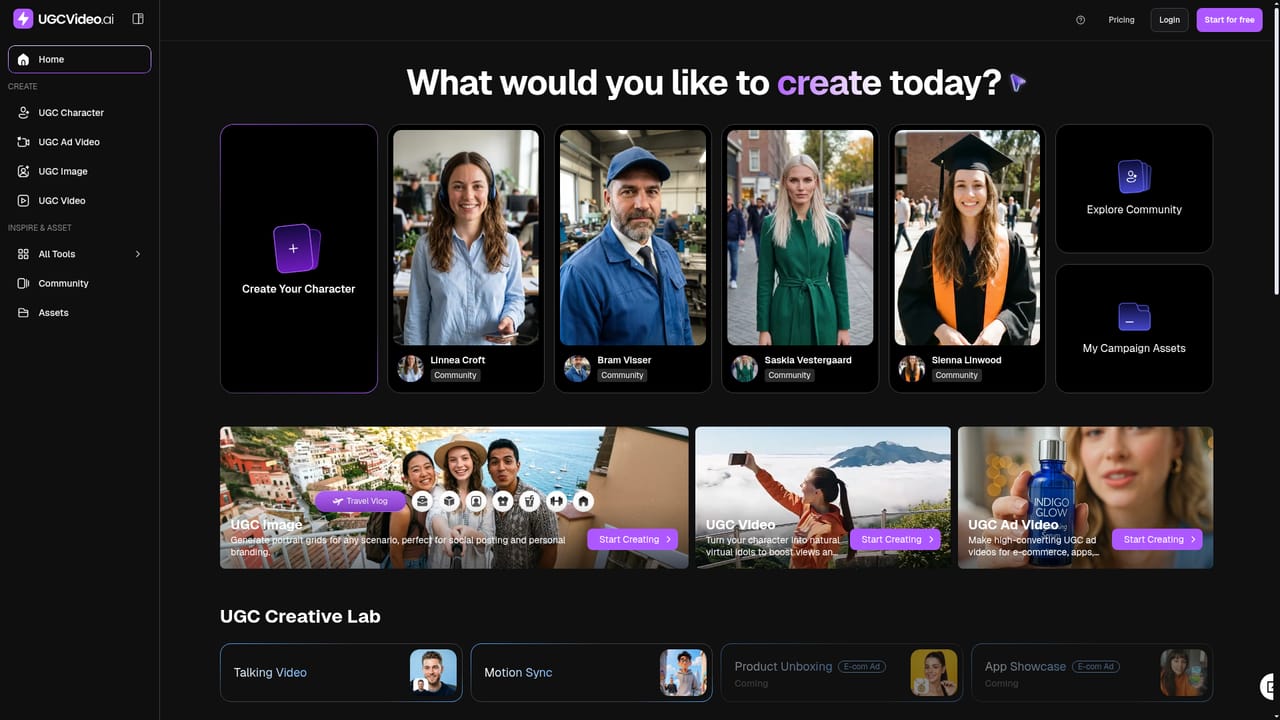
    Choose an AI influencer from the library or upload your own photo, then select a UGC template with a hook that suits your product.
    UGCVideo.ai — Pick an avatar and template
  3. 3Add a script or product URL
    Type your text, use the AI script writer, or paste a product link. Set voice, language and gestures to match the audience.
  4. 4Tune realism settings
    Adjust skin tone, texture and natural imperfections so the presenter fits the product category and brand tone.
  5. 5Generate and download the MP4
    Render the video, which takes a few minutes, then download the file and upload it to TikTok or Meta Ads.
  6. 6Upgrade when you need more
    Compare plans for removing the watermark, gaining commercial rights and raising video and parallel generation limits.
    UGCVideo.ai — Upgrade when you need more

Pros and cons

Pros

  • Product URL to ad workflow removes the need for scripting, filming and editingAI
  • Skin texture and imperfection controls give avatars a less plastic, more relatable lookAI
  • Template and influencer library plus ad-cloning shortens campaign setupAI
  • Free plan lets users test output before paying for a subscriptionAI
  • Paid tiers include commercial rights and scale credits up to high-volume agency useAI

Cons

  • Free plan is limited to 2 videos a month, adds a watermark and bars commercial useAI
  • Output is capped by credits and monthly video quotas, so heavy testing needs a higher tierAI
  • Focused on short talking-head ad formats, not general video editing or long-form productionAI
  • Homepage gives no details on integrations or direct publishing; videos are downloaded as MP4AI
  • Realistic fake influencers in ads may raise disclosure and platform-policy questions for brandsAI

How much does UGCVideo.ai cost?

Free trial

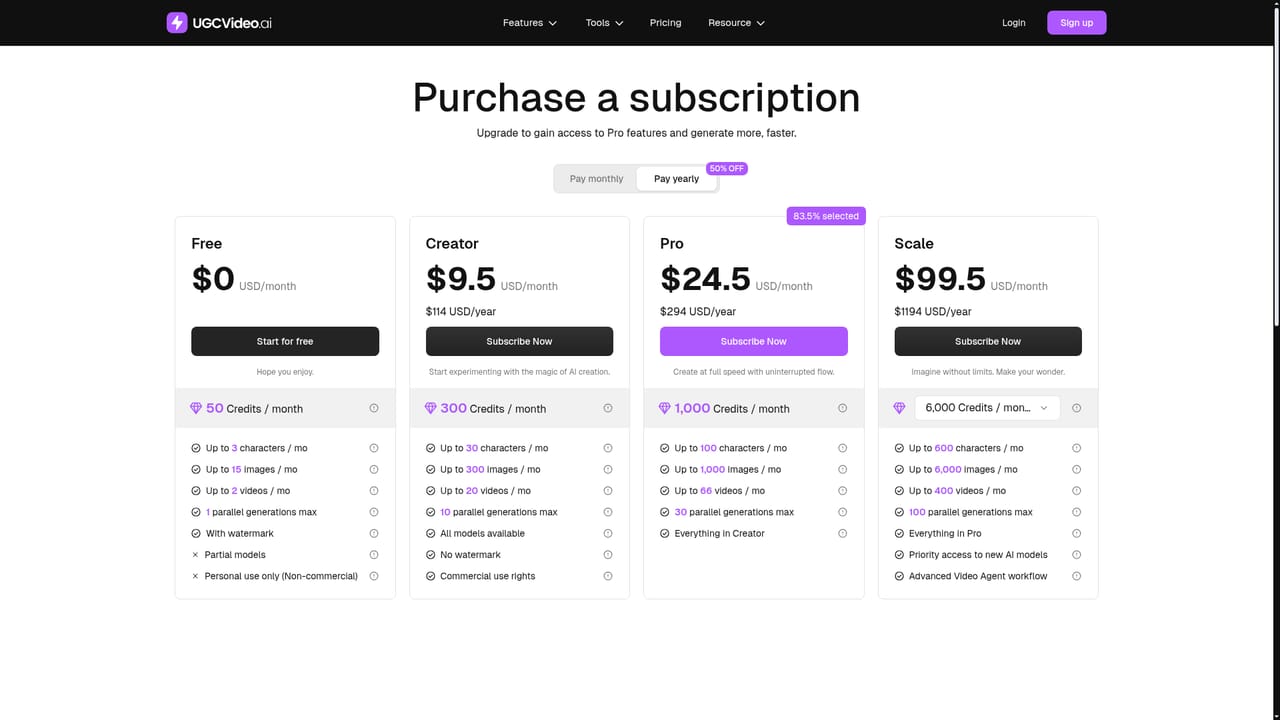
A permanent Free plan offers 50 credits a month, up to 2 videos, 15 images and 3 characters, with a watermark and non-commercial use only.

Learn more

Pricing

Four monthly plans: Free ($0, 50 credits, watermark, personal use), Creator ($9.5/month on yearly billing, 300 credits), Pro ($24.5/month, 1,000 credits) and Scale ($99.5/month, 6,000 credits). Yearly billing is discounted, and paid tiers allow commercial use.

Learn more

Features

AI influencer creation from text or image, product URL to video, script writer, talking heads with gestures and lip-sync, skin texture and ethnicity controls, template and influencer library, TikTok and Reels ad cloning, and a central asset workspace.

Frequently asked questions about UGCVideo.ai

  • How much does UGCVideo.ai cost?
    Four monthly plans: Free ($0, 50 credits, watermark, personal use), Creator ($9.5/month on yearly billing, 300 credits), Pro ($24.5/month, 1,000 credits) and Scale ($99.5/month, 6,000 credits). Yearly billing is discounted, and paid tiers allow commercial use.
  • Does UGCVideo.ai offer a free trial?
    A permanent Free plan offers 50 credits a month, up to 2 videos, 15 images and 3 characters, with a watermark and non-commercial use only.
  • How do you use UGCVideo.ai?
    The walkthrough on this page covers 6 steps: 1. Create a free account 2. Pick an avatar and template 3. Add a script or product URL 4. Tune realism settings 5. Generate and download the MP4 6. Upgrade when you need more.
  • What platforms does UGCVideo.ai support?
    UGCVideo.ai is available on Web App.
  • What are the limitations of UGCVideo.ai?
    Free plan is limited to 2 videos a month, adds a watermark and bars commercial use. Output is capped by credits and monthly video quotas, so heavy testing needs a higher tier. Focused on short talking-head ad formats, not general video editing or long-form production.

Status

StatusActive
Views0
Outbound clicks0
Added10/18/2026

Platforms

Web App

Pricing

FreemiumSubscription