LayerBack

Turn diagram screenshots into editable Visio, PowerPoint and draw.io files

Beginner API
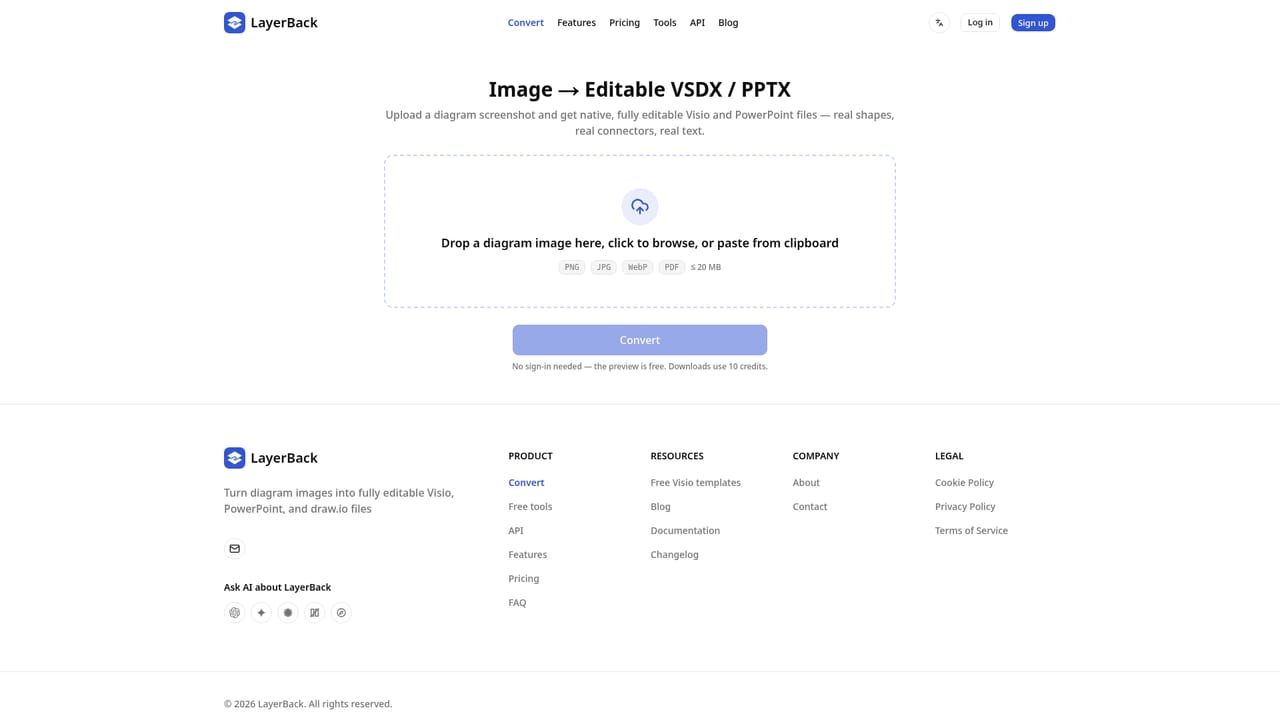
Screenshot of LayerBack, Turn diagram screenshots into editable Visio, PowerPoint and draw.io files

What is LayerBack?

LayerBack is a convert image to 2D tool that turns diagram screenshots into editable Visio, PowerPoint and draw.io files. LayerBack converts screenshots, PNG, JPG and PDF diagrams into editable VSDX, PPTX, draw.io and SVG files, rebuilding shapes, connectors and text as native objects.

LayerBack takes a picture of a diagram and rebuilds it as a file you can actually edit. Upload a screenshot, export, or even a photo of a flowchart, architecture diagram, org chart, network topology, UML or ER diagram, and the service reconstructs it with native shapes, connectors that stay bound to their endpoints, and plain editable text. The output opens in Visio as VSDX, in PowerPoint as PPTX, in draw.io, and as SVG, all from a single conversion. The difference from typical converters is the approach. Many tools simply embed your image inside a file container, so the result looks editable but is still one flat picture. LayerBack processes the diagram the way a person would read it: it identifies boxes, diamonds, containers, arrows and labels, then recreates each one as a separate object. The site's own example shows a converted order fulfillment flowchart where grabbing a shape pulls its connectors along. It is aimed at people who inherit diagrams rather than draw them: analysts rebuilding figures from reports, engineers documenting legacy systems, consultants reproducing client slides, and teams migrating old screenshots into maintainable source files. The workflow is short. Conversions are free and need no account, the preview appears in the browser, and a web editor lets you correct anything before downloading. Credits are only spent on the download, and failed conversions are not charged. For heavier use there is a REST API with an OpenAPI spec, completion webhooks so jobs can post results back instead of being polled, and an MCP server for clients such as Claude and Cursor. Compared with manual redrawing or generic image-to-vector tools, LayerBack is narrower but deeper: it cares about diagram structure and editability, not visual fidelity alone. If you need a one-off quote or a quick sketch, the free tier covers it. If you maintain diagram pipelines, the API and credit bundles are the reason to stay.

How do you use LayerBack?

  1. 1Upload your diagram
    Go to the converter, drop a PNG, JPG, WebP or PDF file up to 20 MB, or paste an image straight from the clipboard. No account is needed to start.
    LayerBack — Upload your diagram
  2. 2Review the converted result
    LayerBack rebuilds the diagram in roughly 30 to 60 seconds and shows live progress. Check the preview for missing labels or misplaced connectors.
  3. 3Fix details in the online editor
    Use the built-in editor to nudge shapes, retype text or restyle elements before export. Edits and the download draw on your credit balance.
  4. 4Download in your format
    A single download includes VSDX, PPTX, draw.io and SVG. Open the file in Visio, PowerPoint or draw.io and everything remains editable.
  5. 5Automate with the API
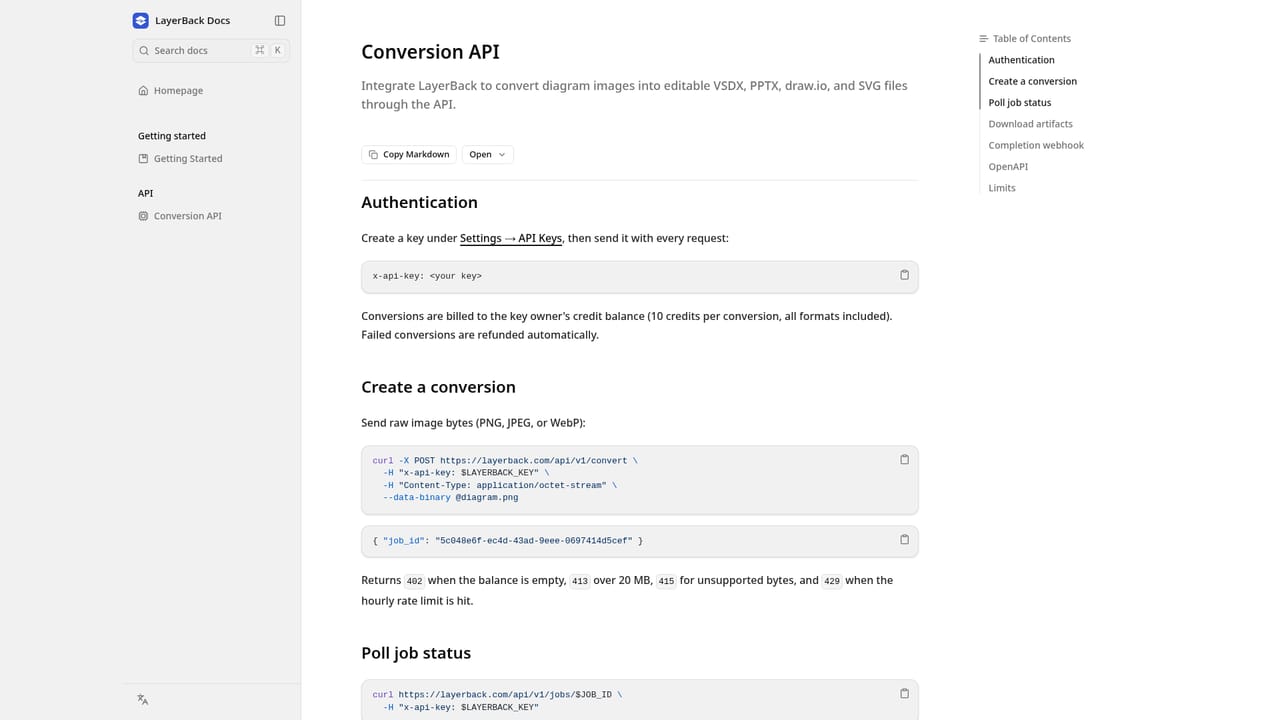
    Create an API key in Settings, then send image bytes to the convert endpoint. Add a callback_url to receive a webhook when the job finishes.
    LayerBack — Automate with the API
  6. 6Open Visio files without Visio
    If you only need to check a VSDX, use the free browser viewer instead of installing desktop software.

Pros and cons

Pros

  • Output is genuinely editable: native shapes, bound connectors and live text rather than a wrapped imageAI
  • Conversions and previews are free with no sign-in, so you can test quality before payingAI
  • All four output formats (VSDX, PPTX, draw.io, SVG) come with a single conversionAI
  • Failed conversions are automatically refunded across paid plansAI
  • REST API, webhooks and an MCP server make batch migration and agent use practicalAI

Cons

  • Uploads are capped at 20 MB, which rules out large scanned document setsAI
  • Conversions typically take 30 to 60 seconds, so the tool is slow for one-off quick checksAI
  • Downloads cost 10 credits each, and free accounts are limited to two conversions at a timeAI
  • Very dense or low-resolution diagrams may need manual cleanup in the online editor before exportAI
  • Features such as the API and higher concurrency sit behind paid tiers, so light users hit limits fastAI

How much does LayerBack cost?

Pricing

Free tier: unlimited free conversions and previews with no sign-in, limited to 2 conversions at a time. Paid plans: Pro $20/month or $10 yearly (1,000 credits), Plus $40 or $20 yearly (3,000 credits), Max $80 or $40 yearly (10,000 credits). Downloads and edits cost 10 credits each.

Learn more

Support

Email support on the Pro plan; Plus and Max plans include priority support. Failed conversions are refunded automatically on all paid tiers.

Integrations

REST API with OpenAPI spec and webhook callbacks, plus an MCP server (layerback-mcp) for Claude, Cursor and other MCP clients. Outputs open in Visio, PowerPoint and draw.io.

Learn more

Features

Converts PNG, JPG, WebP and PDF diagrams into native VSDX, PPTX, draw.io and SVG files. Shapes, connectors and text are rebuilt as editable objects rather than a flattened image. Includes an online editor, conversion history, a free VSDX viewer, a REST API with OpenAPI spec, completion webhooks, and an MCP server for AI agents.

Learn more

Frequently asked questions about LayerBack

  • How much does LayerBack cost?
    Free tier: unlimited free conversions and previews with no sign-in, limited to 2 conversions at a time. Paid plans: Pro $20/month or $10 yearly (1,000 credits), Plus $40 or $20 yearly (3,000 credits), Max $80 or $40 yearly (10,000 credits). Downloads and edits cost 10 credits each.
  • Does LayerBack have an API?
    Yes, LayerBack offers an API.
  • How do you use LayerBack?
    The walkthrough on this page covers 6 steps: 1. Upload your diagram 2. Review the converted result 3. Fix details in the online editor 4. Download in your format 5. Automate with the API 6. Open Visio files without Visio.
  • What platforms does LayerBack support?
    LayerBack is available on Web App.
  • What does LayerBack integrate with?
    REST API with OpenAPI spec and webhook callbacks, plus an MCP server (layerback-mcp) for Claude, Cursor and other MCP clients. Outputs open in Visio, PowerPoint and draw.io.
  • What are the limitations of LayerBack?
    Uploads are capped at 20 MB, which rules out large scanned document sets. Conversions typically take 30 to 60 seconds, so the tool is slow for one-off quick checks. Downloads cost 10 credits each, and free accounts are limited to two conversions at a time.

Status

StatusActive
Views0
Outbound clicks0
Added10/21/2026

Platforms

Web App

Pricing

FreemiumSubscription