Free trial
A free plan gives 30 voice minutes a month, and the included US or Canadian number is free for 14 days. No credit card is required to start.
Learn moreAn open-source AI receptionist that answers calls and books appointments.

LobbyStack is an AI book generator tool. LobbyStack answers business calls around the clock, books appointments into your calendar, captures caller details and transfers urgent calls to your team. It learns from your website, documents and FAQs, and is available as a hosted cloud service or a self-hosted open-source stack.
LobbyStack is an AI phone receptionist built for small businesses that lose work to unanswered calls. It picks up the line, talks to the caller from your own business information, captures what they need, and, when the caller is ready, books an appointment straight into your calendar and texts a confirmation. Calls that need a person can be transferred to a number you choose, or the caller's details and reason for ringing are recorded so your team can call back with context. The receptionist can handle every call, or only step in when staff are busy, after hours, or simply cannot reach the phone. Setup is designed for owners rather than developers. You connect a new local number or forward calls from the line customers already dial, then load the receptionist with knowledge: your website, PDFs, service lists, policies, hours and FAQs. From there you decide the greeting, tone and routing rules: which calls get answered, which get booked, which take a message, and which go to a human. Each call lands in a dashboard with a recording, transcript, summary, caller details and any booking, so nothing depends on scribbled notes. The product is especially tuned to trades and appointment-driven businesses. Dedicated pages cover plumbing, HVAC, electrical, roofing, garage door repair, appliance repair, restoration, locksmiths, property management, dental offices, salons and spas, with call flows shaped around emergencies, quotes and rebooking. Against generic voicemail or rigid call trees, the difference is a natural conversation plus a booking and a written summary. LobbyStack is also open source. Teams that need to keep recordings and customer data inside their own infrastructure can self-host the stack instead of using the hosted cloud service. That combination of a free starting tier, published paid plans and a self-hosted path makes it a credible option for small operators who want call coverage without surrendering control of the data.
A free plan gives 30 voice minutes a month, and the included US or Canadian number is free for 14 days. No credit card is required to start.
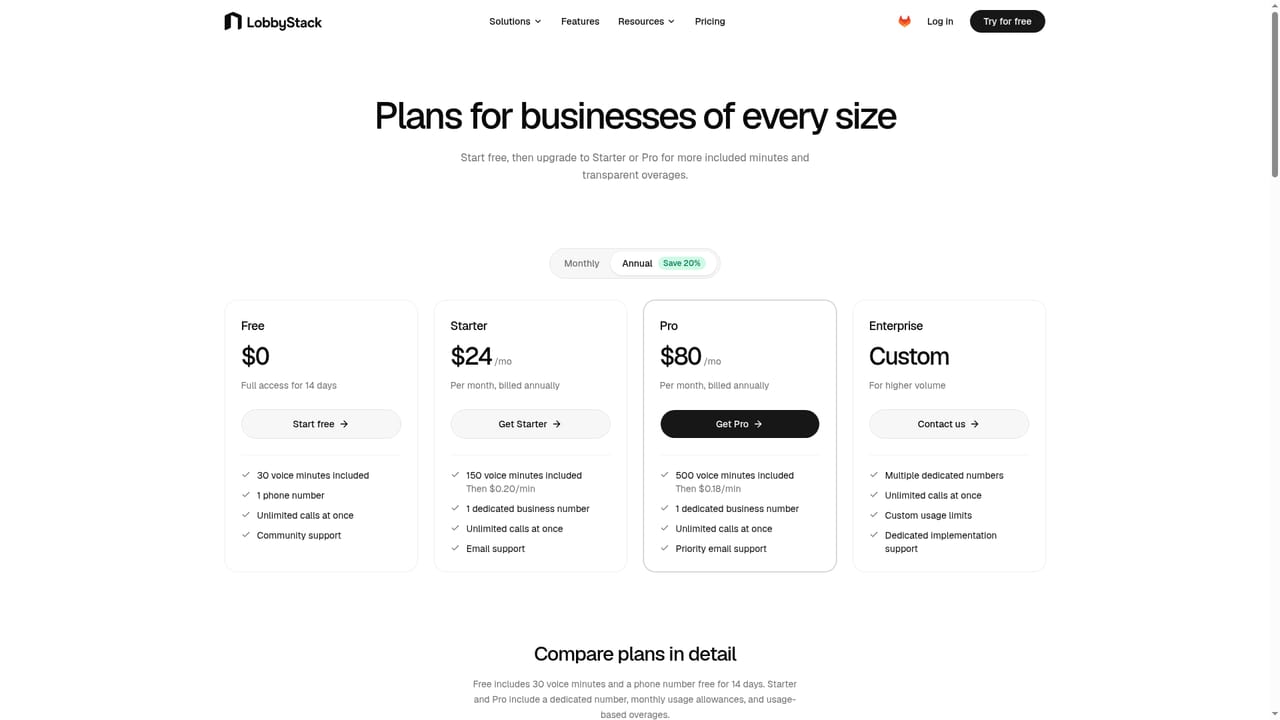
Learn moreFree: $0, 30 voice minutes a month plus a US or Canadian number free for 14 days, no card needed. Starter: $30/mo with 150 voice minutes, 50 alert SMS segments, 20 transfer attempts, email support. Pro: $100/mo with 500 minutes, 200 SMS segments, 100 transfers, priority email. Enterprise: custom for higher volume, multiple numbers and self-hosting support. Usage based overages.
Learn moreStarter includes email support and Pro adds priority email support. Enterprise covers higher volume, multiple numbers and self-hosting implementation support. A buyer guide and trade-specific solution pages sit on the site.
The homepage names Google Calendar for availability checks, bookings and confirmations. Business knowledge can be imported from websites, PDFs, documents and spreadsheets. Phone coverage works through a new LobbyStack number or call forwarding from your existing line.
Learn moreAnswers calls with a customisable greeting and tone, using imported websites, PDFs, documents, spreadsheets, service lists, policies and FAQs. Books appointments through Google Calendar with availability checks and confirmation texts. Collects names, contact details, service needs and timing. Transfers urgent calls or takes a message. Saves recordings, transcripts, summaries and caller details in one dashboard, with email alerts and optional SMS alerts on paid plans.
Learn more AI Angels400+ customizable AI girlfriends for NSFW chat, voice calls, and roleplay
 Candy AIExperience the future of companionship with AI friends who chat, role-play, and connect with you on a human level.
 ourdream.aiA vast AI roleplay platform with millions of characters for chat, images, video and voiceAI Angels400+ customizable AI girlfriends for NSFW chat, voice calls, and roleplayCandy AIExperience the future of companionship with AI friends who chat, role-play, and connect with you on a human level.ourdream.aiA vast AI roleplay platform with millions of characters for chat, images, video and voice


