
Magic Regex Generator

Describe the pattern you need and get a tested regex back

Beginner
Screenshot of Magic Regex Generator, Describe the pattern you need and get a tested regex back

What is Magic Regex Generator?

Magic Regex Generator is a developer tool. An AI regex assistant that converts plain descriptions of the text you want to match into tested regular expressions, with a sandboxed runner, JavaScript and Python 3 output, match and capture modes, and a small library of ready made snippets for emails, HTML tags and dates.

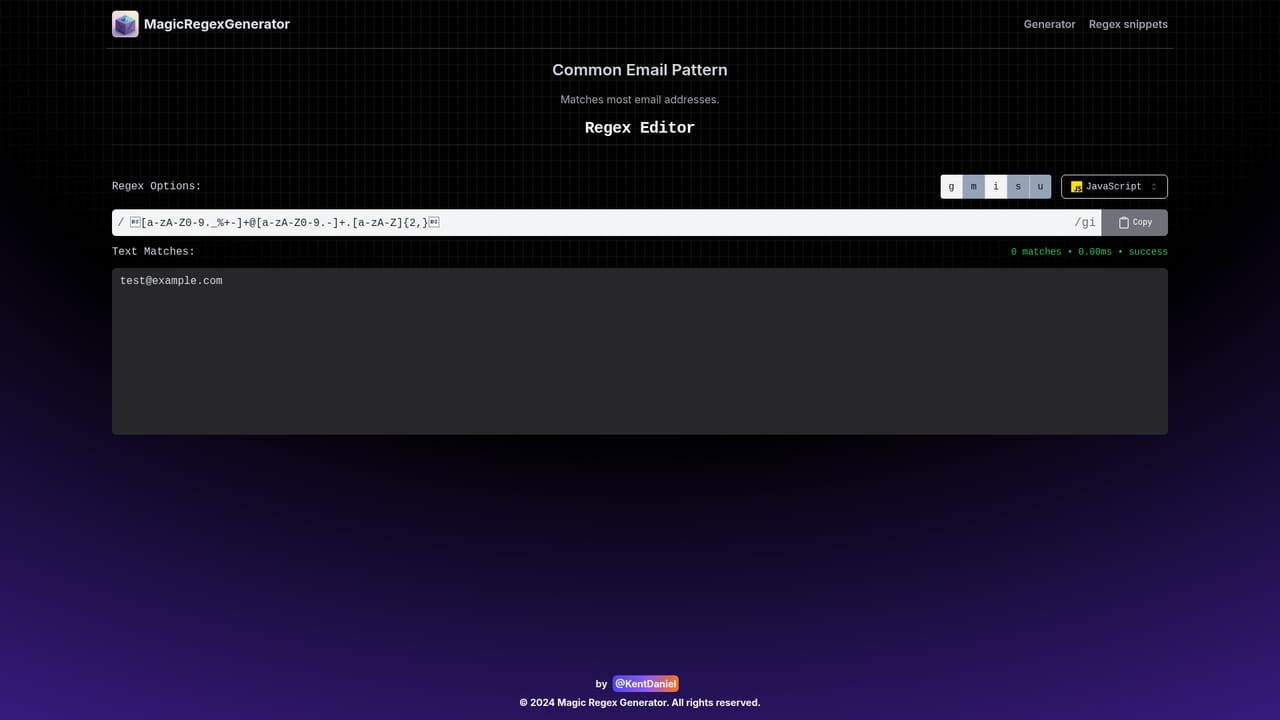
Magic Regex Generator is a browser based tool built around an AI coding agent that turns a plain language description of what you want to match into a working regular expression. Instead of writing syntax by hand and debugging it through trial and error, you describe the target (an email address shape, a date format, the attributes inside an HTML tag) and the agent produces a pattern, then executes it in a secure sandbox to check that it behaves as expected before handing it over. The interface is split between a conversational assistant, labelled Regex Copilot, and a conventional regex workbench. A pattern field carries the generated expression, flag toggles cover the usual g, i and m modifiers, and you can switch between match and capture modes. Test strings accept multi line input, and the results panel prints the verification output so you can confirm what matched and what did not. A runtime selector covers JavaScript (ES6+) and Python 3, and the tool emits a copy ready code snippet showing how to apply the pattern in JavaScript with the match method. The tool is aimed squarely at developers, data engineers and data scientists who need pattern matching, text extraction or input validation but do not want to spend an afternoon relearning regex syntax. A library of common snippets (email addresses, HTML tags, dates in dd-MM-YYYY format) gives quick starting points, each with a try it out page that loads the pattern into the tester so you can adjust it against your own data. Where it fits: it competes with regex explainers and standalone testers such as Regex101 or RegExr, but leans on generation rather than explanation as the primary workflow. The site itself notes that AI generated patterns may not be appropriate for highly sensitive applications, so treat the output as a strong first draft that you verify and review rather than an audited, production guaranteed expression.

How do you use Magic Regex Generator?

  1. 1Describe the pattern you need
    Open the Regex Copilot panel and state in plain language what should be matched, for example an email address or a date. The agent drafts a candidate expression for you.
    Magic Regex Generator — Describe the pattern you need
  2. 2Set flags, mode and runtime
    Review the generated pattern in the pattern field, then choose your flags (g, i, m), pick match or capture mode, and select JavaScript or Python 3 as the runtime.
  3. 3Paste test strings and run
    Drop sample text into the multi line test strings box and run the pattern. The results panel shows the verification output so you can see exactly what matched.
  4. 4Copy the code snippet
    Once the pattern behaves correctly, copy the generated JavaScript snippet to reuse the expression in your own codebase.
  5. 5Try a ready made snippet
    Load one of the common snippets (email pattern, HTML tags, or dd-MM-YYYY dates) through its try it out page, then adjust it against your own data in the tester.
    Magic Regex Generator — Try a ready made snippet

Pros and cons

Pros

  • The agent executes each generated pattern in a sandbox, so you see verification output instead of an untested guessAI
  • Plain language input lowers the barrier for developers who rarely touch regex syntaxAI
  • Built in tester supports flags, match or capture mode, multi line test strings and JavaScript plus Python 3 runtimesAI
  • Copy ready code snippets and a snippet library for emails, HTML tags and dd-MM-YYYY dates speed up common jobsAI
  • Everything runs in the browser with no install stepAI

Cons

  • No pricing information is published on the homepage, so the commercial terms are unclearAI
  • Runs are limited to JavaScript (ES6+) and Python 3, with no PCRE, Java, Go or .NET targets listedAI
  • The site warns that AI generated patterns may be unsuitable for highly sensitive applications, so output needs manual reviewAI
  • Snippet library is small (three examples) and lighter than the pattern collections on established regex testersAI
  • No account, saved patterns or team sharing features are described on the homepageAI

How much does Magic Regex Generator cost?

Features

AI coding agent that generates regex from a description, runs the pattern in a secure sandbox and returns verification output. Includes a pattern field with g, i and m flags, match and capture modes, a JavaScript (ES6+) and Python 3 runtime switch, multi line test strings, a results panel, a copyable JavaScript code snippet, and quick snippets for email addresses, HTML tags and dates.

Frequently asked questions about Magic Regex Generator

  • How do you use Magic Regex Generator?
    The walkthrough on this page covers 5 steps: 1. Describe the pattern you need 2. Set flags, mode and runtime 3. Paste test strings and run 4. Copy the code snippet 5. Try a ready made snippet.
  • What platforms does Magic Regex Generator support?
    Magic Regex Generator is available on Web App.
  • What are the limitations of Magic Regex Generator?
    No pricing information is published on the homepage, so the commercial terms are unclear. Runs are limited to JavaScript (ES6+) and Python 3, with no PCRE, Java, Go or .NET targets listed. The site warns that AI generated patterns may be unsuitable for highly sensitive applications, so output needs manual review.

Status

StatusActive
Views0
Outbound clicks0
Added10/21/2026

Platforms

Web App

Pricing

Free