Free trial
A free sign-up route is offered through the clinician portal, and a 30 percent first-purchase code appears on the homepage. No trial length is stated.
Learn moreAn AI scribe that turns patient visits into clinic-ready notes
Own Medical Scribe? Verify ownership to get a dofollow link
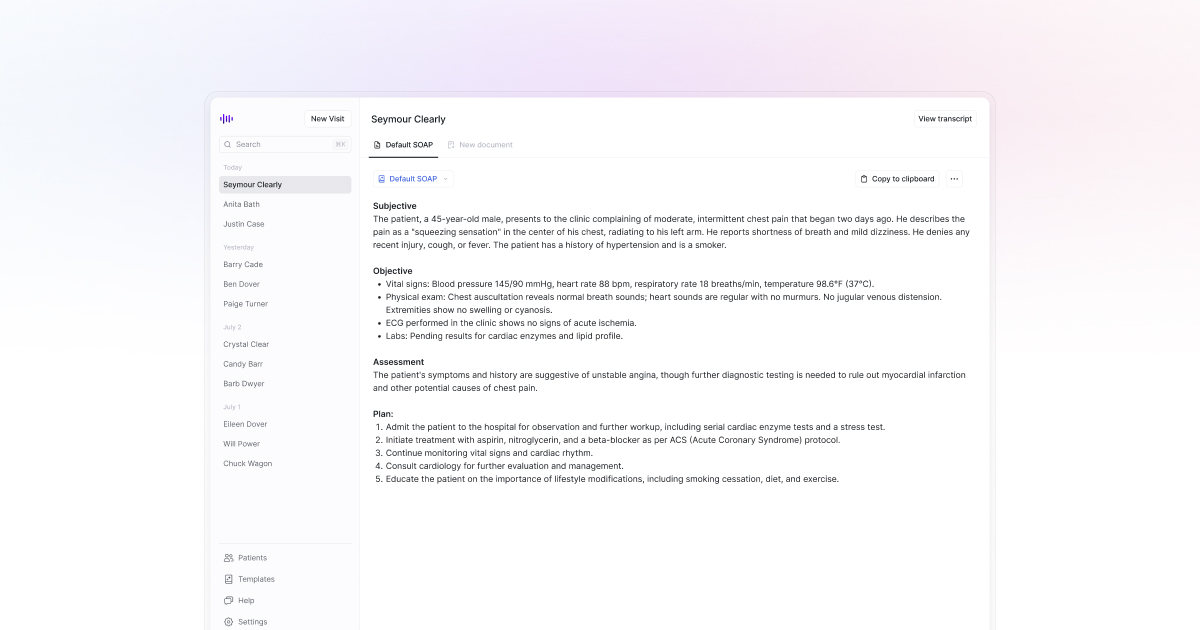
Medical Scribe records patient visits and clinician dictation, transcribes them with medical-tuned speech recognition, and generates structured notes such as SOAP and progress reports. It runs on web, iPhone, Apple Watch and Android, supports 57 languages, and is HIPAA compliant with encryption.
Medical Scribe is a clinical documentation assistant built for healthcare professionals who lose hours to charting. It records a patient consultation, transcribes the conversation with speech-to-text models trained on medical vocabulary, and then generates a structured note from that recording. The pitch is straightforward: hand the paperwork to an assistant and give the clinician back their evenings. The note output is the core of the product. Templates are organised by specialty, with Direct Primary Care, family medicine, cardiology, physical therapy, psychology, acupuncture and veterinary work among the listed options, and structures ranging from SOAP format to follow-up and progress notes. Sections such as summary, history of presenting complaint, assessment and plan are filled in automatically from the visit, and the clinician can adjust style and structure to match how they actually chart. Transcription is aimed specifically at drug names, procedures, anatomical terms and clinical shorthand, which is where generic dictation tools tend to fall apart. In practice, a clinician starts a recording on an iPhone, an Apple Watch or the web app, then reviews and edits the generated note on a phone, watch or computer. Medical Scribe also accepts clinician dictation, so the same pipeline covers both spoken encounters and notes read aloud after the fact. Multilingual support spans 57 languages with the same medical terminology handling, which matters for practices serving patients in their preferred language. The buyer profile is individual clinicians and small practices that want notes without a human scribe on payroll, plus hospitals and clinics that need team plans and enterprise arrangements. Security is positioned front and centre, with HIPAA compliance and encryption described as standard. Compared with enterprise-grade ambient documentation platforms, Medical Scribe leans on native consumer hardware (Apple Watch recording is unusual) and on specialty template breadth rather than deep EMR integration claims, which the homepage does not substantiate. Primary care, specialty, therapy and veterinary settings are the most natural fit, and anyone needing a fast route from conversation to an editable note will find the workflow short.
A free sign-up route is offered through the clinician portal, and a 30 percent first-purchase code appears on the homepage. No trial length is stated.
Learn moreThe homepage does not list prices. A 30 percent discount for new clinicians is advertised with the code FRIENDS30, free sign-up is offered, and separate team and enterprise pricing is available by contacting the company to discuss requirements.
Learn moreSupport is offered through scheduled demos and a contact route for team and enterprise enquiries. No help centre or documentation pages are listed on the homepage.
Medical-tuned speech-to-text for drug names, procedures and anatomy; automatic SOAP and progress note generation; specialty templates spanning primary care, cardiology, physical therapy, psychology and veterinary work; recording via web, iPhone, Apple Watch and Android; clinician dictation support; 57 languages; HIPAA compliance and encryption.
Learn more AI Angels400+ customizable AI girlfriends for NSFW chat, voice calls, and roleplay
 Candy AIExperience the future of companionship with AI friends who chat, role-play, and connect with you on a human level.
 ourdream.aiA vast AI roleplay platform with millions of characters for chat, images, video and voiceAI Angels400+ customizable AI girlfriends for NSFW chat, voice calls, and roleplayCandy AIExperience the future of companionship with AI friends who chat, role-play, and connect with you on a human level.ourdream.aiA vast AI roleplay platform with millions of characters for chat, images, video and voice







