Midjourney prompts

A free browser tool that spins out fresh Midjourney prompts on demand

Beginner
Screenshot of Midjourney prompts, A free browser tool that spins out fresh Midjourney prompts on demand

What is Midjourney prompts?

Midjourney prompts is a generative art tool. A free browser-based generator that produces Midjourney prompt ideas on demand, with copy-to-clipboard output and an accompanying guide to writing specific, token-efficient prompts.

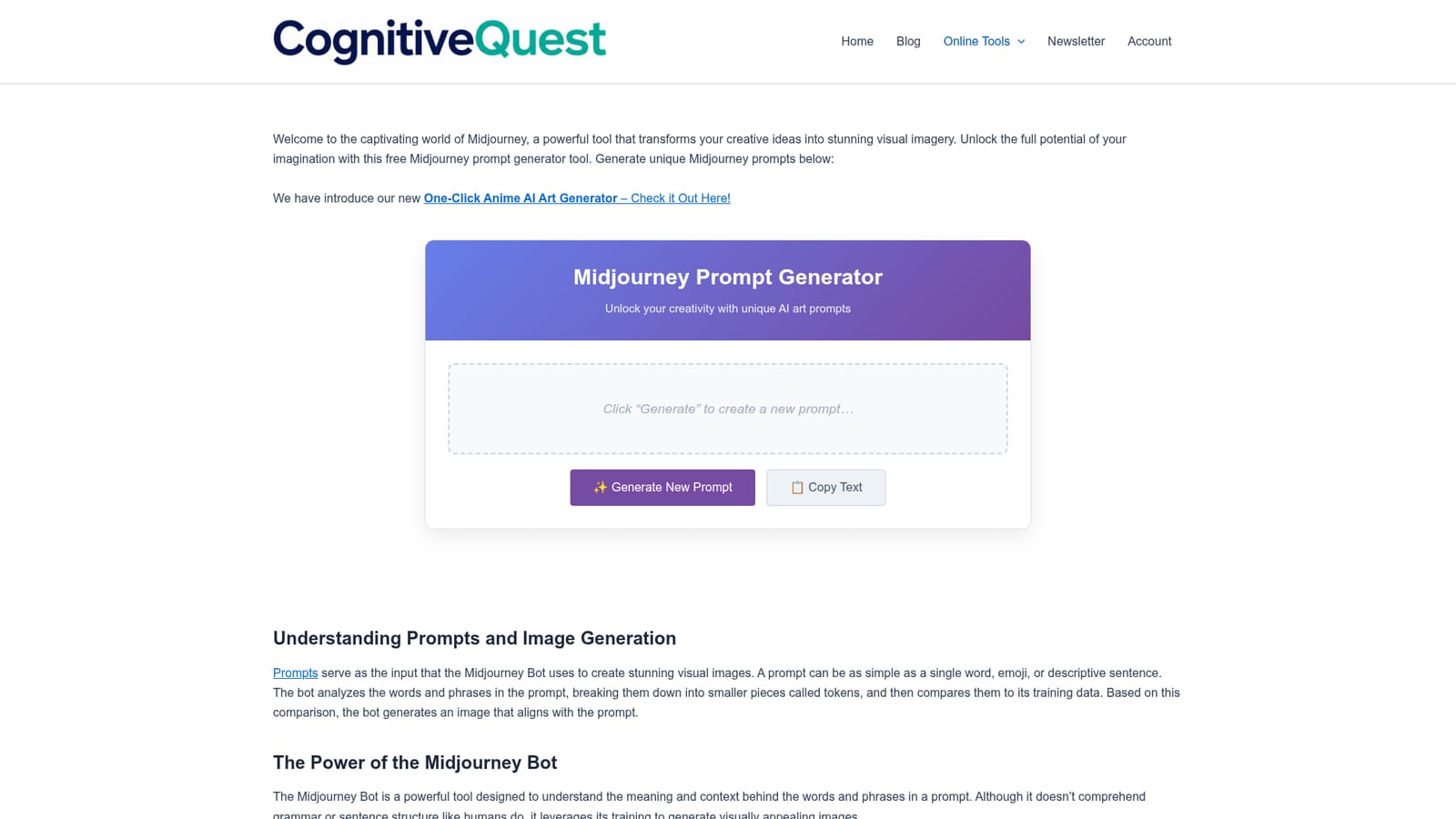
The Midjourney Prompt Generator from Cognitive Quest is a free, no-signup web tool that generates text prompts intended for use with Midjourney, the Discord-based image generator. A single click of the Generate button produces a new prompt, and a Copy Text button puts it on the clipboard so it can be pasted directly into the Midjourney Bot. The page frames the generator as a way to break through creative block: instead of staring at a blank command line, the user starts from a ready-made phrase and edits from there. Around the generator, the page doubles as a short primer on how Midjourney reads input. It explains that a prompt can be a single word, an emoji or a full descriptive sentence, and that the bot breaks the text into tokens and compares them against its training data to produce an image. It is candid about the limits of that process: the bot does not parse grammar or sentence structure the way a person does, so wording choices matter more than syntax. The practical guidance is the strongest part for newcomers. Readers are told to favour specific synonyms over generic terms, to cut filler words so each remaining word carries more weight, and to think through subject, medium, environment, lighting, colour, mood and composition before writing. Number and collective noun advice covers precision, and the advanced section introduces parameters such as --no for excluding elements from the frame. Warnings about leaving things vague are included too: anything unspecified is randomized. It suits hobbyists, writers and designers who already pay for Midjourney and want faster starting points, not people looking for a full prompt library or a parameter editor. Comparable tools in this space tend to bundle saved prompt histories and structured builders; this one is deliberately minimal. Cognitive Quest also publishes related Midjourney reviews, version overviews and pricing breakdowns on the same site, so the generator works best as an entry point into that wider material.

How do you use Midjourney prompts?

  1. 1Open the generator page
    Load the Cognitive Quest page hosting the Midjourney Prompt Generator. The tool sits near the top, above the explanatory sections.
    Midjourney prompts — Open the generator page
  2. 2Generate a prompt
    Click the Generate New Prompt button. A fresh prompt appears in the output area, and clicking again replaces it with a different one.
  3. 3Copy the text
    Use the Copy Text button to place the generated prompt on your clipboard, ready to paste.
  4. 4Paste into the Midjourney Bot
    Open Discord, go to the Midjourney Bot, type or paste the prompt after the imagine command and send it.
  5. 5Refine with the guide
    Return to the page and apply its advice: swap generic words for specific synonyms, cut filler, and add details on lighting, mood and composition.
  6. 6Add parameters for control
    Use advanced parameters such as --no to exclude unwanted elements, and consult the site's version overviews to understand model differences.
    Midjourney prompts — Add parameters for control

Pros and cons

Pros

  • Completely free with no account or signup requiredAI
  • One-click generation plus a copy button makes it fast to test ideas in MidjourneyAI
  • The surrounding guide explains how tokens and training data shape outputAI
  • Practical prompt advice covers specificity, filler words, numbers and the --no parameterAI
  • Useful for breaking creative block when starting from a blank Discord commandAI

Cons

  • No option to set style, subject or length before generating a promptAI
  • No saved history or favourites, so prompts disappear once you generate a new oneAI
  • Prompts are generic and still need substantial editing for a specific briefAI
  • No parameter builder for aspect ratio, stylize or version flagsAI
  • Requires a separate paid Midjourney subscription, since the tool only writes textAI

How much does Midjourney prompts cost?

Features

A single-button prompt generator with copy-to-clipboard output, paired with a written guide covering token handling, specificity, filler word removal, context details, numeric precision and advanced parameters such as --no for excluding elements from an image.

Frequently asked questions about Midjourney prompts

  • How do you use Midjourney prompts?
    The walkthrough on this page covers 6 steps: 1. Open the generator page 2. Generate a prompt 3. Copy the text 4. Paste into the Midjourney Bot 5. Refine with the guide 6. Add parameters for control.
  • What platforms does Midjourney prompts support?
    Midjourney prompts is available on Web App.
  • What are the limitations of Midjourney prompts?
    No option to set style, subject or length before generating a prompt. No saved history or favourites, so prompts disappear once you generate a new one. Prompts are generic and still need substantial editing for a specific brief.

Status

StatusActive
Views0
Outbound clicks0
Added10/21/2026

Platforms

Web App

Pricing

Free