Free trial
A free preview generation is available without payment and typically takes one to three minutes, but downloads always require payment.
Learn moreTurn images or text prompts into previewable, downloadable 3D assets
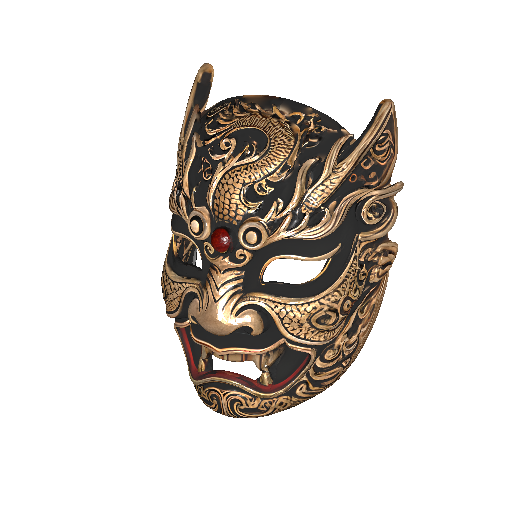
Next3D is a convert image to 2D tool that turns images or text prompts into previewable, downloadable 3D assets. Next3D generates 3D models from images or text prompts, lets you compare results across ten-plus AI generators like Hunyuan 3D, Rodin v2 and Meshy v6, preview assets in the browser and export textured GLB files.
Next3D is a browser-based platform that generates 3D models from either a reference image or a written description. It sits in the category of AI asset tools rather than full modeling suites: the job is to produce a starting mesh with geometry and textures, not to replace careful manual work on hero assets. The studio accepts JPG, PNG and WebP uploads up to 10MB, and also supports multi-view image input for models that can use several angles of the same object. The interesting part is the model roster. Instead of one generation engine, Next3D runs a lineup of frontier 3D generators side by side, including Hunyuan 3D, Seed3D, Rodin v2, Trellis 2, Tripo H3.1 and Meshy v6. Each carries its own credit cost per generation (roughly 20 to 50 credits depending on the model) and its own strengths, from crisp surface detail to clean geometry or product-style shape consistency. Users pick per asset and can switch engines whenever a result misses. In practice the workflow is short: upload or describe, preview the concept, generate, inspect in the browser viewer, then export. Exports come out as textured GLB, ready for engines and pipelines, with conversion to FBX, OBJ, PLY or STL available downstream. The site also bundles a standalone online viewer that opens GLB, GLTF, OBJ, FBX, STL, PLY, DAE, 3MF, X3D and BLEND files, plus dedicated 3DS, GLB and STL viewer pages and a format comparison directory. It suits indie game developers, product designers, e-commerce teams, architects making concept massing, and content creators who need props quickly without hiring a freelancer. Beginners get a route in without months of Blender training; experienced artists get a fast blockout stage. Budget carefully: credits pay for generation, but downloading results requires a separate purchase or subscription, and a free preview does not include the file.
A free preview generation is available without payment and typically takes one to three minutes, but downloads always require payment.
Learn moreCredit-based pay-as-you-go pricing, with generation costs ranging from about 20 to 50 credits depending on the model chosen. New accounts receive 50 credits after registration. Credits cover generation only; downloading a result requires a separate purchase or subscription.
Learn moreImage-to-3D, text-to-3D and 2D-to-3D generation with multi-view image support; a roster of ten-plus AI 3D models including Hunyuan 3D, Seed3D, Rodin v2, Trellis 2, Tripo H3.1 and Meshy v6; concept image preview before full generation; in-browser 3D preview; textured GLB export with conversion to FBX, OBJ, PLY and STL; plus an online viewer for GLB, GLTF, OBJ, FBX, STL and other formats.
Learn more AI Angels400+ customizable AI girlfriends for NSFW chat, voice calls, and roleplay
 Candy AIExperience the future of companionship with AI friends who chat, role-play, and connect with you on a human level.
 ourdream.aiA vast AI roleplay platform with millions of characters for chat, images, video and voiceAI Angels400+ customizable AI girlfriends for NSFW chat, voice calls, and roleplayCandy AIExperience the future of companionship with AI friends who chat, role-play, and connect with you on a human level.ourdream.aiA vast AI roleplay platform with millions of characters for chat, images, video and voice