Motion.so

A video agent that plans, cuts and checks the edit for you

Beginner API
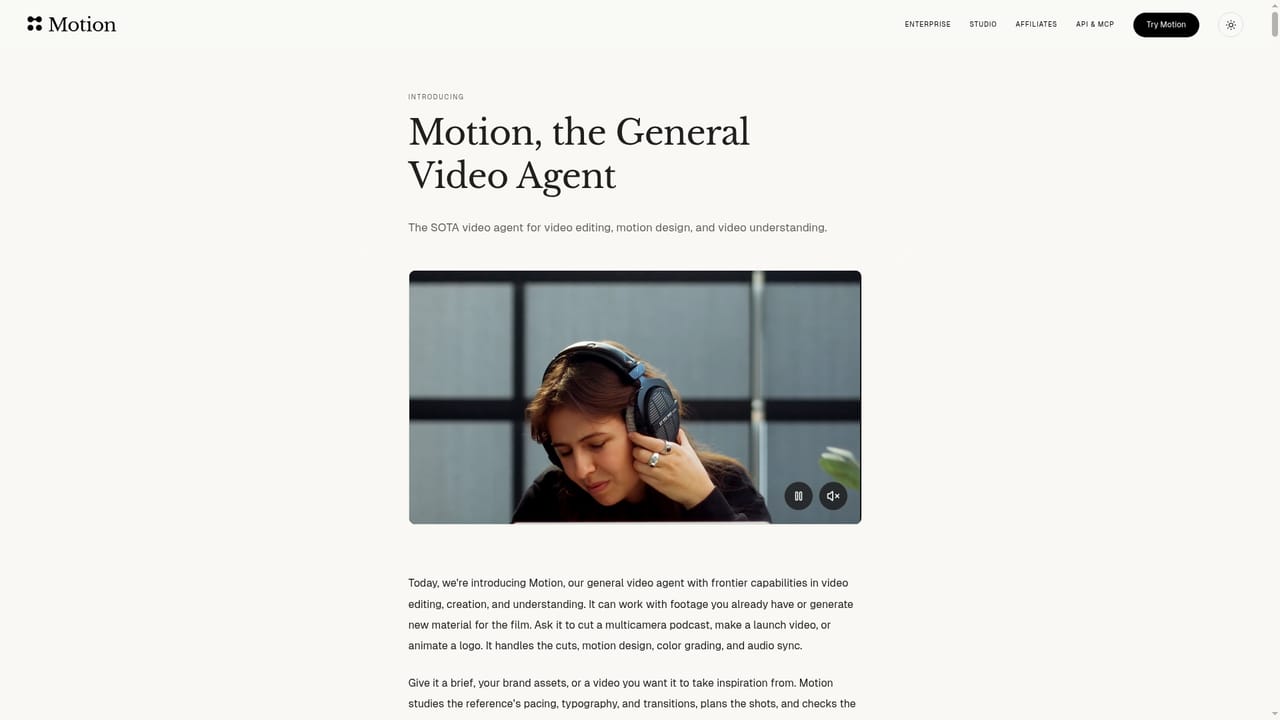
Screenshot of Motion.so, A video agent that plans, cuts and checks the edit for you

What is Motion.so?

Motion.so is a short videos tool. Motion, from Mosaic, is a video agent that turns footage, briefs or reference clips into planned, edited and self-reviewed videos, with chat, timeline and on-frame editing, scheduled automations, social scheduling and exports to Premiere Pro, After Effects, DaVinci Resolve, Remotion and Hyperframes.

Motion is a video agent built by Mosaic. The premise is simple: supply footage, a written brief, a reference clip or a rough idea, and the agent plans the video, constructs each shot, assembles the cut and reviews it before handing anything over. It is aimed at launch videos, talking heads, podcast clips and motion design work rather than raw text to video generation alone. In practice the workflow starts with what you already have. You can attach footage, images, audio or a style reference, or paste a link to a video you want the output to resemble. Motion studies that reference for pacing and typography, cuts the footage while keeping dialogue intact, then moves through planning, grading and animating before it checks its own cut. The result arrives with a duration and aspect ratio stated up front, so expectations are set before you watch. The first cut is treated as a draft, not a delivery. Changes can be requested in chat, drawn directly on a preview frame (Motion reads the mark and its timestamp and edits that moment), or made by hand in a timeline where clips, titles and audio layers sit together. Finished work exports to Premiere Pro, After Effects, DaVinci Resolve, Remotion or Hyperframes for further polishing. Broader workflow features push it past a one-off generator. Plugins pull in sources from Dropbox, Google Drive, Slack, Frame.io, Getty, Notion, GitHub and Figma. Automations run repeatable jobs on a schedule or when a new YouTube video or stream ends, each run in its own chat. Social connections schedule and track finished videos across major platforms. An API and an MCP integration let products and agents call Motion directly. It competes with AI video generators and with manual editing suites, sitting between them: more authored than a prompt-to-clip tool, more automated than an NLE. Teams already fluent in Adobe or Resolve get the most from the export path, while marketers and podcasters can stay inside Motion end to end.

How do you use Motion.so?

  1. 1Read how the video agent works
    Start on the General Video Agent page to see the plan, build, edit and check pipeline and the kind of input each project accepts.
    Motion.so — Read how the video agent works
  2. 2Open Motion and pick a plan
    Launch Motion from the site, then open Pricing inside the product to compare credit bundles and monthly plans before your first render.
    Motion.so — Open Motion and pick a plan
  3. 3Connect your sources and references
    Link the tools where your assets live, such as Drive, Dropbox, Notion or Figma, and bring footage, brand files and reference clips into the conversation.
    Motion.so — Connect your sources and references
  4. 4Brief the agent and review the first cut
    Describe the video, attach footage or a reference link, and wait for the planned cut. Then reply in chat, annotate the preview or adjust the timeline to refine it.
  5. 5Set up recurring runs
    For repeat work, create an automation that fires on a schedule or when a new video or stream lands, and review each run in its own chat.
    Motion.so — Set up recurring runs
  6. 6Export or schedule the result
    Send the finished video to Premiere Pro, After Effects, DaVinci Resolve, Remotion or Hyperframes, or connect social accounts to schedule and track it.

Pros and cons

Pros

  • Accepts footage, written briefs, links or style references and matches pacing and typography from a reference clipAI
  • Self-checks the cut before delivery instead of returning an unchecked first passAI
  • Three edit paths (chat replies, annotations on the preview, manual timeline) cover quick fixes and fine controlAI
  • Scheduled automations give each run its own chat, so recurring video work stays reviewableAI
  • Direct exports to Premiere Pro, After Effects, DaVinci Resolve, Remotion and Hyperframes keep existing pipelines intactAI

Cons

  • Credit based pricing means cost scales with experimentation, which is hard to predict for heavy iterationAI
  • Editing happens per chat run, so long projects can spread context across many separate sessionsAI
  • No free tier is stated: the entry route is a credit bundle or a monthly planAI
  • Timeline editing is described at a level that will not satisfy editors who expect full NLE depthAI
  • Social scheduling and automations add setup overhead that solo users making one video will not needAI

How much does Motion.so cost?

Pricing

Credits based. Flex costs $6 for 200 credits with no subscription and credits that never expire. Pro starts at $29 per month for 1,000 credits monthly, with larger bundles and annual billing available. Enterprise is custom priced for teams needing 50,000+ credits per month.

Learn more

Integrations

Plugins bring in Dropbox, Google Drive, Slack, Frame.io, Getty, Notion, GitHub and Figma. Social connections cover Instagram, YouTube, TikTok, LinkedIn, X and more. An API and an MCP server link Motion to products and agents.

Learn more

Features

Plans, builds, edits and self-checks videos from footage, a brief or a reference clip, preserving dialogue and matching reference pacing and typography. Refine by chat, by annotating the preview frame at a timestamp, or in a timeline holding clips, titles and audio. Exports to Premiere Pro, After Effects, DaVinci Resolve, Remotion and Hyperframes.

Learn more

Frequently asked questions about Motion.so

  • How much does Motion.so cost?
    Credits based. Flex costs $6 for 200 credits with no subscription and credits that never expire. Pro starts at $29 per month for 1,000 credits monthly, with larger bundles and annual billing available. Enterprise is custom priced for teams needing 50,000+ credits per month.
  • Does Motion.so have an API?
    Yes, Motion.so offers an API.
  • How do you use Motion.so?
    The walkthrough on this page covers 6 steps: 1. Read how the video agent works 2. Open Motion and pick a plan 3. Connect your sources and references 4. Brief the agent and review the first cut 5. Set up recurring runs 6. Export or schedule the result.
  • What platforms does Motion.so support?
    Motion.so is available on Web App.
  • What does Motion.so integrate with?
    Plugins bring in Dropbox, Google Drive, Slack, Frame.io, Getty, Notion, GitHub and Figma. Social connections cover Instagram, YouTube, TikTok, LinkedIn, X and more. An API and an MCP server link Motion to products and agents.
  • What are the limitations of Motion.so?
    Credit based pricing means cost scales with experimentation, which is hard to predict for heavy iteration. Editing happens per chat run, so long projects can spread context across many separate sessions. No free tier is stated: the entry route is a credit bundle or a monthly plan.

Status

StatusActive
Views0
Outbound clicks0
Added10/22/2026

Platforms

Web App

Pricing

PaidSubscription