Free trial
Yes: a 7-day free trial with one connected account, no card required. Lead lists are included just as they are on a paid plan.
Learn moreRun outbound campaigns from the AI agent you already use

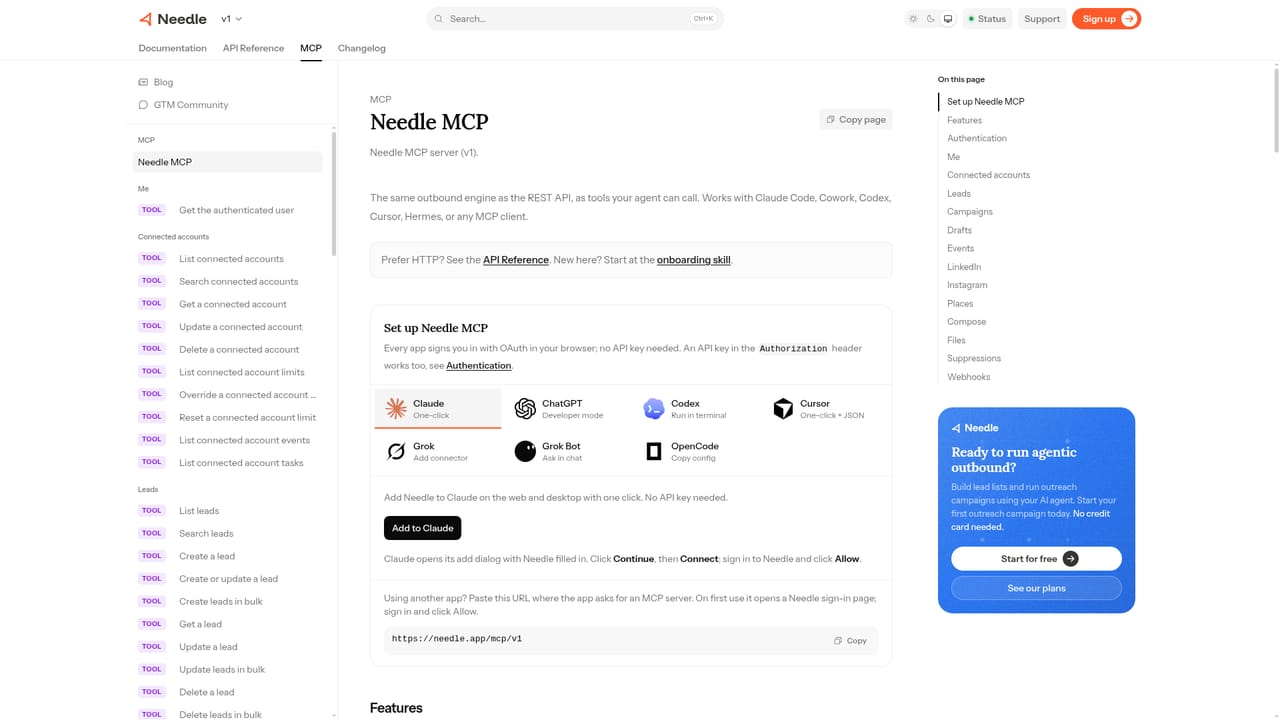
Needle turns outbound into an agent task: connect it as an MCP server to Claude, ChatGPT or similar clients, ask for leads that match your ICP, and launch multi-channel sequences across LinkedIn, Instagram and email. Priced per connected sender, with lead lists included and send limits enforced by default.
Needle is an outbound engine built around a different premise from most sales tools: instead of opening a dashboard, you talk to the AI agent you already use and ask it to find leads and launch campaigns. The product ships as an MCP server, so once it is connected to Claude, ChatGPT, Grok Bot, Cursor, Gemini, n8n or similar clients, the agent can search for prospects and start sequences on your behalf. In the examples on the site, a single request such as finding seed to Series A SaaS founders in Europe with 10 to 50 people produces a list of matched leads, skips contacts already in the CRM, and starts a LinkedIn campaign with several senders enrolled. Lead sourcing is built on buying signals rather than a static database. Lists can be assembled from LinkedIn, Instagram and Places on the accounts you connect, and there is no per-lead charge or credit meter. Messaging draws on the lead profile, the signals that made the person match your ideal customer profile, and your own past conversations, so the agent can write in your voice. One campaign can mix channels inside a single sequence: LinkedIn, Instagram and email today, with WhatsApp and SMS listed as coming soon. The homepage also positions the tool well beyond sales, showing recruiting, fundraising, competitor analysis and other GTM workflows handled by the same agent. Needle is aimed at founders, GTM teams and agencies that already work inside an AI agent and want outbound to happen there. Guardrails are on by default: per-account daily send limits, human-like cadence, warm-up for new senders, and automatic suppression of customers, open deals and recently contacted people. A funnel view reports sent, accepted, replied and booked counts, and an insights panel suggests specific edits to campaign steps. The tradeoffs are real: the workflow assumes comfort with MCP and an agent client, channels beyond LinkedIn, Instagram and email are not yet live, and costs scale with each connected sending account.
Yes: a 7-day free trial with one connected account, no card required. Lead lists are included just as they are on a paid plan.
Learn morePricing is per connected account at $69 per month, and lead lists are included. There is no per-lead charge, credit meter or top-up system, so your sending limits are the only ceiling on list size. A 7-day free trial covers one account with no card required.
Learn moreNeedle connects as an MCP server to agent clients including Claude, ChatGPT, Grok Bot, Cursor, Google Gemini, n8n and others. Sending channels are LinkedIn, Instagram and email, with WhatsApp and SMS listed as coming soon.
Learn moreCore features include ICP-based lead search with signal matching, agent-driven campaign creation over MCP, multi-channel sequences for LinkedIn, Instagram and email, messaging drafted from profile and conversation context, and guardrails covering send limits, warm-up and suppression lists. A funnel view tracks sent, accepted, replied and booked counts, and an insights panel suggests specific campaign edits.
Learn more AI Angels400+ customizable AI girlfriends for NSFW chat, voice calls, and roleplay
 Candy AIExperience the future of companionship with AI friends who chat, role-play, and connect with you on a human level.
 ourdream.aiA vast AI roleplay platform with millions of characters for chat, images, video and voiceAI Angels400+ customizable AI girlfriends for NSFW chat, voice calls, and roleplayCandy AIExperience the future of companionship with AI friends who chat, role-play, and connect with you on a human level.ourdream.aiA vast AI roleplay platform with millions of characters for chat, images, video and voice


