Free trial
A free forever plan is offered with no credit card required. Whether a separate time limited trial exists for paid tiers is not stated on the homepage.
Learn moreTurn a prompt into polished slides and documents in seconds
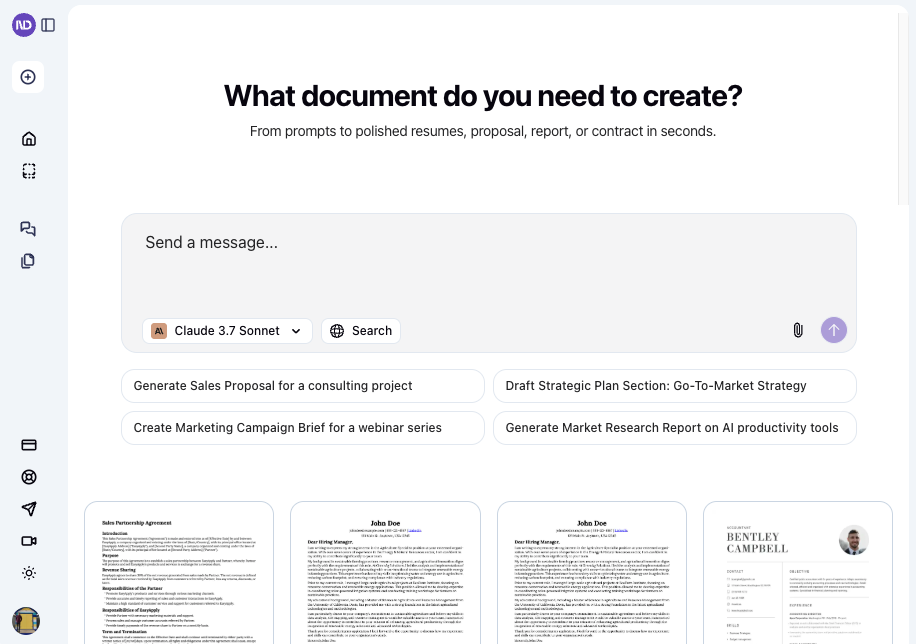
NextDocs.io is a google docs formatter tool that turns a prompt into polished slides and documents in seconds. AI builder that turns a single prompt into designed presentations, documents and social posts, with multiple versions per prompt, brand kits, AI or manual editing, and export to PDF, PowerPoint, Google Slides and Google Docs.
NextDocs.io is an AI document and presentation builder that takes a short written prompt and returns a finished, designed piece of work. Instead of starting from a blank canvas, a user describes what they need (a client presentation, a proposal, a contract, a social post) and the tool handles structure, layout, formatting and visual design on its own. The pitch is aimed squarely at people who care about the output looking professional but do not want to spend hours nudging text boxes and spacing. The workflow is built around choice before commitment. A single prompt can produce up to four variants with different structures, styles and layouts, which are compared side by side before one is picked. From there the document stays editable two ways at once: prompts can rewrite a full document, restyle one page, or adjust a single sentence, while manual drag and drop editing remains available for anything the AI gets wrong. A brand kit layer stores colors, fonts and logos once, so every new document inherits them automatically, and the AI can even assemble a brand kit from scratch. Output is not locked inside the platform. Documents and decks can be shared online or exported to PDF, PowerPoint, Google Slides and Google Docs with formatting preserved, which matters for teams that still live inside Microsoft and Google ecosystems. Templates cover common business formats such as marketing strategy decks, YC style pitch decks, agency proposals, product plans and roadmaps. The tool sits closest to AI presentation makers, but its scope is broader than slides alone. Teams that need one engine for decks, docs and marketing copy will find the fit natural. Teams with heavy spreadsheet, data visualization or real time co-editing needs should look at dedicated presentation suites instead. A free forever plan lowers the barrier to testing, and the homepage cites adoption across 83K+ users in 195+ countries.
A free forever plan is offered with no credit card required. Whether a separate time limited trial exists for paid tiers is not stated on the homepage.
Learn moreThe homepage advertises a free forever plan and states that no credit card is required to get started. Published rates, paid tiers and usage limits are not shown on the homepage, so commercial terms need to be confirmed with the vendor.
Learn moreA request demo form is offered for prospective buyers. The homepage does not describe help centre, live chat or email support, so response options for existing users are unclear.
Learn moreThe homepage names export and sharing to Google Slides, Google Docs, PowerPoint and PDF. No native integrations or sync connectors are listed, so anything beyond file export should be verified with the vendor.
Core features include one prompt generation across presentations, documents and social posts, up to four versions per prompt for side by side comparison, AI editing alongside manual drag and drop, a reusable brand kit for colors, fonts and logos, and export or sharing to PDF, PowerPoint, Google Slides and Google Docs.
Learn more AI Angels400+ customizable AI girlfriends for NSFW chat, voice calls, and roleplay
 Candy AIExperience the future of companionship with AI friends who chat, role-play, and connect with you on a human level.
 ourdream.aiA vast AI roleplay platform with millions of characters for chat, images, video and voiceAI Angels400+ customizable AI girlfriends for NSFW chat, voice calls, and roleplayCandy AIExperience the future of companionship with AI friends who chat, role-play, and connect with you on a human level.ourdream.aiA vast AI roleplay platform with millions of characters for chat, images, video and voice