Support
A support page is available on the site. The homepage FAQ covers switching from Notion or Apple Notes, manual organization, privacy, and calendar use.
Learn moreA capture-first notes app that turns scattered thoughts into tasks and events
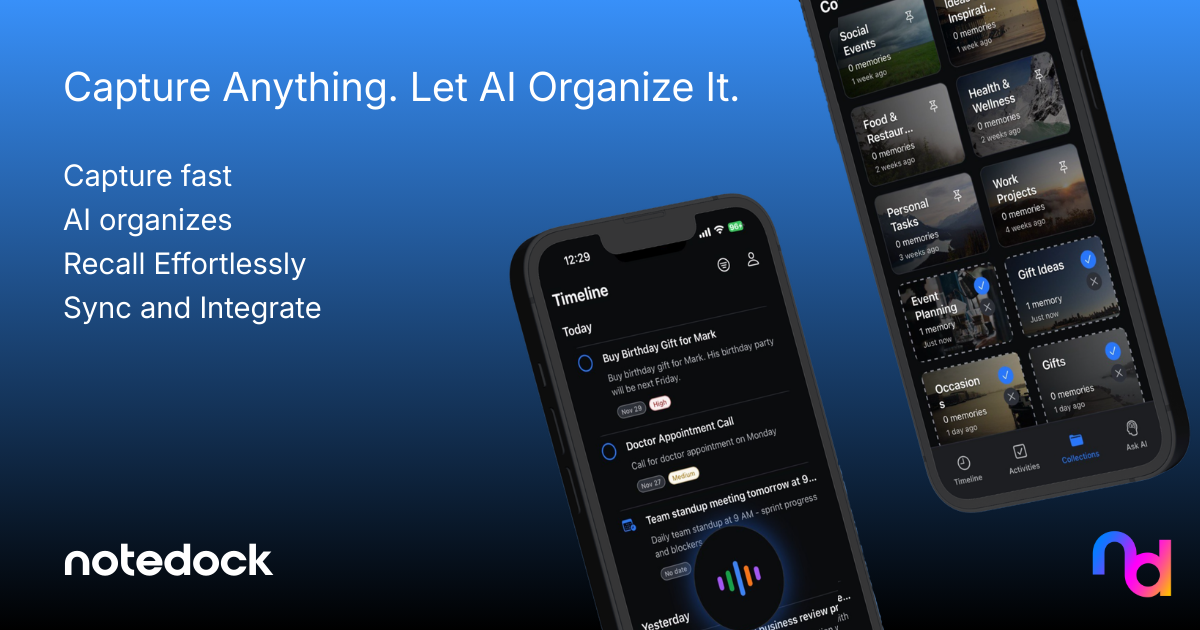
NoteDock is an AI task generator tool. NoteDock captures text, voice, links, and screenshots in one inbox, then uses AI to tag, group, and turn them into tasks and calendar events. Natural language search surfaces old notes, and relevant saved items resurface when needed.
NoteDock is a note capture tool built around a single premise: the mind is for having ideas, not for holding them. Instead of asking users to file notes into folders and pages, it accepts whatever arrives first. Typed text, voice recordings, links, photos from a library, screenshots, and camera shots all go into the same inbox. An AI layer then adds context, tags each item, and groups related thoughts together, so a collection about a single trip or project forms without anyone building the structure by hand. The second half of the product is action. NoteDock reads captured notes and converts them into tasks and calendar events. Tasks arrive with a priority (Medium and High appear in the product examples) and a time window such as This Week, and deadlines or calendar sync are handled automatically rather than entered manually. When a note describes something with a date, like a birthday party next Saturday at 7 PM, the app treats it as an event worth scheduling. Retrieval is conversational: users ask in plain language for everything saved about the Q4 project or a meeting with a specific person, and the system returns matching notes with a short summary instead of a raw list. A resurfacing feature distinguishes it from a plain database. Saved articles, restaurants, gift ideas, and travel tips come back at moments when they are relevant, often with a quick summary attached. The travel use case is the clearest illustration: years of scattered cafe names and temple recommendations are gathered into one itinerary when a trip finally happens. NoteDock positions itself as a companion to Notion and Apple Notes rather than a replacement, catching the material that slips past structured systems. It suits founders, students, creators, and marketers who capture constantly and organize rarely. Anyone who wants granular manual control over notebooks and databases will find the automation thin, and the homepage shows no concrete pricing, so cost needs checking directly.
A support page is available on the site. The homepage FAQ covers switching from Notion or Apple Notes, manual organization, privacy, and calendar use.
Learn moreCalendar integration creates events directly from notes. Slack and Notion are listed as in progress, so the live integration set is limited to calendars at present.
Capture text, voice, links, screenshots, photos, and camera input in a single inbox. AI adds context, tags items, and groups related thoughts. Notes convert into tasks with priorities and time windows, and dated entries become calendar events. Natural language search returns matching notes with summaries, Ask AI expands or brainstorms around saved material, and relevant old saves resurface when needed.
 AI Angels400+ customizable AI girlfriends for NSFW chat, voice calls, and roleplay
 Candy AIExperience the future of companionship with AI friends who chat, role-play, and connect with you on a human level.
 ourdream.aiA vast AI roleplay platform with millions of characters for chat, images, video and voiceAI Angels400+ customizable AI girlfriends for NSFW chat, voice calls, and roleplayCandy AIExperience the future of companionship with AI friends who chat, role-play, and connect with you on a human level.ourdream.aiA vast AI roleplay platform with millions of characters for chat, images, video and voice

.jpg)