Pineify

AI coding agent, finance agent and stock research toolkit for traders

Beginner API
Screenshot of Pineify, AI coding agent, finance agent and stock research toolkit for traders

What is Pineify?

Pineify is a developer tool. Pineify combines an AI coding agent for Pine Script, MQL5, cTrader and NinjaScript with a stock screener, AI stock picker, finance chat agent, chart screenshot analysis, backtest reports and a trading journal. Aimed at active traders and strategy developers who want code generation and market research in a single workspace.

Pineify is a trading workspace built around an AI coding agent for indicator and strategy code. The agent generates Pine Script for TradingView, MQL5 for MetaTrader 5, cTrader cBots and NinjaScript, working either from a written prompt or from an uploaded chart screenshot. A documentation knowledge base sits behind the model, syntax errors are detected and corrected automatically, and a memory layer keeps context across a session. Custom Skills let a user encode workflow rules and call them by name. A separate visual editor covers traders who would rather not prompt at all: 235+ technical indicators, candlestick pattern recognition, and the ability to merge several indicators into a single script. Existing Pine Script can be imported and converted into a strategy with backtesting attached. Beyond code generation, Pineify bundles research and screening tools. A finance agent pulls live quotes across stocks, options, forex and crypto, reads financial statements and ratios, runs natural language screens, and brings in web search plus X and Reddit sentiment. The stock screener exposes 300 TradingView-powered technical fields across up to 100 symbols per collection, with bullish, neutral and bearish states and timeframes from one minute to one day. An AI stock picker assigns daily 1-10 predictive scores from technical, fundamental and sentiment data, with an options chain including Greeks and implied volatility. Market Insights adds options flow, dark pool trades and congressional disclosures, while analyst ratings aggregate upgrades and price targets. The toolkit extends to chart screenshot analysis (support, resistance, entry, stop and target zones with a confidence score), a backtest deep report covering Sharpe, Sortino, SQN, VaR, Monte Carlo simulation and rolling window analysis with Excel export, a trading journal with checklists and performance reports, and a Chrome extension for parameter grid searches on TradingView strategies. Pineify suits active traders and strategy developers who already work inside TradingView, MetaTrader or cTrader and want faster iteration, plus discretionary traders who want screening and research in one place. It competes with standalone AI code assistants on the coding side and with market research terminals on the data side. The headline billing is pay once, use forever, with an invite-only Signals & Overlays indicator sold separately.

How do you use Pineify?

  1. 1Generate your first indicator or strategy
    Open the coding agent, describe the setup in plain language or upload a chart screenshot, and pick the target platform (Pine Script, MQL5, cTrader or NinjaScript). The agent returns code with syntax errors already corrected.
    Pineify — Generate your first indicator or strategy
  2. 2Run a screen to build a candidate list
    Use the market screener to select technical fields from the 300 available, set your timeframe and symbol collection, then sort by bullish, neutral or bearish state to narrow the universe.
    Pineify — Run a screen to build a candidate list
  3. 3Check scores and analyst views on a name
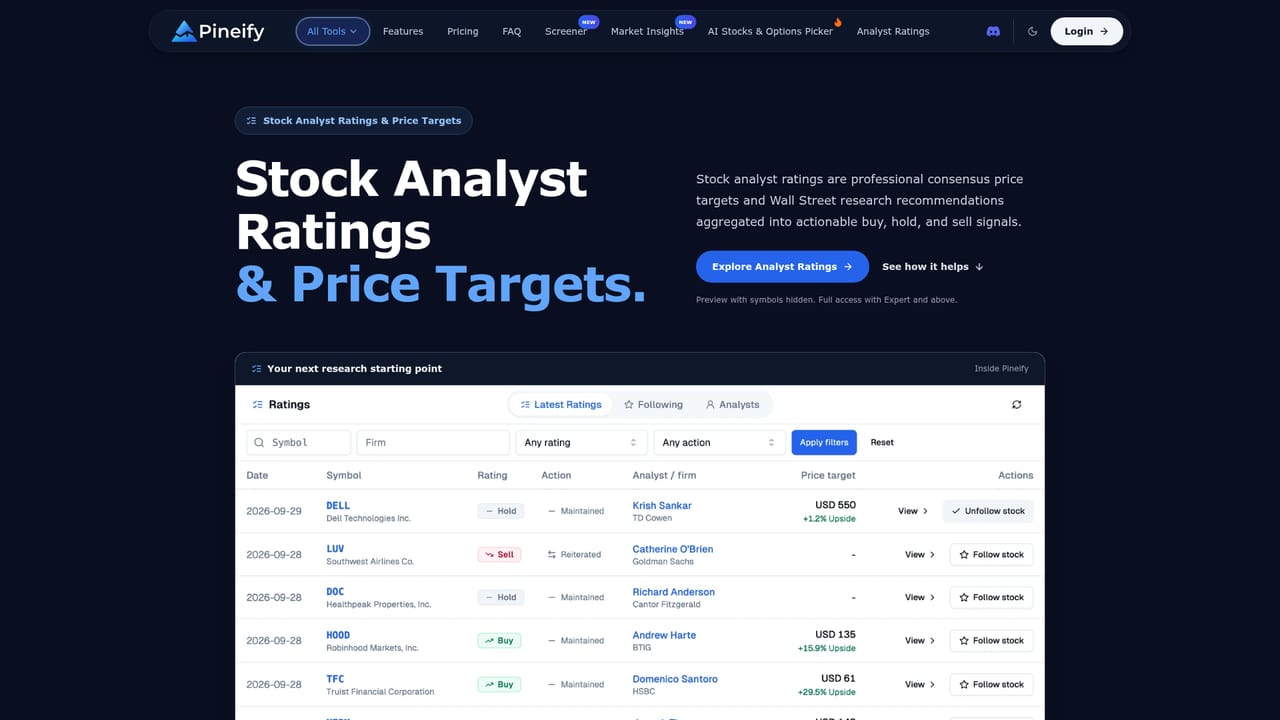
    Review the daily 1-10 predictive score for candidates, then cross-check analyst upgrades, price targets and implied upside in the ratings feed before committing capital.
    Pineify — Check scores and analyst views on a name
  4. 4Stress test the backtest
    Import your TradingView strategy report into the deep report tool to get Sharpe, Sortino, SQN and VaR metrics, rolling window stability checks, Monte Carlo simulation and a multi-sheet Excel export.
    Pineify — Stress test the backtest
  5. 5Pick a plan and unlock the workspace
    The homepage states a single payment model with lifetime access plus an optional invite-only Signals & Overlays indicator; confirm current terms on the billing page before purchasing.

Pros and cons

Pros

  • Generates code for four trading platforms from text prompts or chart screenshots, not Pine Script aloneAI
  • Automatic syntax error detection removes most of the debugging loop for non-programmersAI
  • Visual editor with 235+ indicators and candlestick pattern recognition covers users who avoid promptingAI
  • Research suite is unusually broad: screener, options flow, dark pool, congressional trades and analyst ratingsAI
  • Hosted MCP server lets ChatGPT, Claude or Cursor validate trading code and pull market dataAI

Cons

  • Homepage claims the custom model outperforms ChatGPT, Gemini and Claude without published benchmarksAI
  • Pricing is described only as pay once, use forever; no figures, tiers or refund terms appear on the pageAI
  • Most research modules (options flow, dark pool, congress) are US-market focused, limiting non-US tradersAI
  • Feature sprawl across roughly a dozen tools means depth in each is hard to verify before buyingAI
  • No documented support channels, documentation site or community forum on the homepageAI

How much does Pineify cost?

Pricing

The homepage states a one-time payment model: pay once and use forever, with a separate invite-only Signals & Overlays indicator. No prices, tiers, renewal terms or refund policy are shown on the page, so exact costs must be confirmed at checkout.

Learn more

Integrations

Works with TradingView, MetaTrader 5, cTrader and NinjaTrader for generated code, and provides a hosted MCP server for ChatGPT, Claude, Codex, Cursor and Gemini. Web search is powered by Perplexity AI, with X and Reddit sentiment feeds.

Features

AI coding agent for Pine Script, MQL5, cTrader and NinjaScript from prompts or screenshots, with error fixing and custom Skills. Visual editor with 235+ indicators and import of existing code. Finance agent with live quotes, statements and natural language screening. Stock screener with 300 technical fields, AI stock picker with 1-10 scores and options chain, market insights, analyst ratings, chart analysis, backtest deep report and trading journal.

Frequently asked questions about Pineify

  • How much does Pineify cost?
    The homepage states a one-time payment model: pay once and use forever, with a separate invite-only Signals & Overlays indicator. No prices, tiers, renewal terms or refund policy are shown on the page, so exact costs must be confirmed at checkout.
  • Does Pineify have an API?
    Yes, Pineify offers an API.
  • How do you use Pineify?
    The walkthrough on this page covers 5 steps: 1. Generate your first indicator or strategy 2. Run a screen to build a candidate list 3. Check scores and analyst views on a name 4. Stress test the backtest 5. Pick a plan and unlock the workspace.
  • What platforms does Pineify support?
    Pineify is available on Web App and Browser extension.
  • What does Pineify integrate with?
    Works with TradingView, MetaTrader 5, cTrader and NinjaTrader for generated code, and provides a hosted MCP server for ChatGPT, Claude, Codex, Cursor and Gemini. Web search is powered by Perplexity AI, with X and Reddit sentiment feeds.
  • What are the limitations of Pineify?
    Homepage claims the custom model outperforms ChatGPT, Gemini and Claude without published benchmarks. Pricing is described only as pay once, use forever; no figures, tiers or refund terms appear on the page. Most research modules (options flow, dark pool, congress) are US-market focused, limiting non-US traders.

Status

StatusActive
Views0
Outbound clicks0
Added10/21/2026

Platforms

Web AppBrowser extension

Pricing

Paid