Free trial
A free trial button sits on the homepage and the builder can be used without an account or credit card. Signing up includes 1 free AI generated invitation on the Free plan.
Learn moreAI birthday invitations with built-in QR code RSVP tracking
Own PleaseRSVP AI? Verify ownership to get a dofollow link
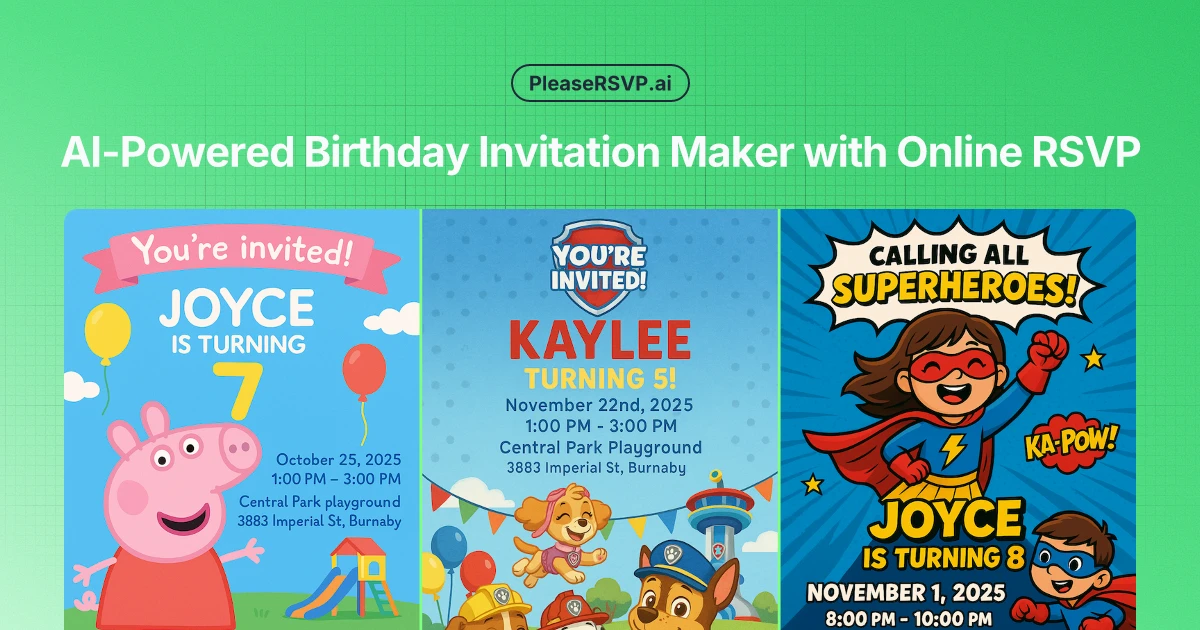
PleaseRSVP AI is a card generator tool. An AI invitation maker for children's birthday parties that generates a themed card in about a minute, then handles responses through a QR code guests can scan without signing up. Hosts get real time RSVP tracking, headcounts and automatic reminders, with 500+ themes and support for eight languages.
PleaseRSVP AI is a browser based invitation generator aimed squarely at parents organizing children's birthday parties. You fill in a short form (child's name, age, party start and end times, RSVP deadline, venue, theme and a contact name and phone number), pick one of the supported languages, and the tool produces a finished invitation in roughly a minute. The form asks for no design input at all, which is the point: the AI handles layout and artwork, and the finished card arrives ready to print at home or send digitally. The more interesting half of the product is guest management. Every invitation carries a unique QR code, and guests who scan it can respond without creating an account or logging in. Responses land in a dashboard with real time updates, email notifications, a full guest list showing attendance status, and headcounts split between adults and children. Hosts can decide whether guests must supply an email or phone number, and reminder emails go out automatically as the party date approaches. It is the combination of design and response tracking that separates it from a plain invitation template site, and the headcount detail is what makes cake, food and favor planning less of a guess. Design coverage is broad rather than deep. The library holds more than 500 themed templates spanning boys, girls and neutral options, with popular characters such as Peppa Pig, Octonauts and superheroes alongside dinosaurs, unicorns and art themes. Custom themes are supported, and generated cards are described as one of a kind rather than straight template fills. Invitations can be produced in eight languages: English, Spanish, French, German, Portuguese, Italian, Dutch and Russian. The site now directs new visitors toward PartyInvitation.AI, described as an upgraded successor with more features, so PleaseRSVP reads as a mature but no longer actively expanding product. For a one-off party it remains a low-effort option against Canva templates or hiring a designer, though the free tier caps guest tracking at 30 and serious hosts will need a paid plan.
A free trial button sits on the homepage and the builder can be used without an account or credit card. Signing up includes 1 free AI generated invitation on the Free plan.
Learn moreFree plan at $0 with 1 AI invitation, all theme templates and tracking for up to 30 guests. Pro is $10 per month with 5 invitations monthly and tracking for 200 guests. Lifetime access costs $99 one time with unlimited guest tracking and advanced analytics. A 300 credit pack sells for $12 and never expires.
Learn morePriority support is listed as a benefit on the Pro and Lifetime plans, with lifetime priority support and lifetime updates included. The FAQ also addresses cancellation, printing, RSVP editing and guest contact settings.
AI generated invitations from a short party details form, 500+ themed templates plus custom themes, eight invitation languages, printable output, unique QR code RSVP per card with no guest login, real time response dashboard with adult and child headcounts, guest list attendance status, configurable email and phone requirements, automatic reminder emails and guest list export.
 AI Angels400+ customizable AI girlfriends for NSFW chat, voice calls, and roleplay
 Candy AIExperience the future of companionship with AI friends who chat, role-play, and connect with you on a human level.
 ourdream.aiA vast AI roleplay platform with millions of characters for chat, images, video and voiceAI Angels400+ customizable AI girlfriends for NSFW chat, voice calls, and roleplayCandy AIExperience the future of companionship with AI friends who chat, role-play, and connect with you on a human level.ourdream.aiA vast AI roleplay platform with millions of characters for chat, images, video and voice


