Free trial
A free random trial is offered so the tool can be tested before paying, with no subscription or contract needed to start.
Learn moreTurn a selfie into a cartoon avatar that still looks like you
Own Profile Avatar AI? Verify ownership to get a dofollow link

Profile Avatar AI is an avatar presentation tool that turns a selfie into a cartoon avatar that still looks like you.
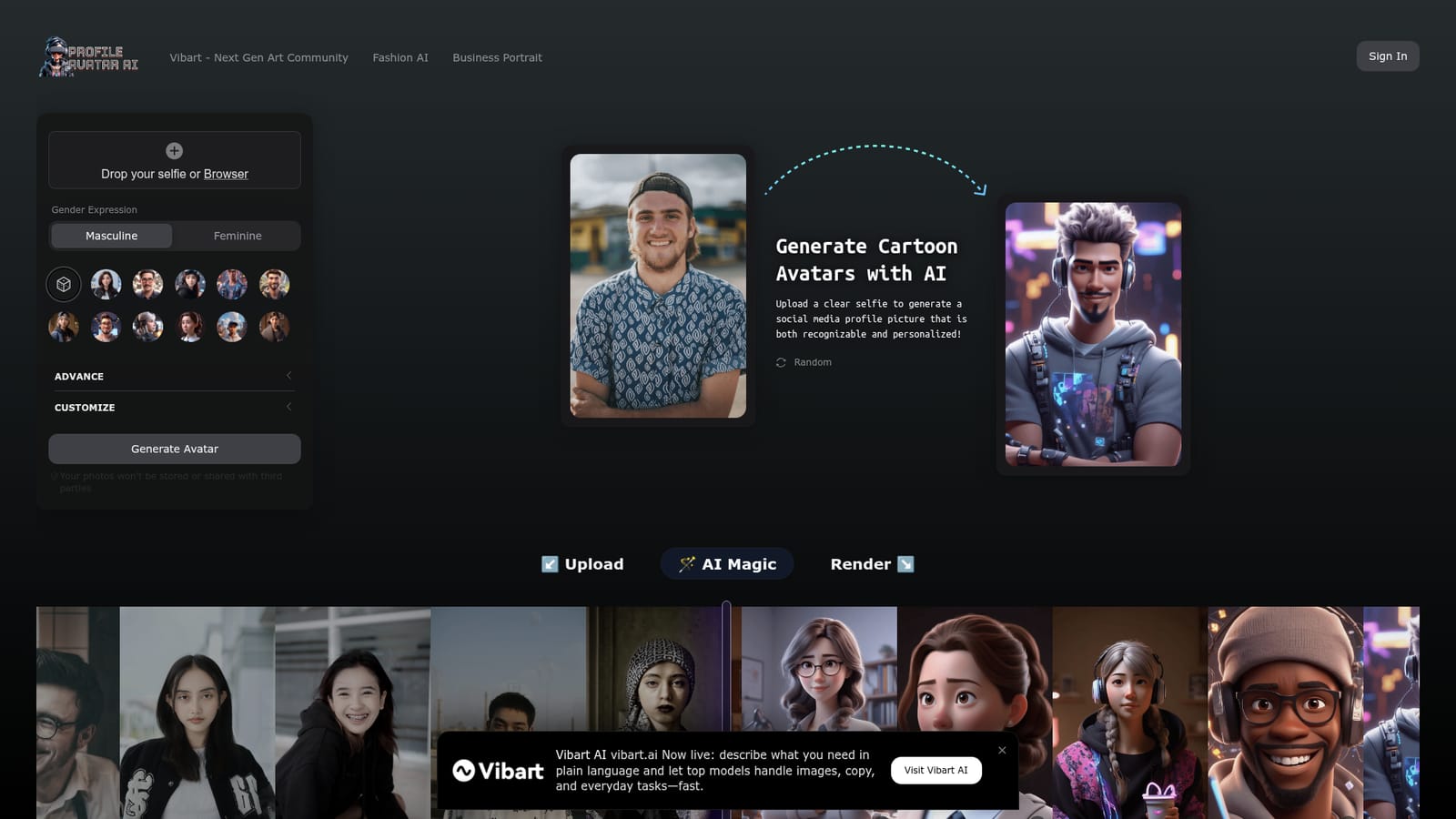
Profile Avatar AI is a browser based avatar maker that converts a single selfie into a cartoon style profile picture. The workflow is deliberately short: you drop a clear photo into the upload area, pick a visual style, set a gender expression (masculine or feminine), and let the model render the result. The output keeps enough of the original face to stay recognizable as you, while the cartoon treatment adds a layer of distance from a real photograph. That combination is the product's main argument: a profile picture with personality that does not expose your actual face. The style list is where most of the choice lives. Included presets cover office, business, gamer, cyberpunk, explorer, pop, programmer, fighter, agent, street and designer looks, plus a random option for people who would rather not decide. An Advanced and Customize area sits alongside the style grid for finer adjustments before you hit the generate button. Because the tool is aimed at a single portrait rather than general image generation, it is faster to reach a usable result than a prompt driven generator that requires you to describe lighting, framing and art direction from scratch. It fits three groups well. Casual users get a social media profile picture or messaging sticker without design skills. Freelancers and creators get a consistent personal brand image that reads as a person rather than a logo. Privacy conscious users get a recognizable but not literal portrait for public accounts. Anyone needing multiple matching avatars for a team, or full control over composition, will find the one-portrait approach limiting. On data handling, the site states that uploaded photos are used only as a reference and are not stored or shared with third parties, and that the AI filters NSFW content. The site also says no subscription is needed: there is a free random trial and pay as you go afterwards. No specific prices are published on the homepage, so check before committing.
A free random trial is offered so the tool can be tested before paying, with no subscription or contract needed to start.
Learn moreThe homepage says no subscription is required: a random free trial is available, and further use is pay as you go with no automatic billing. No actual prices, credit packs or per image rates are listed on the site.
Learn moreSelfie to cartoon avatar conversion with eleven style presets (office, business, gamer, cyberpunk, explorer, pop, programmer, fighter, agent, street, designer) plus a random option. Includes a masculine or feminine expression switch, an Advanced and Customize panel, and a stated policy that uploaded photos are not stored or shared and NSFW content is filtered.
 AI Angels400+ customizable AI girlfriends for NSFW chat, voice calls, and roleplay
 Candy AIExperience the future of companionship with AI friends who chat, role-play, and connect with you on a human level.
 ourdream.aiA vast AI roleplay platform with millions of characters for chat, images, video and voiceAI Angels400+ customizable AI girlfriends for NSFW chat, voice calls, and roleplayCandy AIExperience the future of companionship with AI friends who chat, role-play, and connect with you on a human level.ourdream.aiA vast AI roleplay platform with millions of characters for chat, images, video and voice


