Free trial
No credit card is required to start. Sign up includes 250 words to humanize before any subscription is needed.
Learn moreRewrite AI drafts into natural prose, then verify the result in place
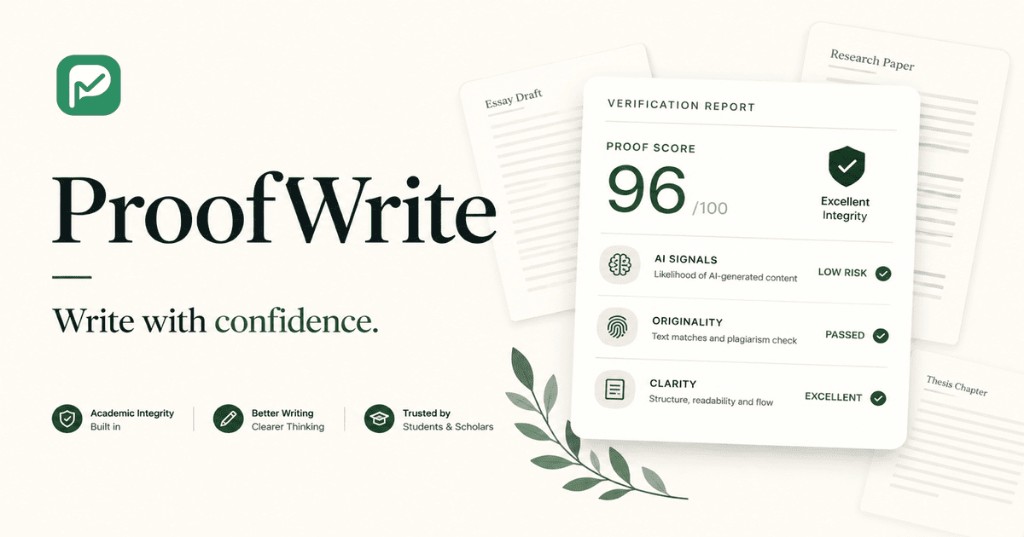
ProofWrite is an AI detector tool that rewrites AI drafts into natural prose, then verify the result in place. ProofWrite rewrites AI-generated drafts into more natural prose across eight writing modes, then scores the output with a built-in AI quality check that returns a Human, Mixed or AI Generated verdict.
ProofWrite is a web workspace built for the stage that follows AI drafting: taking machine-written text and making it read like a person wrote it, then checking whether that work actually landed. You paste or upload a draft, pick one of eight rewriting modes (General, More Human, High Quality, Academic, Simplify, Formal, Informal, Blog), and the tool rebuilds the phrasing. A built-in quality check returns an AI score plus a plain verdict of Human, Mixed, or AI Generated, so the rewrite is judged rather than assumed. The rewriting engine is pitched as pattern-aware rather than a generic spinner. ProofWrite says it is trained on more than 7 million real writing patterns and generates a distinct rewriting pattern per user, targeting the signals that trip detectors: repeating structure, sentences of uniform length, and phrasing that is too polished. The vendor states that meaning, facts and citations are preserved, and that grammar and readability are improved along the way. Results can be re-run with a different mode without leaving the page, which matters because one pass rarely satisfies everyone. The tool names Turnitin, GPTZero, ZeroGPT, Originality.ai, Copyleaks, QuillBot and Winston AI as the detectors it is tested against, and advertises priority access to new detectors as they appear. The audience is spelled out: students and academics working on reports, theses and papers, English as a second language writers who draft in one language and translate, SEO writers pushing volume, and marketing teams that need campaign copy in a consistent brand tone. It competes with standalone humanizers and paraphrasing tools on one point: verification is inside the same product rather than a separate tab. The caveat is the ceiling. Free users get 250 words at sign up, paid plans humanize 750, 1,500 or 3,000 words per request depending on tier, and the deepest multi-tool comparison runs on monthly credits that a high-volume editor can burn through quickly.
No credit card is required to start. Sign up includes 250 words to humanize before any subscription is needed.
Learn moreThree subscription tiers, monthly or annual with introductory discounts. Standard lists $9.99/month annual or $19.99 monthly for 20,000 words and 750 words per request. Pro is $14.99 or $34.99 for 60,000 words and 1,500 per request. Ultra is $29.99 or $59.99 for unlimited words and 3,000 per request. ProofDetect scan limits widen by tier.
Learn moreSupport is offered by email at support@proofwrite.ai, with a FAQ section answering common product questions on the homepage.
Eight rewriting modes (General, More Human, High Quality, Academic, Simplify, Formal, Informal, Blog) built on a claimed 7 million plus pattern dataset, with per-user rewriting patterns. Meaning, facts and citations are stated as preserved. A built-in ProofDetect check returns a before and after AI score with a Human, Mixed or AI Generated verdict, and extra monthly credits unlock deeper multi-tool comparison. All languages supported.
 AI Angels400+ customizable AI girlfriends for NSFW chat, voice calls, and roleplay
 Candy AIExperience the future of companionship with AI friends who chat, role-play, and connect with you on a human level.
 ourdream.aiA vast AI roleplay platform with millions of characters for chat, images, video and voiceAI Angels400+ customizable AI girlfriends for NSFW chat, voice calls, and roleplayCandy AIExperience the future of companionship with AI friends who chat, role-play, and connect with you on a human level.ourdream.aiA vast AI roleplay platform with millions of characters for chat, images, video and voice