PXZ AI

One prompt box for Midjourney, GPT Image, Nano Banana and Seedream

Beginner
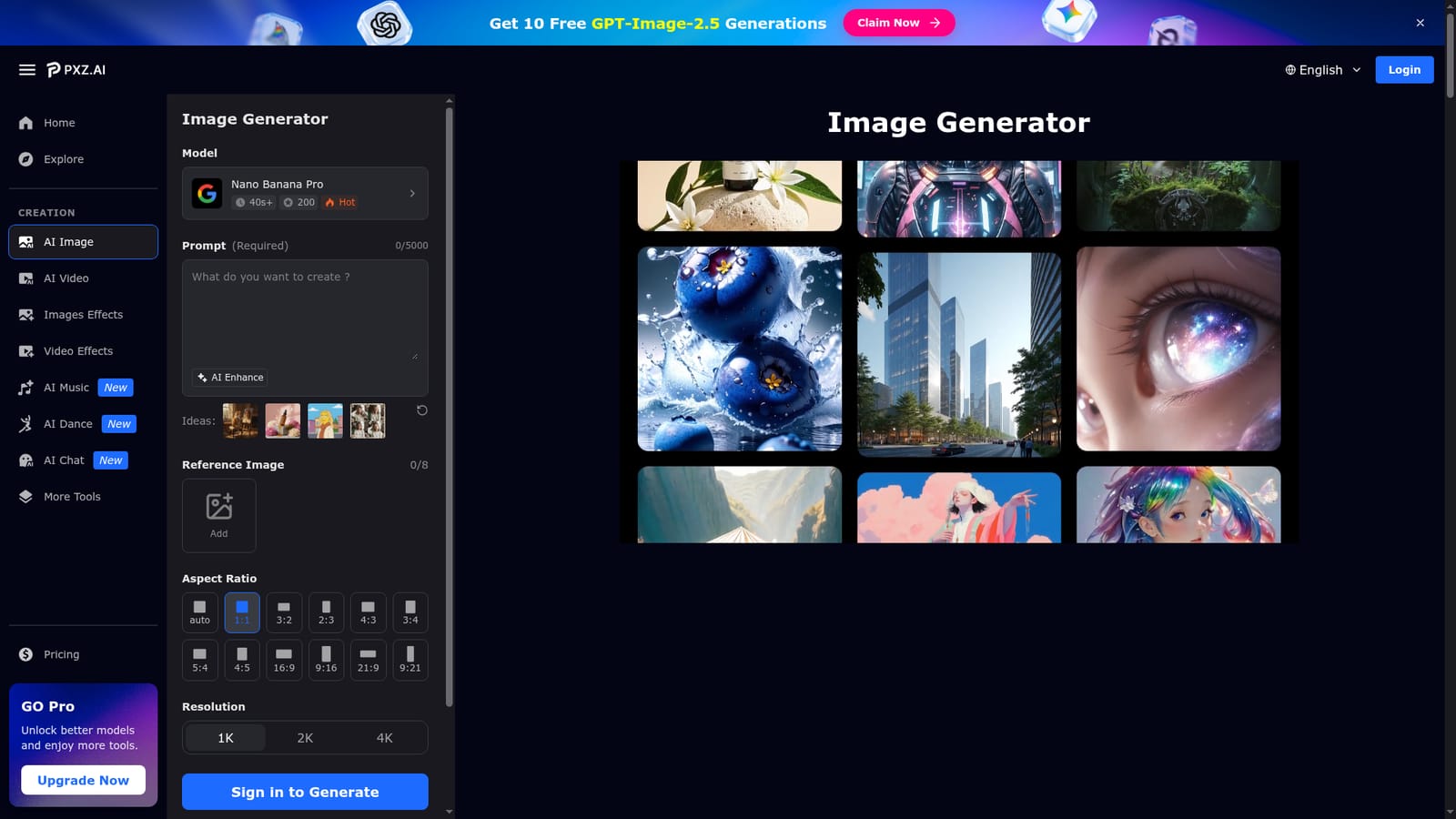
Screenshot of PXZ AI, One prompt box for Midjourney, GPT Image, Nano Banana and Seedream

What is PXZ AI?

PXZ AI is a web image generator that combines Midjourney, GPT Image, Nano Banana, Seedream, Qwen and Flux Kontext behind one prompt form, with reference images, 4K output and a saved generation history.

PXZ AI is a browser-based image generation hub that puts several third-party models behind a single prompt form. Instead of keeping separate accounts with each provider, users choose from a model list that includes Google's Nano Banana variants, OpenAI's GPT Image releases, ByteDance's Seedream versions, Qwen 2 and Midjourney V8.1. Flux Kontext is reachable through a linked model page. Each entry carries an estimated generation time, a numeric rating figure and a one-line note on what the model suits. The workflow is a single form. A prompt of up to 5,000 characters is required, an AI Enhance assistant helps turn rough ideas into fuller descriptions, and up to eight reference images can be attached for image-to-image work. Output controls cover aspect ratios from square to 21:9 and 9:21, resolution at 1K, 2K or 4K, and PNG or JPG files. A public visibility switch is marked as a premium feature, and generating requires signing in. Past generations stay in a history with their metadata, so earlier prompts can be reused, and the site describes batch runs that process several prompts at once. Sample prompts with original and output pairs show typical jobs, such as a skincare product poster or a photo restyled as a cartoon portrait. The audience is broad: social media creators needing steady visuals, small businesses producing product imagery, marketing teams that need many campaign assets, educators building illustrations, and people with no design training. The site states that images created on the platform belong to the user, including for commercial use. Companion pages cover a logo generator, a Splatoon profile picture maker and two photo rating tools. Among alternatives, PXZ AI sits in the aggregator tier. Its value is side-by-side comparison of models and one place to manage output, rather than a deep editor with layers or inpainting. Anyone who wants to test which engine suits a style before committing to a single provider is the natural fit.
How do you use PXZ AI?

  1. 1Open the image generator
    Go to the PXZ image generator page. Sign in, since generation is not available to signed-out visitors.
    PXZ AI — Open the image generator
  2. 2Pick a model
    Choose from the model list, filtered by provider if needed, such as Nano Banana Pro, GPT Image 2.0 or Midjourney V8.1. Check the estimated time shown on each card.
  3. 3Write or enhance a prompt
    Type a specific description of up to 5,000 characters, or use AI Enhance to expand a rough idea. Add reference images if you want image-to-image results.
  4. 4Set aspect ratio, resolution and format
    Select a ratio that suits the platform, a resolution from 1K to 4K, and PNG or JPG output before generating.
  5. 5Generate, compare and refine
    Run the generation, review the result, then adjust the prompt or switch models to compare. Download the version you prefer and find earlier runs in your history.

Pros and cons

Pros

  • Several leading image models in one interface, so styles can be compared without separate subscriptionsAI
  • Accepts up to eight reference images for image-to-image work alongside text promptsAI
  • Flexible output settings: many aspect ratios, 1K to 4K resolution and PNG or JPG filesAI
  • AI Enhance assistant helps beginners improve rough prompts without prompt-engineering knowledgeAI
  • Generation history with metadata makes it easy to revisit and reuse earlier promptsAI

Cons

  • Generating requires signing in, so the tool cannot be tried anonymouslyAI
  • Pricing and credit costs are not explained on the page, making real per-image cost hard to judgeAI
  • Public visibility control is marked premium, hinting that some features sit behind a paid tierAI
  • Focused on generation; no layer-based editing or inpainting tools are describedAI
  • Marketing claims such as time and cost savings are unsubstantiated figures with no stated basisAI

How much does PXZ AI cost?

Free trial

A banner offers 10 free GPT-Image-2.5 generations through a promotional claim link, and several sections invite users to try the generator for free. Terms are not detailed.

Learn more

Pricing

The page does not list plans or prices. It describes a free image generator and marks public visibility as a premium feature, which suggests a freemium model with paid upgrades.

Learn more

Features

Multi-model text-to-image and image-to-image generation, up to 8 reference images, AI Enhance prompt assistant, aspect ratios up to 21:9, 1K to 4K resolution, PNG or JPG export, batch prompts, saved generation history and example prompts.

Frequently asked questions about PXZ AI

  • How much does PXZ AI cost?
    The page does not list plans or prices. It describes a free image generator and marks public visibility as a premium feature, which suggests a freemium model with paid upgrades.
  • Does PXZ AI offer a free trial?
    A banner offers 10 free GPT-Image-2.5 generations through a promotional claim link, and several sections invite users to try the generator for free. Terms are not detailed.
  • How do you use PXZ AI?
    The walkthrough on this page covers 5 steps: 1. Open the image generator 2. Pick a model 3. Write or enhance a prompt 4. Set aspect ratio, resolution and format 5. Generate, compare and refine.
  • What platforms does PXZ AI support?
    PXZ AI is available on Web App.
  • What are the limitations of PXZ AI?
    Generating requires signing in, so the tool cannot be tried anonymously. Pricing and credit costs are not explained on the page, making real per-image cost hard to judge. Public visibility control is marked premium, hinting that some features sit behind a paid tier.

Status

StatusActive
Views0
Outbound clicks0
Added10/18/2026

Platforms

Web App

Pricing

Freemium