Free trial
A free start link appears throughout the site, but no trial length, credit allowance or card requirement is stated on the homepage.
Learn moreInstant AI replies and post drafts for X and LinkedIn

Qura is a Chrome extension plus dashboard that drafts AI replies and converts YouTube videos or URLs into posts for X and LinkedIn. Custom tones keep output on-brand, and a post optimizer tests phrasing for engagement. It targets founders, marketers and creators who want faster engagement without a full social suite.
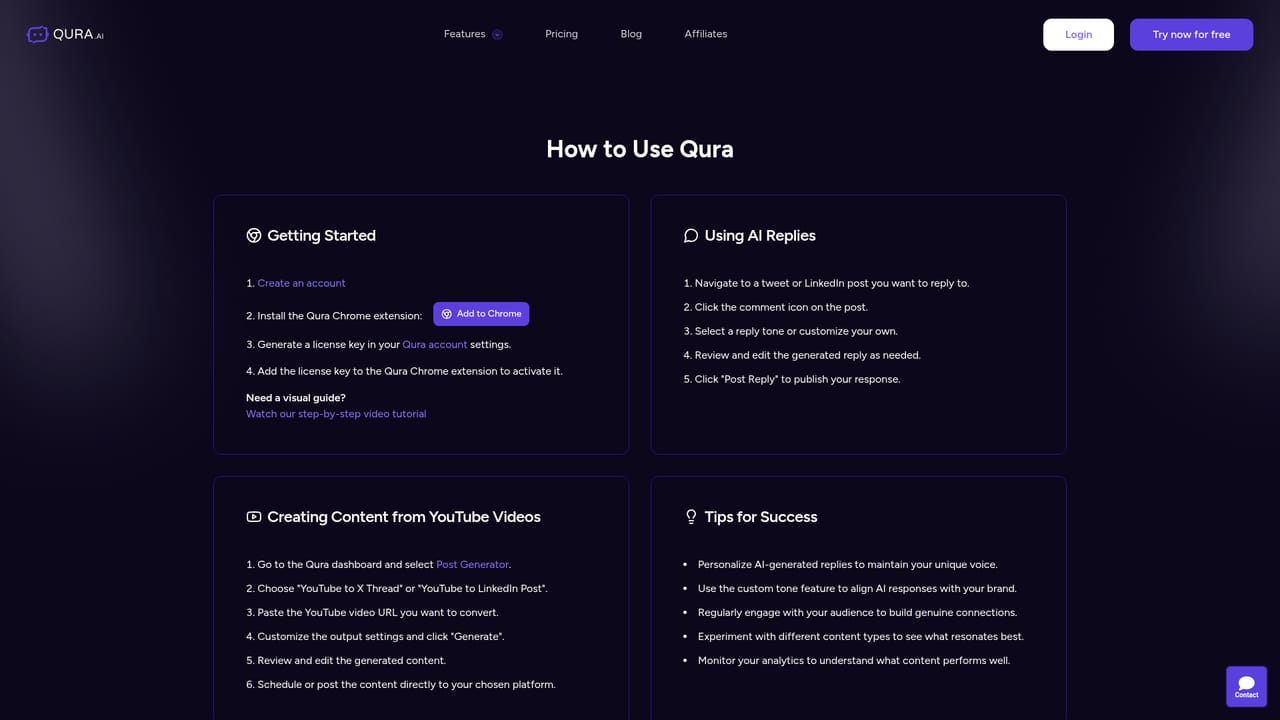
Qura is a Chrome extension backed by a web dashboard that writes replies and posts for social platforms, with X (Twitter) and LinkedIn as its core focus. The premise is simple: most growth on social comes from consistent, thoughtful engagement, and most people cannot sustain that volume by hand. Qura inserts an AI layer into the browser so a reply can be drafted while the user is already reading the post, and longer ideas can be turned into threads or LinkedIn updates from a central dashboard. The product splits into three parts. The AI reply assistant suggests responses in the user's chosen voice, and custom tones let teams write their own instructions so output matches a brand rather than a generic assistant. The content tools accept a URL or a YouTube video and turn it into posts for multiple platforms. The Optimize Tweet feature experiments with phrasing to see which version earns more likes, retweets and replies. A separate growth service is sold alongside the software for users who want the engagement handled for them. The audience is self-managed professionals and small teams: founders building a network, agencies and companies maintaining a brand voice across several accounts, and creators reusing long-form video into short social copy. Setup is deliberately light. Users create an account, install the extension from the Chrome Web Store, generate a licence key in account settings and paste it into the extension. The dashboard handles the heavier content conversion work. Qura sits next to scheduling suites and general writing assistants, but it is narrower by design. It does not try to be a publishing calendar or an analytics platform; it aims at the reply box and the draft window. Its central claim is that AI output is a starting point that users review and customize before posting, which is also how the company frames its compliance with platform terms. Buyers who need multi-seat permissions, approval chains or deep reporting will find it thin compared with full social management suites.
A free start link appears throughout the site, but no trial length, credit allowance or card requirement is stated on the homepage.
Learn moreThree plans are listed. Basic is $20 monthly or $16 per month billed yearly at $192, with 120,000 credits of replies per year. Pro is $25 monthly or $20 per month billed yearly at $240, with 168,000 yearly credits and URL and YouTube to post conversion. Business is $40 monthly or $32 per month billed yearly at $384, with 240,000 yearly credits, video conversion and post optimization.
Learn moreDocumentation and a blog are linked, and a contact form on the site accepts a message plus a screenshot, with email and bug reporting listed as contact routes.
Learn moreDelivered as a Chrome extension with a web dashboard, working inside X and LinkedIn. Logos for Facebook, Reddit, Discord, Instagram, Bluesky, Gmail, Twitch, Threads, Pinterest and YouTube appear, but no integration detail is given.
AI reply suggestions for X and LinkedIn, custom tones with user-written instructions for brand consistency, conversion of URLs and YouTube videos into posts and threads, and an Optimize Tweet tool for testing phrasing. A dashboard handles content conversion, and the Chrome extension handles in-feed replies.
Learn more AI Angels400+ customizable AI girlfriends for NSFW chat, voice calls, and roleplay
 Candy AIExperience the future of companionship with AI friends who chat, role-play, and connect with you on a human level.
 ourdream.aiA vast AI roleplay platform with millions of characters for chat, images, video and voiceAI Angels400+ customizable AI girlfriends for NSFW chat, voice calls, and roleplayCandy AIExperience the future of companionship with AI friends who chat, role-play, and connect with you on a human level.ourdream.aiA vast AI roleplay platform with millions of characters for chat, images, video and voice


