Support
A public documentation site covers setup and integration, and a contact page routes enquiries to the team. No support tiers or SLA details are stated on the homepage.
Learn moreReal-time AI avatars and holograms that speak 100+ languages
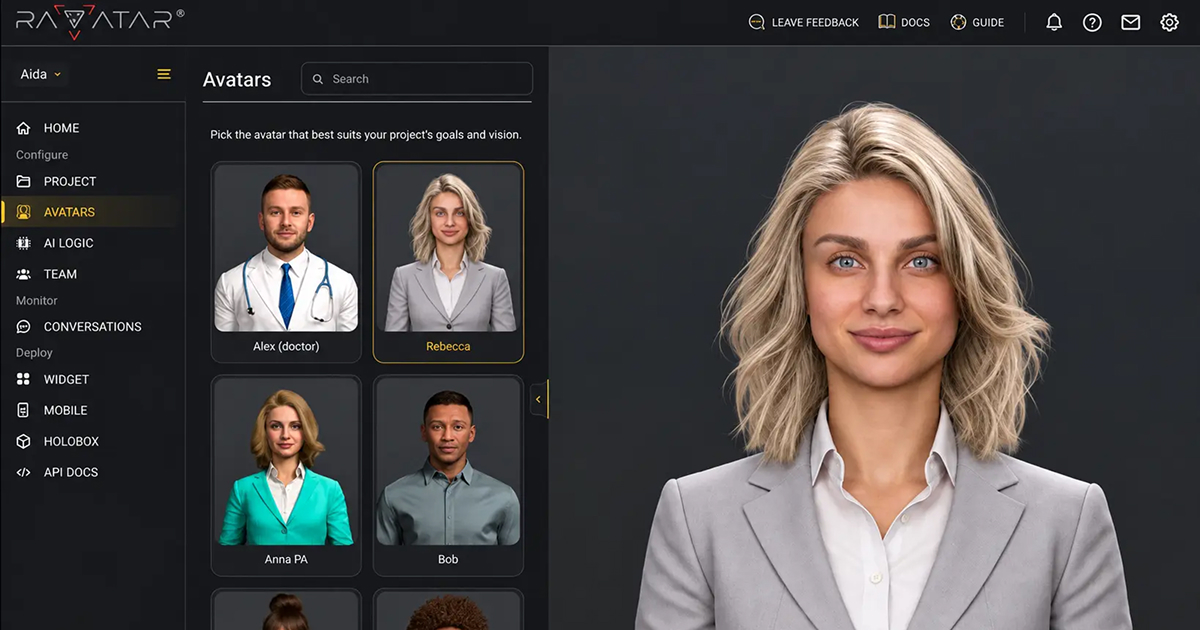
RAVATAR builds real-time interactive AI avatars and holograms for business, layering a full-body 3D digital human in front of your existing LLMs, RAG and CRM systems. It speaks 100+ languages, deploys on web, mobile, kiosk and a 4K Holobox, and offers on-premise or air-gapped hosting for regulated industries.
RAVATAR is a platform for building and deploying real-time interactive AI avatars and AI holograms for business use. The premise is straightforward: a company's existing AI stack already holds the answers, so RAVATAR adds the face. It sits in front of LLMs, retrieval systems, CRM and ERP tools, internal APIs and AI agents, turning them into a full-body 3D digital human that holds spoken conversations in more than 100 languages, around the clock. The avatars are built in Genesis AI Avatar Studio, with real-time rendering, accurate lip sync, facial movement and natural gestures, plus a personality and custom knowledge base trained on the business. The product is aimed at organisations that deal with high volumes of routine customer or visitor questions: hospitals and clinics, banks and financial services firms, hotels, museums, retail floors and live event organisers. Deployment is channel-flexible. A single embed puts an avatar on a web page or inside a mobile app and messenger, an AI kiosk turns a lobby or branch into a staffed one, and a 4K volumetric Holobox (RAVABOX) gives the avatar a life-sized presence in physical space. In practice, teams connect their existing models and knowledge sources, pick or build a character, then publish the same avatar across channels without rebuilding anything. Where RAVATAR departs from the typical avatar generator is its emphasis on controlled deployment. There are on-premise and private cloud options, and a fully air-gapped mode for strict security mandates, with all components (models, speech, rendering) running inside the customer's own perimeter. The company positions this as GDPR and EU AI Act ready, and notes optimisation for Intel, NVIDIA and AMD hardware. Public case work is mostly experiential: a holographic financial advisor at LHoFT in Luxembourg, an interactive Charles Fazzino hologram at the Elliott Museum, an AI event host for Pullman London, tax training avatars for PwC, a digital twin of an AMD executive at GITEX, and a Howard Carter hologram. The pattern suits brands that want a memorable, face-to-face interface rather than a text widget. Pricing is not published on the homepage, so budgeting requires a conversation with sales.
A public documentation site covers setup and integration, and a contact page routes enquiries to the team. No support tiers or SLA details are stated on the homepage.
Learn moreThe avatar layer plugs into your existing AI stack: LLMs and RAG systems, CRM and ERP platforms, internal APIs and AI agents. Web and mobile deployment uses a single embed snippet, and on-premise setups connect directly to your own systems.
Learn moreReal-time full-body 3D avatars with natural speech, accurate lip sync and gestures across 100+ languages. Custom knowledge trained on your business, an AI personality that matches your brand, and a human interface layer over LLMs, RAG, CRM, ERP, internal APIs and AI agents. Deploy by one-line embed on web and mobile, on an AI kiosk, or in a 4K Holobox, with on-premise, private cloud and air-gapped hosting.
Learn more AI Angels400+ customizable AI girlfriends for NSFW chat, voice calls, and roleplay
 Candy AIExperience the future of companionship with AI friends who chat, role-play, and connect with you on a human level.
 ourdream.aiA vast AI roleplay platform with millions of characters for chat, images, video and voiceAI Angels400+ customizable AI girlfriends for NSFW chat, voice calls, and roleplayCandy AIExperience the future of companionship with AI friends who chat, role-play, and connect with you on a human level.ourdream.aiA vast AI roleplay platform with millions of characters for chat, images, video and voice