RemoteX

Diagnose and fix production servers from your phone, with approval on every change

Advanced
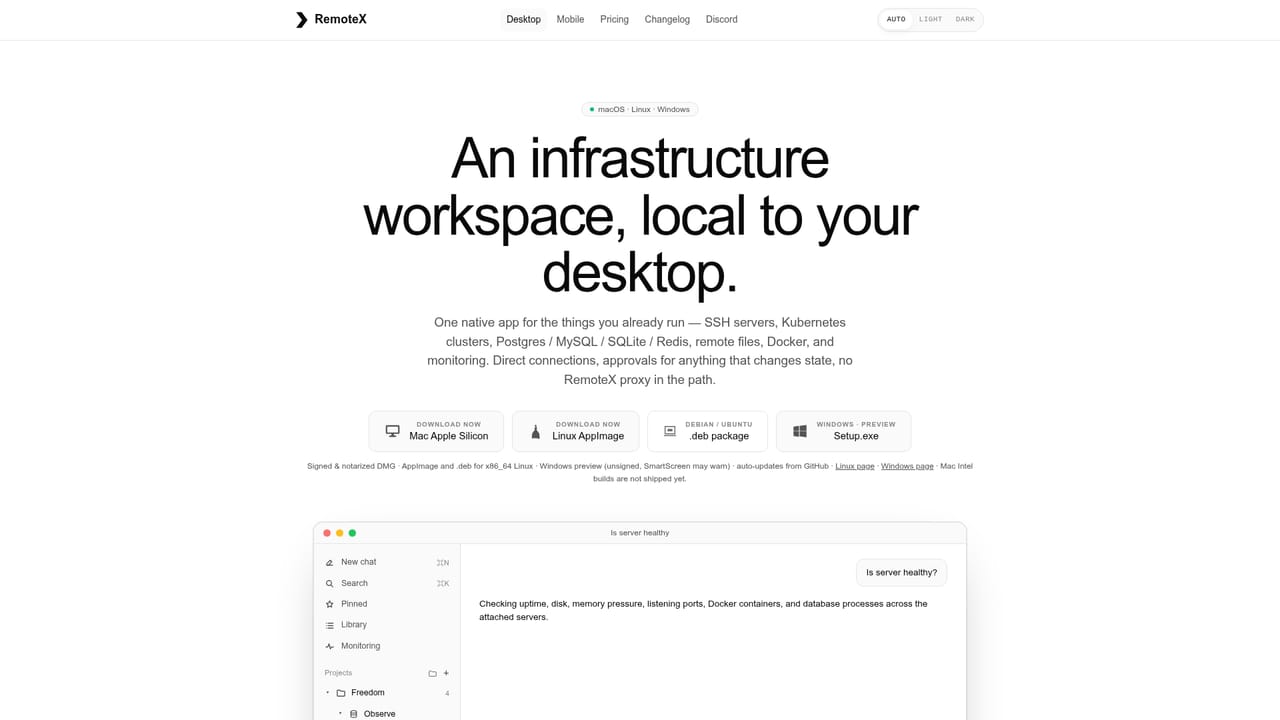
Screenshot of RemoteX, Diagnose and fix production servers from your phone, with approval on every change

What is RemoteX?

RemoteX is an AI task generator tool. A multi-platform AI ops client that connects straight to your servers over SSH, investigates across hosts, clusters, databases and files, and executes changes only after explicit approval. Bring your own model from fourteen providers, or run a local one.

RemoteX is a server operations client for Mac, Linux, Windows, iPhone, and Android that puts an AI agent between you and the machines you run. Instead of opening an SSH session, a dashboard, a database client, and a log tail, you ask a question in plain language. The agent inspects the attached servers, Docker hosts, Kubernetes clusters, databases, logs, and files, runs read-only diagnostics on its own, streams the command output back as evidence, and then proposes a change. Nothing that mutates state executes until you approve the exact command bytes, and on mobile that approval is gated by Face ID. The core design bet is locality. There is no agent to install on the server and no RemoteX proxy in the path: your device connects over SSH directly, prompts travel from your machine to the model provider you picked, and credentials sit in the platform keychain. RemoteX ships no bundled model. Instead it works with around fourteen providers including Anthropic, OpenAI, Gemini, Copilot, OpenRouter, xAI, DeepSeek, Mistral, Bedrock, Ollama, and LM Studio, and you can sign in with an existing ChatGPT or GitHub Copilot subscription rather than generating an API key. The desktop build, still marked beta, adds the deeper workspace: projects that group infrastructure, a database explorer with a Results tab for Postgres, MySQL, SQLite, and Redis, a read-only remote file tree with syntax highlighting, an approved local folder so the agent can cross-reference your repo against a server config, reusable skills and multi-step workflows invoked with a dollar sign, threshold alert rules compiled from plain English with a single model call, and per-server health sparklines scrubbable from one hour to thirty days. Session memory is stored on-device per server. RemoteX makes the most sense for solo operators, on-call engineers, and small infrastructure teams who already know their way around a shell and want the investigation assembled in one thread. It is not a replacement for a full observability stack or an agent-based monitoring platform.

How do you use RemoteX?

  1. 1Install RemoteX on your phone or desktop
    Grab the iOS or Android build from the app stores, or download the Apple Silicon Mac disk image, the Linux AppImage or .deb, or the Windows preview installer. The same agent core and safety classifier run on every platform.
    RemoteX — Install RemoteX on your phone or desktop
  2. 2Connect a model provider
    Sign in with an existing ChatGPT or GitHub Copilot subscription, or paste an API key for Anthropic, Gemini, OpenRouter, xAI, DeepSeek, Mistral, Bedrock and others. Local options such as Ollama and LM Studio are supported if you prefer to keep inference on your own hardware.
  3. 3Add your first server over SSH
    On Mac, RemoteX scans ssh-agent and the keys already sitting in your .ssh directory so you can pick one instead of pasting a private key. Add the host, attach a database or Docker host alongside it if needed, and group related infrastructure into a project.
  4. 4Ask what is wrong and read the evidence
    Phrase the question as you would to a colleague. The agent runs read-only checks such as uptime, disk usage and container status, and streams the real command output into the activity view so you can verify its reasoning before accepting any conclusion.
  5. 5Approve the proposed fix
    State-changing commands surface as a card showing the exact bytes, a short explanation and a risk label. Approve with Face ID or Touch ID to run it, then ask the agent to verify the result.
  6. 6Save repeat work as skills and alerts
    Store common investigations as skills or multi-step workflows and invoke them with a dollar sign in chat. Describe a threshold alert in plain English and RemoteX compiles a rule that evaluates locally, then links it to a pre-seeded investigation.

Pros and cons

Pros

  • Read-only diagnostics run autonomously while every state-changing command waits behind an approval card with risk labelAI
  • No agent on the server and no vendor proxy: SSH, prompts and keys stay direct between your device and providerAI
  • Fourteen model providers plus ChatGPT and Copilot sign-in, so an existing subscription can replace an API keyAI
  • Live health sampling and scrubbable metric sparklines arrive without installing monitoring softwareAI
  • Handy for out-of-hours work: full investigations from iPhone and Android, with Face ID or Touch ID on approvalsAI

Cons

  • Desktop app is labelled beta, so the database explorer, projects and skills features may still shiftAI
  • Alert rules are local threshold checks on sampled metrics, not a substitute for a real observability or paging stackAI
  • Running well depends on choosing a capable model, and the tool does not bundle one, so cost and quality vary by providerAI
  • Approval on every mutating command slows down bulk routine work that a scripted runbook would finish fasterAI
  • No shared team layer described: workspace is device-local, which complicates handoffs across an on-call rotationAI

How much does RemoteX cost?

Pricing

No prices are shown on the homepage or the linked pricing page: the site directs visitors to a separate pricing page, and the model provider you connect is billed by that provider. Apps for iOS, Android, Mac, Linux and Windows are listed as available downloads.

Learn more

Integrations

Works with Anthropic, OpenAI, Gemini, GitHub Copilot, OpenRouter, xAI, DeepSeek, Mistral, Vercel, AWS Bedrock, Ollama and LM Studio. Infrastructure targets include SSH servers, Docker, Kubernetes, Postgres, MySQL, SQLite, Redis and approved local folders.

Features

Plain-language investigation across SSH servers, Docker hosts, Kubernetes clusters, Postgres, MySQL, SQLite and Redis, with streamed command output as evidence. Approval cards gate every mutation. Desktop adds a database explorer, remote and local file browsing, reusable skills and workflows, English-to-rule alerts, Plan mode, per-server health sparklines, pinned answers and local session memory.

Learn more

Frequently asked questions about RemoteX

  • How much does RemoteX cost?
    No prices are shown on the homepage or the linked pricing page: the site directs visitors to a separate pricing page, and the model provider you connect is billed by that provider. Apps for iOS, Android, Mac, Linux and Windows are listed as available downloads.
  • How do you use RemoteX?
    The walkthrough on this page covers 6 steps: 1. Install RemoteX on your phone or desktop 2. Connect a model provider 3. Add your first server over SSH 4. Ask what is wrong and read the evidence 5. Approve the proposed fix 6. Save repeat work as skills and alerts.
  • What platforms does RemoteX support?
    RemoteX is available on Web App, iOS, Android, MacOS, Windows and Linux.
  • What does RemoteX integrate with?
    Works with Anthropic, OpenAI, Gemini, GitHub Copilot, OpenRouter, xAI, DeepSeek, Mistral, Vercel, AWS Bedrock, Ollama and LM Studio. Infrastructure targets include SSH servers, Docker, Kubernetes, Postgres, MySQL, SQLite, Redis and approved local folders.
  • What are the limitations of RemoteX?
    Desktop app is labelled beta, so the database explorer, projects and skills features may still shift. Alert rules are local threshold checks on sampled metrics, not a substitute for a real observability or paging stack. Running well depends on choosing a capable model, and the tool does not bundle one, so cost and quality vary by provider.

Status

StatusActive
Views0
Outbound clicks0
Added10/21/2026

Platforms

Web AppiOSAndroidMacOSWindowsLinux

Pricing

Freemium