SageBrush

Scribble on a canvas, get AI imagery back

Beginner
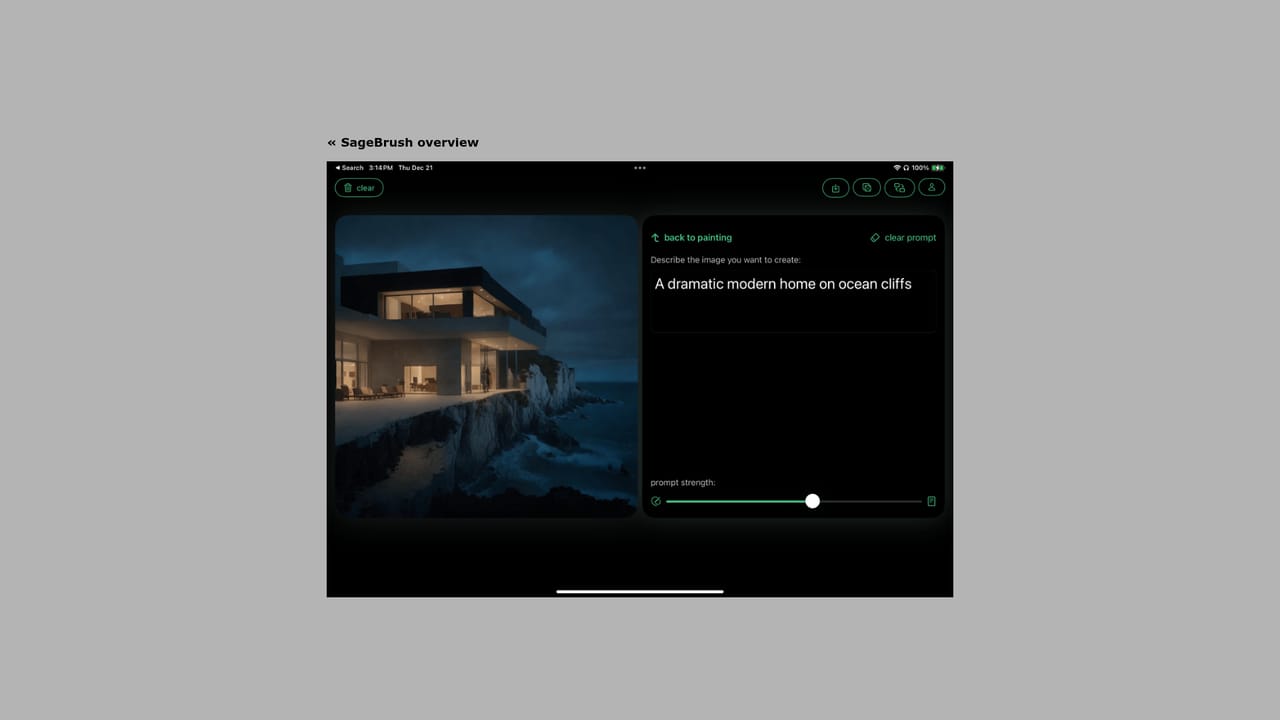
Screenshot of SageBrush, Scribble on a canvas, get AI imagery back

What is SageBrush?

SageBrush is a drawing to image tool. An iOS sketch to image app that turns finger or Apple Pencil drawings into AI artwork, with a prompt editor, adjustable prompt strength, quality levels and seed randomization. Free to download, with token purchases required for generating.

SageBrush is an iOS app that turns rough drawings into finished AI imagery. You sketch a composition on a blank canvas with a finger or an Apple Pencil, type a prompt that describes subject and style, and the model renders a polished picture that keeps the shape of what you drew. It sits in the sketch to image corner of generative art, aimed at people who want more authorship than a text box alone provides. The workflow is deliberately small. A prompt editor accepts anything from a short phrase to a long descriptive passage, and a prompt strength control decides how far the AI may drift from the drawing. Separate settings let you switch between quality levels to trade rendering detail for speed, and a randomize action reinterprets the same sketch with a new seed so one drawing can yield several plausible results. Canvas modes cover left and right handed drawing, and the interface ships in light and dark themes for sketching at any hour. The pitch is accessibility rather than professional production. The app describes itself as an imaginative tool for any skill level, and the drawing surface is framed as being as familiar as a box of crayons. Someone who cannot render a landscape by hand can still block out a horizon and a river, then let the prompt supply texture and mood. The result is a partner model of creation: the human sets composition, the machine fills in craft. Compared with pure text to image generators, SageBrush trades breadth for spatial control, since nothing in the prompt can dictate layout as precisely as a drawn line. Compared with full painting suites, it offers far fewer manual tools. The app is free to download but requires in app purchase of tokens to generate, so heavy use carries a running cost on top of the App Store install.

How do you use SageBrush?

  1. 1Install SageBrush from the App Store
    Download SageBrush AI Painter on a compatible iPhone or iPad. The app is free to install, but generating images requires purchasing tokens inside the app.
    SageBrush — Install SageBrush from the App Store
  2. 2Watch the demo video first
    A short walkthrough on the site shows the sketch, prompt and controls in use, which is the quickest way to understand what the strength and quality settings change.
    SageBrush — Watch the demo video first
  3. 3Sketch your composition
    Open a canvas, choose the left or right handed layout, and block out the main shapes with a finger or Apple Pencil. Keep the drawing simple; the AI supplies detail.
  4. 4Write the prompt
    Describe the subject and the style you want in the prompt editor. A concise phrase works, as does a longer passage when you want specific detail.
  5. 5Balance drawing against prompt
    Adjust prompt strength to set how much the result resembles your sketch, change quality level for more or less detail, and randomize the seed to compare interpretations.
  6. 6Get help if something breaks
    The support page on the Apposite site is the place to look for contact details and answers about the app or token purchases.
    SageBrush — Get help if something breaks

Pros and cons

Pros

  • Sketch first workflow gives direct control over composition instead of relying on prompt wording aloneAI
  • Prompt strength slider lets you decide how closely the output follows the drawing versus the textAI
  • Seed randomization produces several interpretations of a single sketch without redrawingAI
  • Left and right handed canvas modes plus light and dark themes suit different drawing habitsAI
  • Low barrier to entry for people with no traditional art trainingAI

Cons

  • Locked to iPhone and iPad through the App Store, with no web or desktop versionAI
  • Every generation consumes tokens bought in app, so costs accumulate with experimentationAI
  • Quality level controls are not documented with concrete resolution or model detailsAI
  • No layer tools, brushes or undo history described, so it is not a substitute for a paint appAI
  • Output fidelity to the original sketch depends on an undocumented strength scale that takes trial and errorAI

How much does SageBrush cost?

Pricing

SageBrush is a free download from the App Store. The site states that use requires in app purchase of tokens, so image generation is paid per use rather than covered by the install. No token prices or bundles are listed on the homepage.

Learn more

Support

Apposite maintains a support page linked from the site navigation and the SageBrush product page, intended for questions about the app and its token purchases.

Learn more

Features

Sketch to image generation from finger or Apple Pencil drawings, a prompt editor for subject and style, a prompt strength control that sets how closely output follows the drawing, selectable quality levels, seed randomization for alternate interpretations, left and right handed canvas layouts, and light and dark modes.

Learn more

Frequently asked questions about SageBrush

  • How much does SageBrush cost?
    SageBrush is a free download from the App Store. The site states that use requires in app purchase of tokens, so image generation is paid per use rather than covered by the install. No token prices or bundles are listed on the homepage.
  • How do you use SageBrush?
    The walkthrough on this page covers 6 steps: 1. Install SageBrush from the App Store 2. Watch the demo video first 3. Sketch your composition 4. Write the prompt 5. Balance drawing against prompt 6. Get help if something breaks.
  • What platforms does SageBrush support?
    SageBrush is available on iOS.
  • What are the limitations of SageBrush?
    Locked to iPhone and iPad through the App Store, with no web or desktop version. Every generation consumes tokens bought in app, so costs accumulate with experimentation. Quality level controls are not documented with concrete resolution or model details.

Status

StatusActive
Views0
Outbound clicks0
Added10/22/2026

Platforms

iOS

Pricing

FreePaid