Free trial
No trial is needed because the tool is presented as free and usable without logging in.
Learn moreStable Diffusion image generation through the crowdsourced AI Horde, no login needed

ArtBot is an AI image upscaler tool. A free, no-login Stable Diffusion interface running on the volunteer AI Horde, with text to image, img2img, inpainting, ControlNet, sketch and live paint tools, upscalers and a community image gallery.
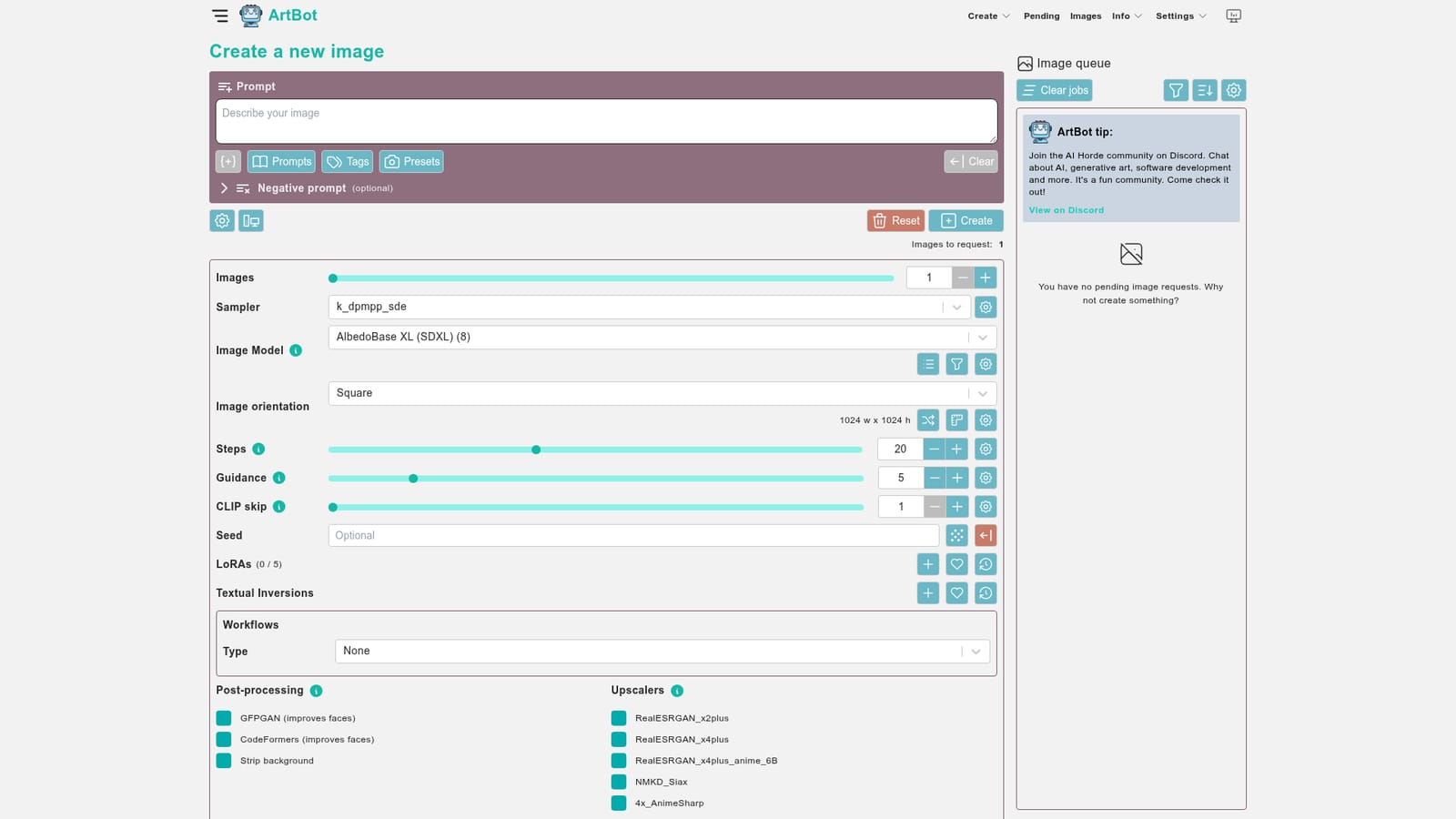
ArtBot is a browser front end for Stable Diffusion image generation that draws its compute from the AI Horde, a distributed cluster of volunteer workers. Instead of running a model locally or paying a hosted service, requests are queued to that shared network, which is why the site can advertise itself as free and usable without an account. The interface exposes the knobs that experienced Stable Diffusion users expect: sampler, model, orientation and resolution, steps, guidance, CLIP skip, seed, LoRAs, textual inversions and workflows, plus post-processing options such as GFPGAN and CodeFormers for faces, background stripping and several upscalers including RealESRGAN variants and AnimeSharp. Optional flags cover Karras sampling, hires fix, tiling, slow workers, NSFW generations and a prompt replacement filter. Text to image is only the entry point. The same workspace bundles an image-to-image panel with upload from device or URL, inpainting, ControlNet, a sketch canvas under Draw and a Live Paint mode. An interrogate tool works in the opposite direction, reading an existing image to recover a usable prompt. Finished and pending jobs live in a gallery, and a rate images page lets users score output, which feeds the preference data the Horde uses to route work. A showcase surfaces community results, and model and worker detail pages let you inspect what is actually serving your request. Practically, ArtBot suits people who want Stable Diffusion output without a GPU, an install or a credit card, and who accept queue times as the trade. Hobbyists, prompt tinkerers and anyone exploring SDXL models on modest hardware are the natural audience. Because generation depends on volunteers, throughput and model availability shift with network load, and speed is not something the tool controls. Users who need predictable latency or commercial-grade throughput should look at paid hosted generators; ArtBot is the option for experimenters who value breadth of controls and zero cost over guaranteed turnaround.
No trial is needed because the tool is presented as free and usable without logging in.
Learn moreThe site describes ArtBot as free to use, with generation handled by the volunteer AI Horde cluster. No paid tiers or subscription pricing are stated on the homepage.
Learn moreHelp channels include the FAQ, a contact form, the project GitHub issue tracker, a Discord channel and Mastodon, with about, changelog and contributors pages on site.
Learn moreBuilt on the AI Horde distributed computing network; the project is open source and links to its GitHub repository.
Learn moreText to image with model, sampler, steps, guidance, CLIP skip, seed, LoRAs, textual inversions and workflows; image-to-image, inpainting, ControlNet, Draw and Live Paint; GFPGAN and CodeFormers face fixes, background stripping and RealESRGAN, Siax, AnimeSharp upscalers; Karras, hires fix, tiling and NSFW options; image interrogation, galleries, rating and a showcase.
Learn more AI Angels400+ customizable AI girlfriends for NSFW chat, voice calls, and roleplay
 Candy AIExperience the future of companionship with AI friends who chat, role-play, and connect with you on a human level.
 ourdream.aiA vast AI roleplay platform with millions of characters for chat, images, video and voiceAI Angels400+ customizable AI girlfriends for NSFW chat, voice calls, and roleplayCandy AIExperience the future of companionship with AI friends who chat, role-play, and connect with you on a human level.ourdream.aiA vast AI roleplay platform with millions of characters for chat, images, video and voice


