ShareSpeak

Invisible voice-activated teleprompter for Mac and Windows

Beginner
Screenshot of ShareSpeak, Invisible voice-activated teleprompter for Mac and Windows

What is ShareSpeak?

ShareSpeak is a Mac and Windows teleprompter that stays invisible during screen sharing and recording, moving the script forward as you speak. It supports MacBook notch placement, a saved script library with word count and speaking-time estimates, and a choice of Gemini, Whisper or Apple speech models, including offline local ones.

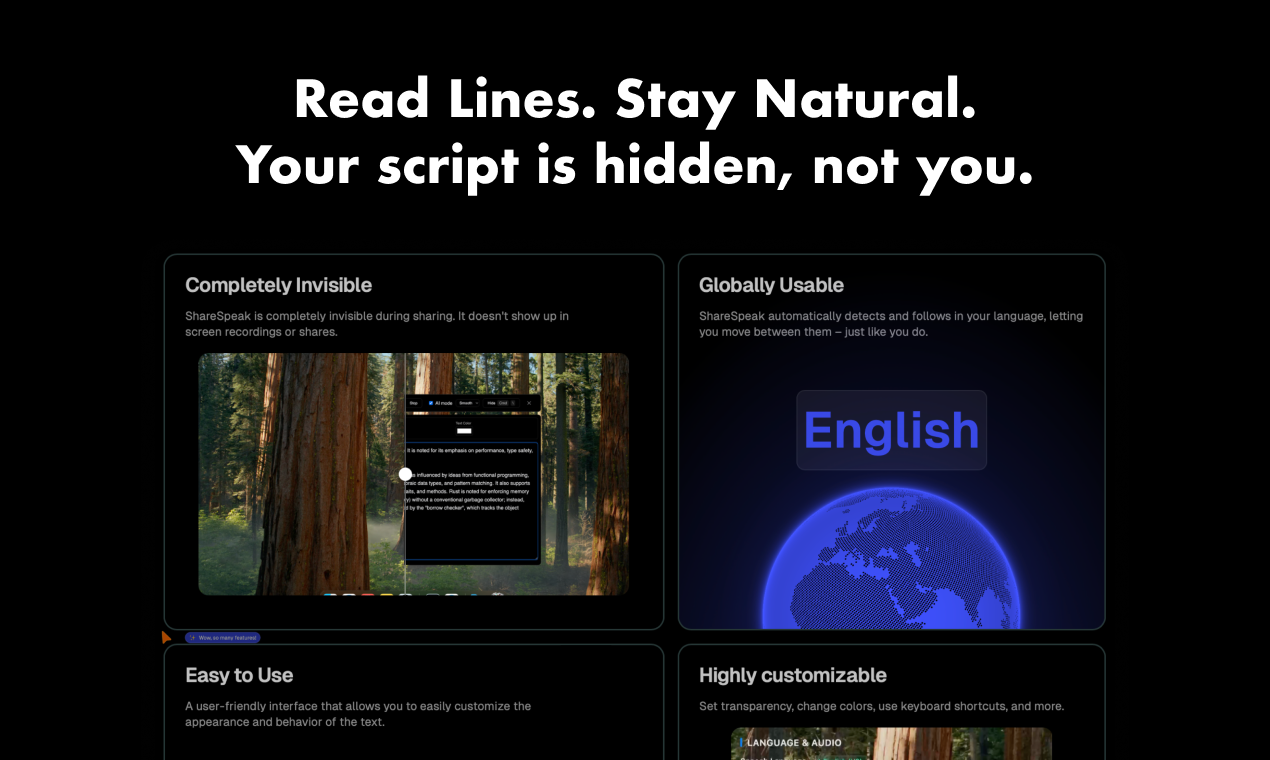
ShareSpeak is a desktop teleprompter built around one idea: the script should be visible to the presenter and to nobody else. The app runs on Mac and Windows and stays hidden from screen shares and screen recordings, so a viewer watching a demo, a sales call or a tutorial never sees the text panel sitting behind the browser. Scrolling is voice driven, meaning the script advances as the presenter speaks, with manual control available when a slower or faster pace is needed. That combination removes the usual filler sounds and the awkward pauses that come from hunting for a place in a written script. On MacBooks the app can sit inside the notch bar, which places the text directly beside the camera and keeps gaze close to the lens. The window is fully resizable and remembers its size, and transparency, colors and keyboard shortcuts can all be adjusted. Scripts are stored in a library, one per call, account or video, with a live word count and speaking-time estimate shown while writing; pressing play loads the script into the teleprompter. Speech recognition can run through Gemini, Whisper or Apple Speech Recognition, and local offline models are available so no audio has to leave the machine and no API key is required. The product is aimed at people who appear on camera under their own name: screencasters, workshop hosts, sales teams running recurring calls, online teachers and course creators. It is a single-purpose utility rather than a recording studio, so it handles the reading and pacing problem and leaves capture and editing to whatever tools the user already runs. The pricing model is deliberately simple: a one-time payment for lifetime access rather than a subscription, with a 21-day refund window and a license that floats between two devices. A separate mobile version exists for iPhone, and the Windows audience gets a comparison page against other teleprompter apps. Anyone weighing it against free browser teleprompters should note that invisibility during sharing and local speech models are the two features that carry most of the price.

How do you use ShareSpeak?

  1. 1Download and install the desktop app
    Get the Mac or Windows build from the download page and install it. Windows users can check the comparison page first to see how it stacks up against other teleprompter apps.
  2. 2Write or paste your script
    Add a script to the library, one entry per call, account or video. The editor shows a live word count and an estimate of how long the script takes to speak.
  3. 3Pick a speech recognition model
    Select Gemini, Whisper or Apple Speech Recognition for voice tracking, or switch to a local offline model if the script should never leave the machine.
  4. 4Place and style the teleprompter window
    Drag the window to the size you want and enable notch bar mode on a MacBook to keep text near the camera. Adjust transparency, colors and keyboard shortcuts to taste.
  5. 5Test invisibility before going live
    Start a screen share or a local recording and confirm the panel does not appear in the captured feed. Do this once per conferencing or capture tool you rely on.
  6. 6Load the script and present
    Press play to send the script into the teleprompter, then speak normally. Scrolling follows your voice, and manual controls are there when you need to slow down or jump back.

Pros and cons

Pros

  • Script panel stays hidden from screen shares and recordings, so viewers never see the textAI
  • Voice-driven scrolling follows natural speech, with manual override when pacing needs to changeAI
  • Choice of Gemini, Whisper or Apple speech recognition, plus offline local models that need no API keyAI
  • One-time payment with lifetime updates and a license that floats between two devicesAI
  • Scripts library with live word count and speaking-time estimates keeps recurring calls and videos organizedAI

Cons

  • Mac and Windows only, with the notch bar feature limited to MacBooks that actually have a notchAI
  • No free tier is advertised, so the 21-day refund is the only way to test without payingAI
  • Cannot record or edit video itself, so it depends on separate capture softwareAI
  • Invisibility applies to the app window, and it is not stated whether it survives every capture method and conferencing toolAI
  • Mobile support is a separate App Store app rather than the same desktop experienceAI

How much does ShareSpeak cost?

Pricing

One-time payment, no subscription. Listed price is $14.99 for lifetime access, with early tiers of $12.50 for the first 400 users and $14.99 for the first 1,000, rising to $17.99 afterwards. Lifetime updates, all features and two devices per floating license are included, plus a 21-day refund policy.

Learn more

Support

Support is reached by email according to the FAQ section on the homepage, and a public feedback board at sharespeak.userjot.com accepts feature requests and product ideas.

Features

Voice-activated scrolling with manual speed control, a window that stays invisible during screen sharing and recording, MacBook notch bar mode in beta, adjustable size and remembered window dimensions, transparency and color options, keyboard shortcuts, automatic language following, a script library with live word count and speaking-time estimates, and a choice of Gemini, Whisper or Apple speech models including offline local ones.

Frequently asked questions about ShareSpeak

  • How much does ShareSpeak cost?
    One-time payment, no subscription. Listed price is $14.99 for lifetime access, with early tiers of $12.50 for the first 400 users and $14.99 for the first 1,000, rising to $17.99 afterwards. Lifetime updates, all features and two devices per floating license are included, plus a 21-day refund policy.
  • How do you use ShareSpeak?
    The walkthrough on this page covers 6 steps: 1. Download and install the desktop app 2. Write or paste your script 3. Pick a speech recognition model 4. Place and style the teleprompter window 5. Test invisibility before going live 6. Load the script and present.
  • What platforms does ShareSpeak support?
    ShareSpeak is available on MacOS, Windows and iOS.
  • What are the limitations of ShareSpeak?
    Mac and Windows only, with the notch bar feature limited to MacBooks that actually have a notch. No free tier is advertised, so the 21-day refund is the only way to test without paying. Cannot record or edit video itself, so it depends on separate capture software.

Status

StatusActive
Views0
Outbound clicks0
Added10/21/2026

Platforms

MacOSWindowsiOS

Pricing

Paid