Free trial
A 15-day free trial is offered, and no transaction limit is mentioned, so trial usage is not capped by volume.
Learn moreBudgeting that syncs from bank email alerts, not your bank login
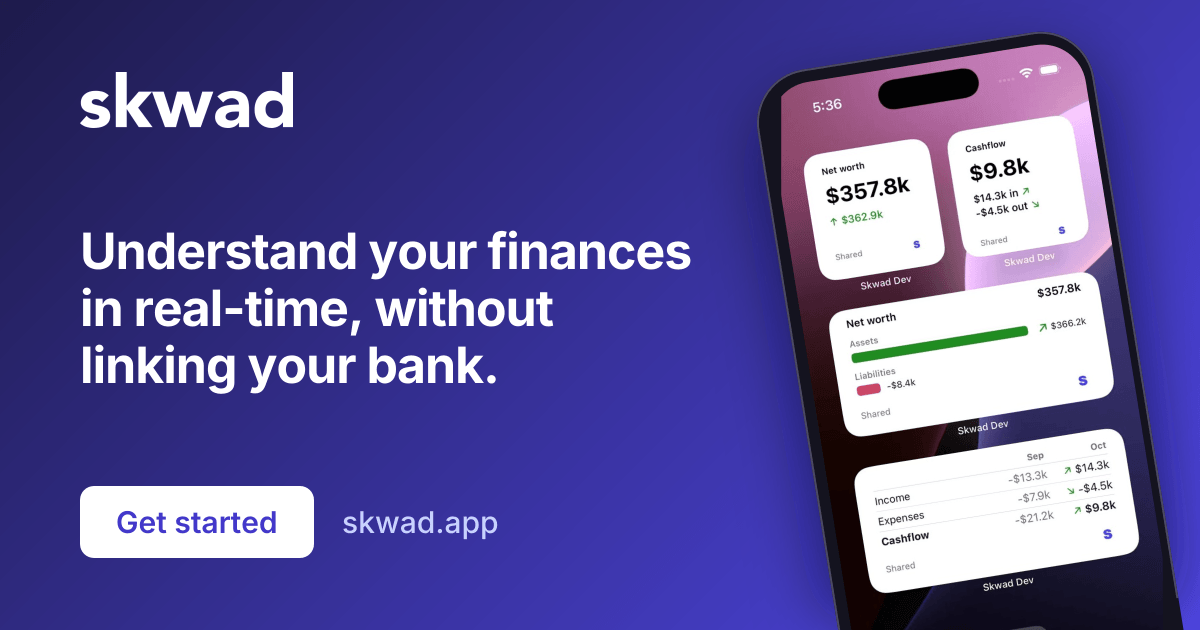
Skwad is a proactive AI assistant tool. A privacy-first budgeting app that builds your transaction history from your bank's email alerts instead of shared banking credentials, with optional bank linking, envelope budgeting, subscription monitoring, and a free companion seat for couples.
Skwad is a personal budgeting app built around a privacy-first idea: your bank already emails you when money moves, so Skwad reads those alerts instead of asking for your banking credentials. After signing up, each user gets a unique Skwad scan email address. Forward your bank's transaction and balance alerts to it (or log in with Gmail and set up forwarding rules), and Skwad parses the messages into real-time transactions. No banking portal access is shared with any third party on this path, and there are no passwords or two-factor prompts to redo. For people who would rather have history populate immediately, Skwad also offers optional bank linking through a partner, covering a stated 11,000+ institutions across the US and Canada and backfilling three to six months of pending and posted transactions, including investment accounts. The two methods can be mixed: email scans for instant tracking, linking for the gaps. Old data comes in through CSV, Excel, OFX, or QIF uploads, including Mint exports, and bank statement PDFs can be converted to Excel. The budgeting model is zero-based envelope budgeting, with targets, rollovers, custom paycheck cycles (bi-weekly, monthly, irregular), line item splits across envelopes, and multi-currency conversion at the transaction, account, or workspace level. Skwad scans transactions for repeating charges, flags price changes and new subscriptions, and sends push and email recaps. Custom reporting tools cover cashflow, category trends, and merchant breakdowns. Every plan includes a free companion seat with separate logins and customized views, which suits couples and shared households. Skwad positions itself as a lower-cost alternative to YNAB, Monarch, and Copilot, and publishes head-to-head comparisons against those and Mint. It is strongest for budgeters who dislike handing bank credentials to aggregators, for Canadian users, and for anyone who wants spreadsheet-like control without abandoning a proper app.
A 15-day free trial is offered, and no transaction limit is mentioned, so trial usage is not capped by volume.
Learn moreSkwad sells subscription plans, with separate DIY (email scans) and Link (bank linking) options. The site says pricing runs at roughly half the cost of YNAB, Monarch, and Copilot, and that the sign-up rate is kept for life with no renewal surprises. A promo code for 30 percent off the first year is advertised on the homepage.
Learn moreSyncs through bank email alerts from any provider, Gmail login and forwarding, optional bank linking covering 11,000+ US and Canadian institutions, plus CSV, Excel, OFX, and QIF imports.
Learn moreEnvelope budgeting with rollovers and targets, custom paycheck cycles, line item splits, multi-currency conversion, subscription and price-change alerts, spending recaps, receipt scanning, bank statement PDF to Excel conversion, custom reporting, and a free companion seat.
Learn more AI Angels400+ customizable AI girlfriends for NSFW chat, voice calls, and roleplay
 Candy AIExperience the future of companionship with AI friends who chat, role-play, and connect with you on a human level.
 ourdream.aiA vast AI roleplay platform with millions of characters for chat, images, video and voiceAI Angels400+ customizable AI girlfriends for NSFW chat, voice calls, and roleplayCandy AIExperience the future of companionship with AI friends who chat, role-play, and connect with you on a human level.ourdream.aiA vast AI roleplay platform with millions of characters for chat, images, video and voice





%20(1).webp)

