Free trial
A free account is offered with limited access to the presentation making tools, so the generator and builder can be tried before paying.
Learn moreDescribe a topic, get a seven-slide deck, then track who reads it.
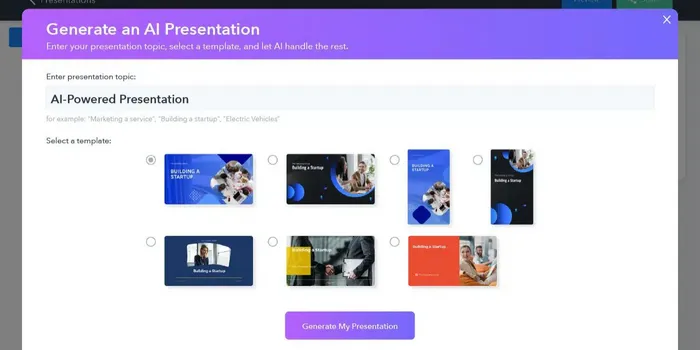
Slidecast generates a seven slide AI presentation from a topic prompt, adds optional AI voiceover in one of 35 voices, and formats slides automatically. Decks are editable in a drag and drop builder, shareable by link, email, text or QR code, and tracked with view duration, location and completion analytics.
Slidecast is a browser based presentation tool that pairs an AI deck generator with a drag and drop editor and a distribution layer built around sharing and measurement. You describe a topic, and the system returns a seven slide presentation with both slide copy and design elements already in place. From there the deck behaves like any other Slidecast project: editable, importable and shareable. The AI work goes beyond the first draft. Slide formatting runs automatically so slide layouts do not need manual attention. An audio feature turns a slide script into a voiceover, with 35 voices to pick from, which suits pre-recorded decks that get sent rather than presented live. After generation you can rework anything in the builder, pull from a library of 110k+ templates and a million plus photos, or import your own images, videos, GIFs, forms and existing PowerPoint files. The part that separates Slidecast from a plain AI deck generator is what happens after export. Presentations open on any device without logins or downloads, and can be delivered by URL, email, text message or a generated QR code. Slidecast then reports on engagement: viewing duration, geographic location, QR scans and completion rates. Teams can wire those signals into marketing campaigns and sync analytics to a CRM, and automated workflows can personalize outreach based on how far a prospect got. That makes the product a fit for sales and marketing teams sending pitch decks into the world, plus educators and internal teams that want collaboration closer to a shared document than to a desktop file. Anyone needing a fast draft will find the generator useful; anyone needing to know whether the deck was actually read is the core audience. Buyers who only want offline files for a conference room may find the analytics layer superfluous, since the value sits in tracked, link based delivery. A free account unlocks limited access to the toolset. Paid plans begin at $15 per month.
A free account is offered with limited access to the presentation making tools, so the generator and builder can be tried before paying.
Learn moreA free account exists with limited access to the presentation tools. Paid accounts with fuller access start at $15 per month, and the site points to its pricing page for the complete set of options.
Learn moreThe site mentions CRM integrations for syncing presentation analytics and connecting Slidecast to marketing campaigns, plus PowerPoint import. No named CRM vendors are listed on the page.
Topic to deck generation producing seven slides with text and design, automated slide formatting, AI voiceover in 35 voices, a drag and drop builder, 110k+ templates and a million plus photo library, PowerPoint and media import, sharing by URL, email, text and QR code, and analytics on view duration, location, scans and completion rates.
 AI Angels400+ customizable AI girlfriends for NSFW chat, voice calls, and roleplay
 Candy AIExperience the future of companionship with AI friends who chat, role-play, and connect with you on a human level.
 ourdream.aiA vast AI roleplay platform with millions of characters for chat, images, video and voiceAI Angels400+ customizable AI girlfriends for NSFW chat, voice calls, and roleplayCandy AIExperience the future of companionship with AI friends who chat, role-play, and connect with you on a human level.ourdream.aiA vast AI roleplay platform with millions of characters for chat, images, video and voice