StoryIntoVideo

Turns stories into narrated, animated video series with a consistent cast

Beginner
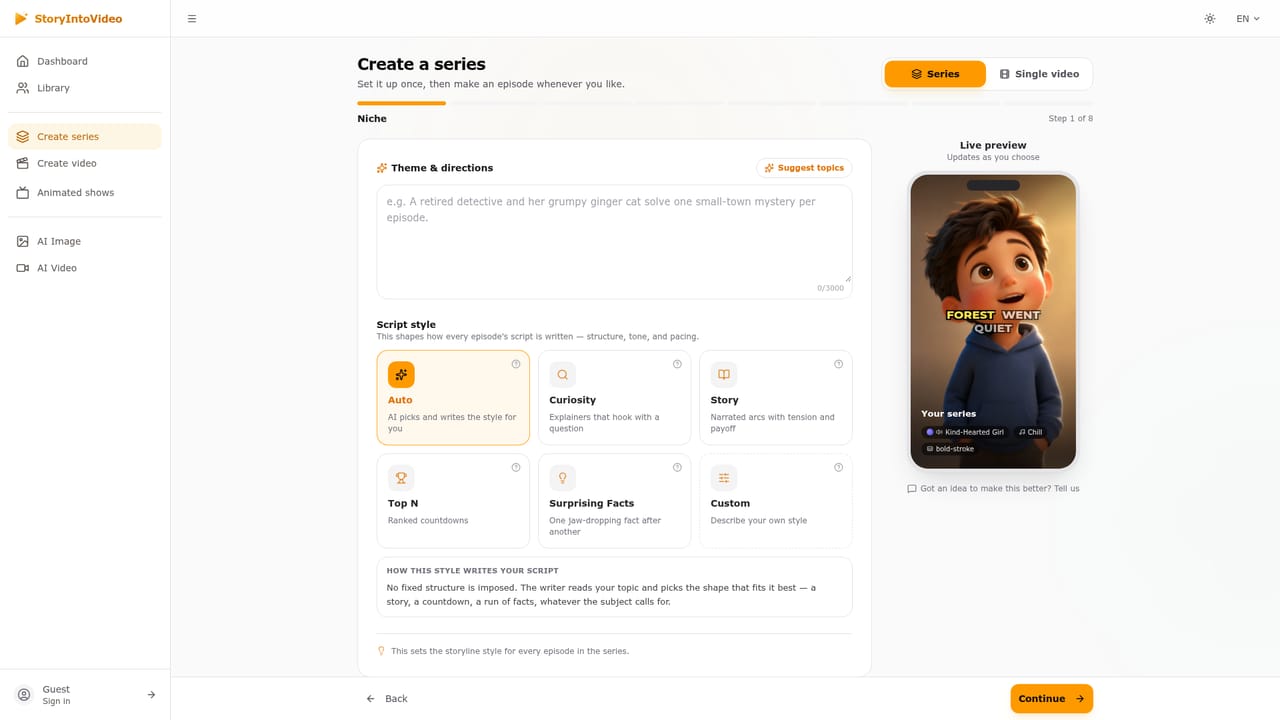
Screenshot of StoryIntoVideo, Turns stories into narrated, animated video series with a consistent cast

What is StoryIntoVideo?

StoryIntoVideo is a storytelling tool that turns stories into narrated, animated video series with a consistent cast. StoryIntoVideo turns a pasted story or one-line idea into narrated, captioned animated videos and multi-episode series, with a free editable script step and consistent characters across shots and episodes.

StoryIntoVideo converts written stories into narrated short videos and keeps them going as episodic series. A user pastes a finished story or types a one-line idea, in any language, and the service drafts a script, designs the characters, and produces shots with voiceover and captions. The pitch is continuity: each character gets a portrait at the script stage, every shot is drawn from it, and later episodes start with the same cast and the same visual style already in place. The workflow is built around review before spending. The script is written first and can be read, edited line by line or sent back for a rewrite without using any credits. Credits are only consumed when the video itself is generated, and the cost is shown before confirmation. Users choose between a series and a single video, pick from 15 art styles (including Pixar-like 3D, Disney, Ghibli, anime, comic, Lego, pixel art and photoreal) or describe their own, and select a narrator from a library of 670 voices across 40 languages, each with a playable sample. Caption styles and music are chosen in the same stage. After generation, an editor lets users redraw a single shot, rewrite a line, animate a key moment, swap music or restyle captions, and only the changed shots are regenerated. Finished episodes can be downloaded and posted manually, since nothing is published or scheduled automatically. The audience is wide but specific: web novel and fiction authors turning chapters into episodes, faceless channel owners running story series on short-form platforms, filmmakers producing narrated animatics for pitching or previs, brand storytellers, and teachers adapting history or literature. Compared with general text-to-video generators, which focus on isolated clips, StoryIntoVideo is closer to a story-to-episode pipeline, trading open-ended cinematic control for script-led structure, character consistency and a predictable credit model. Anyone needing long-form live-action footage or fine camera direction will find it narrower than a full video editor.
How do you use StoryIntoVideo?

  1. 1Open the create page
    Go to the creator and choose between a series or a single video. Type a one-line idea or paste an existing story in any language.
    StoryIntoVideo — Open the create page
  2. 2Pick an art style and cast
    Select one of the 15 art styles or describe your own, then choose your characters. The style stays fixed for the whole series once the first episode is made.
  3. 3Review the free script
    Read the generated script, edit any line or request a rewrite. This stage costs no credits, so it is the place to refine the story and set narrator, music and captions.
  4. 4Generate the video
    Confirm the credit cost shown and make the video. Shots are drawn from the character portraits created at the script stage.
  5. 5Fine-tune in the editor
    Redraw a shot, rewrite a line, animate a key moment or restyle captions. Only the shots you change are regenerated.
  6. 6Download and start the next episode
    Download the finished episode and post it yourself, then begin the next one with the same cast and look.

Pros and cons

Pros

  • Script is written and editable before any credits are spent, so ideas can be tested at no costAI
  • Character portraits keep the same faces across every shot and later episodesAI
  • 15 art styles plus custom style descriptions, locked in across a whole seriesAI
  • Shot-level editor regenerates only the shots that were changedAI
  • Large narration library of 670 voices in 40 languages with playable samplesAI

Cons

  • Credits are consumed per generated shot, and the homepage gives no plan prices, making costs hard to estimate upfrontAI
  • Output is stylized animation or illustrated scenes, not suited to long-form live-action footageAI
  • Nothing posts automatically, so publishing to TikTok or YouTube is a manual download-and-upload stepAI
  • Series style is locked after the first episode, limiting later visual experimentationAI
  • Oriented to short episodes, so feature-length storytelling is not a clear fitAI

How much does StoryIntoVideo cost?

Free trial

Script generation, reading, editing and rewriting cost no credits, so a story can be drafted before any spending. A free video allowance is not stated.

Learn more

Pricing

Credits pay for the video itself, shot by shot, and the cost is shown before confirming. Writing and editing the script is free. Specific plan prices are not stated on the homepage.

Learn more

Features

Script-first workflow, character portraits for consistency, episodes that continue the story, 15 art styles or custom, 670 voices in 40 languages, word-by-word captions, music, and a shot-level editor with redraw and animate options.

Frequently asked questions about StoryIntoVideo

  • How much does StoryIntoVideo cost?
    Credits pay for the video itself, shot by shot, and the cost is shown before confirming. Writing and editing the script is free. Specific plan prices are not stated on the homepage.
  • Does StoryIntoVideo offer a free trial?
    Script generation, reading, editing and rewriting cost no credits, so a story can be drafted before any spending. A free video allowance is not stated.
  • How do you use StoryIntoVideo?
    The walkthrough on this page covers 6 steps: 1. Open the create page 2. Pick an art style and cast 3. Review the free script 4. Generate the video 5. Fine-tune in the editor 6. Download and start the next episode.
  • What platforms does StoryIntoVideo support?
    StoryIntoVideo is available on Web App.
  • What are the limitations of StoryIntoVideo?
    Credits are consumed per generated shot, and the homepage gives no plan prices, making costs hard to estimate upfront. Output is stylized animation or illustrated scenes, not suited to long-form live-action footage. Nothing posts automatically, so publishing to TikTok or YouTube is a manual download-and-upload step.

Status

StatusActive
Views0
Outbound clicks0
Added10/18/2026

Platforms

Web App

Pricing

Freemium