Studioify

AI photo editor that makes phone snaps resale-ready for Depop and Vinted

Beginner
Screenshot of Studioify, AI photo editor that makes phone snaps resale-ready for Depop and Vinted

What is Studioify?

Studioify is a web-based AI photo editor for secondhand clothing sellers. It cleans backgrounds, fixes lighting and can add AI models to phone photos, producing consistent listing images for Depop, Vinted, Poshmark and similar marketplaces without prompts.

Studioify is a browser-based AI photo editor aimed at people who sell secondhand clothing on resale marketplaces. It takes the ordinary phone photos sellers already have and turns them into cleaner, more uniform listing images: the background is tidied, the lighting is adjusted and the output is sized for the platform in use. The site names Depop, Vinted, Poshmark and Carousell as its main targets and also mentions Mercari and eBay in its FAQ. The workflow is deliberately narrow. A seller uploads a photo, says what kind of item it is (tops, dresses, shoes or accessories), chooses a display style such as flat-lay, hanging or on-model, and picks a background that suits the shop's look. The tool then generates images ready to download. No prompt writing is involved, which separates it from general-purpose image generators that need careful instructions before they produce usable product shots. An AI model option creates on-body images from flat-lay or hanging photos, so buyers can picture fit and style without a photoshoot. Beyond single edits, Studioify pitches consistency across a whole profile. Unified backgrounds and styling are meant to make a closet read like a small brand, and the site describes cover images for Depop and image packs with several angles and detail shots for Vinted and Poshmark. The company says the edits only improve photo quality and background consistency while the real item stays visible, and it claims this complies with major marketplace guidelines. Sellers should still check each platform's current policy, particularly for generated model images. Among alternatives, Studioify sits between generic background removers and broad AI image suites. It trades flexibility for speed and relevance to fashion resale. Sellers who list many items every week and want a repeatable look are the clear audience, while anyone needing other product categories or fine manual retouching will find the scope limited. The homepage copy does not state pricing or plan limits.
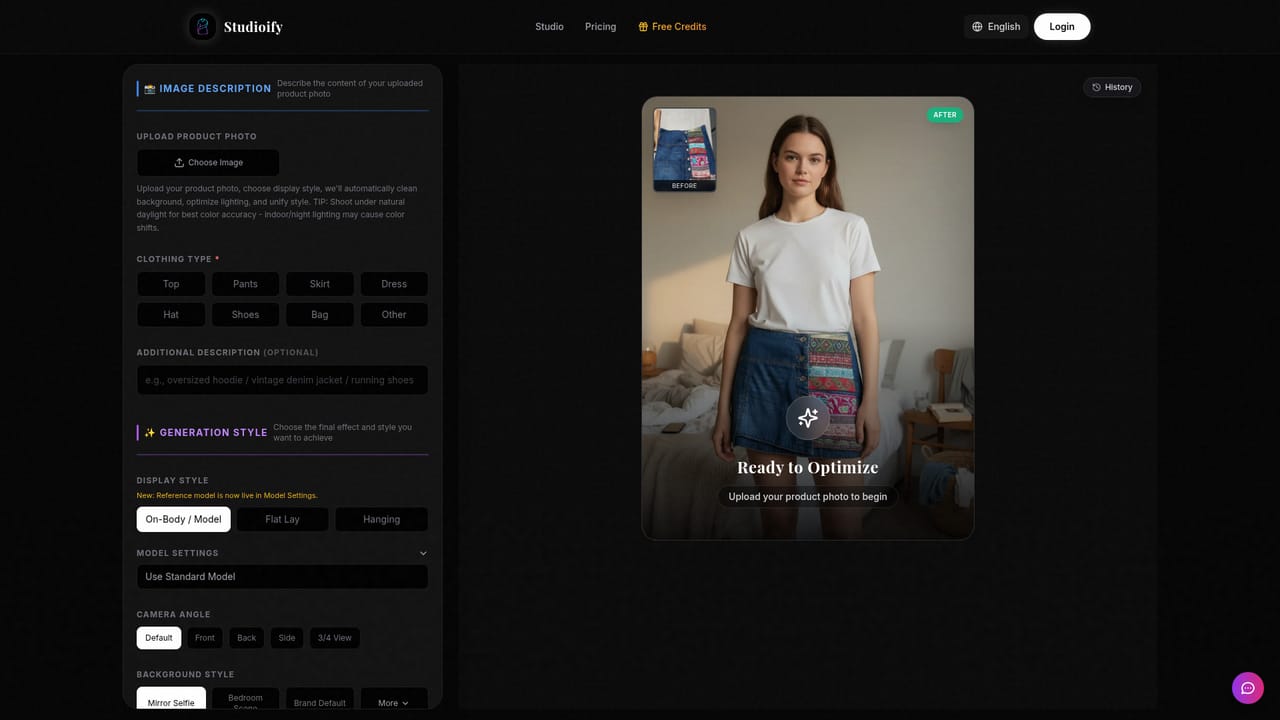
How do you use Studioify?

  1. 1Open the studio
    Go to the Studioify studio page from the homepage and start with the try-free option. Have a few phone photos of your items ready.
    Studioify — Open the studio
  2. 2Upload a photo and pick the item type
    Add your product photo and tell Studioify whether it is a top, dress, shoes or an accessory so the edit suits the item.
  3. 3Choose display style and background
    Select flat-lay, hanging or on-model display, then choose a clean background that matches the look of your shop.
  4. 4Generate and review the result
    Let the AI clean the background and balance the lighting. Check that the garment still looks true to the real item before using it.
  5. 5Download and upload to your marketplace
    Save the images in your chosen size and add them to your Depop, Vinted or Poshmark listing, keeping the same style across items.

Pros and cons

Pros

  • Built around secondhand fashion listings, so choices map to how resale sellers actually shoot and listAI
  • No prompt writing: upload, pick a style and background, then downloadAI
  • Works on existing phone photos, so no reshoot or studio setup is requiredAI
  • Optional AI model visualization shows clothing on a body from flat-lay or hanging shotsAI
  • Aims for a consistent look across a whole closet, which helps a profile look cohesiveAI

Cons

  • Focused on clothing and accessories, so sellers of other product types get little evidence of fitAI
  • Homepage gives no pricing or free usage limits, making cost hard to judge before signing upAI
  • Claims of 2-3x more clicks and saves are stated without any supporting data or methodologyAI
  • AI-generated model shots may sit uneasily with some marketplace rules or buyer expectations of the real itemAI
  • No stated API, bulk integrations or marketplace publishing, so images must be downloaded and uploaded manuallyAI

How much does Studioify cost?

Free trial

The homepage invites sellers to try Studioify free from the studio page, but does not state what is included or any usage limits.

Learn more

Features

Background cleaning, lighting optimization and cropping for clothing photos, with flat-lay, hanging and on-model display styles. AI model visualization creates on-body shots, and platform-sized image packs cover Depop, Vinted, Poshmark, Mercari and eBay.

Frequently asked questions about Studioify

  • Does Studioify offer a free trial?
    The homepage invites sellers to try Studioify free from the studio page, but does not state what is included or any usage limits.
  • How do you use Studioify?
    The walkthrough on this page covers 5 steps: 1. Open the studio 2. Upload a photo and pick the item type 3. Choose display style and background 4. Generate and review the result 5. Download and upload to your marketplace.
  • What platforms does Studioify support?
    Studioify is available on Web App.
  • What are the limitations of Studioify?
    Focused on clothing and accessories, so sellers of other product types get little evidence of fit. Homepage gives no pricing or free usage limits, making cost hard to judge before signing up. Claims of 2-3x more clicks and saves are stated without any supporting data or methodology.

Status

StatusActive
Views0
Outbound clicks0
Added10/18/2026

Platforms

Web App

Pricing

Free Trial