Free trial
The homepage invites visitors to get started for free and its FAQ asks whether the tool can be used at no cost, but no trial length or free plan allowances are stated.
Learn moreAI video ads for ecommerce sellers and creators
Own TemVideo AI Video Ad Maker? Verify ownership to get a dofollow link
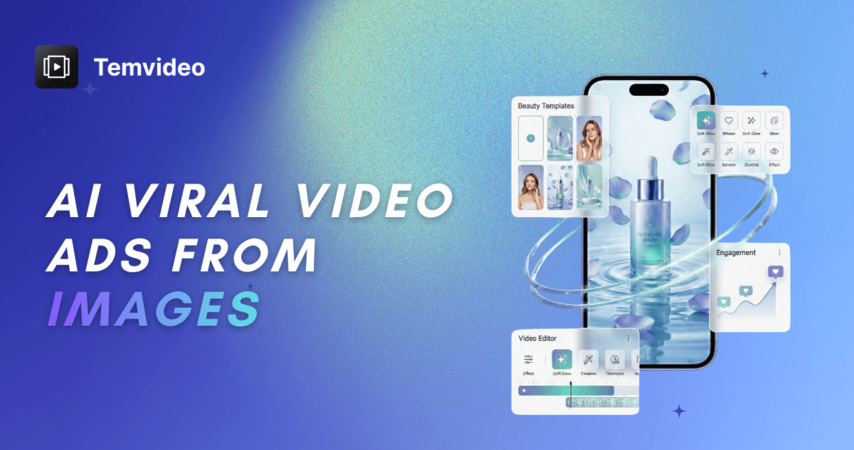
TemVideo AI Video Ad Maker is a make reels AI tool. TemVideo turns scripts, product photos and existing clips into short vertical video ads for TikTok, Instagram, YouTube and Amazon, combining a video remaker, script to video generation, template based auto editing and industry specific templates for tech, fashion, beauty, health, drama and retail.
TemVideo is an AI video production platform aimed squarely at ecommerce sellers and social content creators. The pitch is straightforward: bring a script, a product shot, or an existing clip, and the system assembles a finished vertical video for TikTok, Instagram, YouTube or Amazon. The homepage frames the workflow around one starting point, the words or assets you already have, and promises that scene planning, character work, visuals and the edit are handled automatically. A sample project shown on the page ran to 12 scenes in a 9:16 format with a consistent character across shots. The toolset splits into four distinct entry points. AI Video Remaker takes an uploaded video plus a reference image and swaps the person, pet or product while keeping the original motion, framing and pacing, which suits creators chasing proven viral formats. AI Script to Video generates characters, props, a storyboard and each shot from text, with replaceable assets so a character stays recognizable between scenes. AI Video Short is positioned as the budget option for quick clips built on third party video models. The Video Editing Agent instead works from your own footage, applying polished templates automatically, which is the most useful mode for beginners who already have raw product video. Industry templates carry much of the practical value. The homepage lists ready made flows for 3C tech (feature callouts and voiceover selection), fashion (beat synced music, titles and subtitles), health (a virtual presenter delivering an explainer), beauty (360 degree product showcase from still images), drama (subtitle removal, translation, voiceover and lip sync for international distribution) and retail (dynamic showcase videos from product photos). Enterprise customers can request custom templates matched to brand guidelines. Compared with general purpose text to video tools, TemVideo leans on preset, commerce oriented workflows and multi model clip generation rather than open ended creative control. It sits between a template driven ad builder and a UGC style video studio. Buyers should verify output quality, watermarking and export options before committing, since those details are not spelled out on the homepage.
The homepage invites visitors to get started for free and its FAQ asks whether the tool can be used at no cost, but no trial length or free plan allowances are stated.
Learn moreFour core modes: AI Video Remaker that swaps people, pets or products into an existing clip while keeping motion and pacing; AI Script to Video that builds characters, props, a storyboard and shots from text; AI Video Short for faster, cheaper clips from leading video models; and a Video Editing Agent that auto edits uploaded footage. Industry templates cover 3C tech, fashion, health, beauty, drama and retail, with custom brand templates for enterprise.
 AI Angels400+ customizable AI girlfriends for NSFW chat, voice calls, and roleplay
 Candy AIExperience the future of companionship with AI friends who chat, role-play, and connect with you on a human level.
 ourdream.aiA vast AI roleplay platform with millions of characters for chat, images, video and voiceAI Angels400+ customizable AI girlfriends for NSFW chat, voice calls, and roleplayCandy AIExperience the future of companionship with AI friends who chat, role-play, and connect with you on a human level.ourdream.aiA vast AI roleplay platform with millions of characters for chat, images, video and voice