Free trial
A free allowance of 15 replies is offered with no credit card required, which is a sample rather than a time-limited trial of a paid plan.
Learn moreAI reply co-pilot for LinkedIn and X engagement
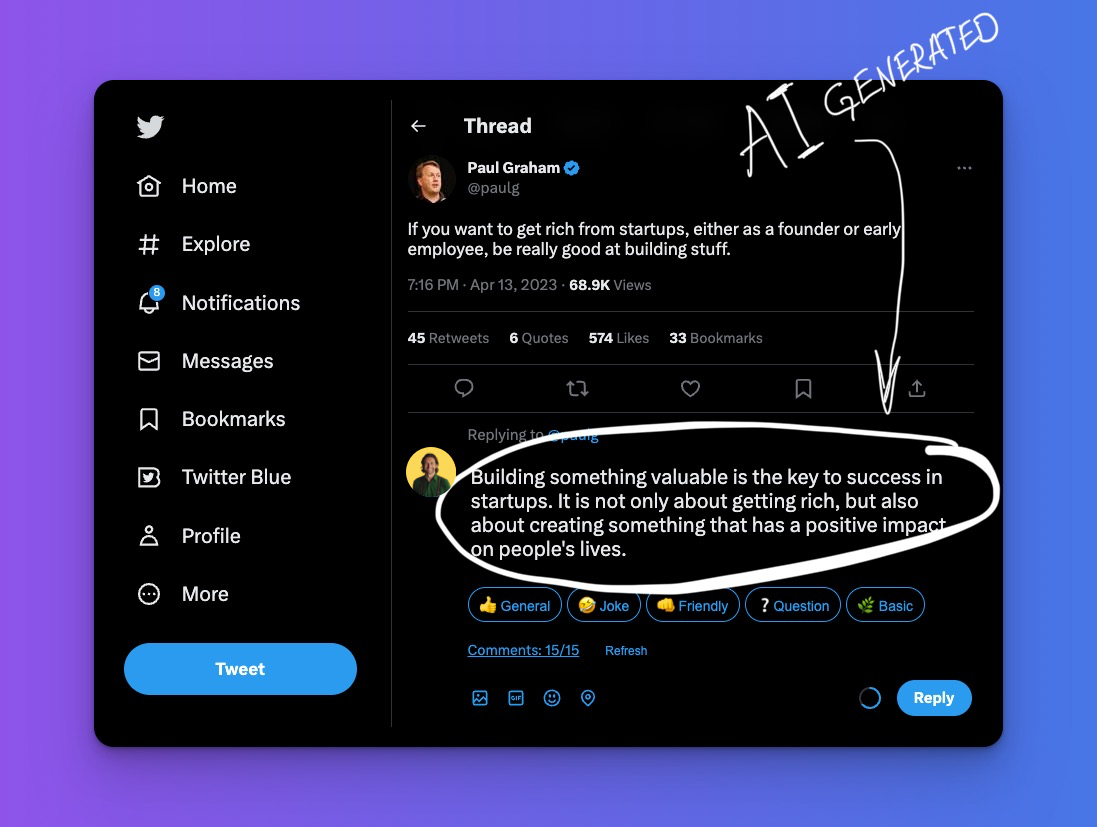
Tribeforce generates LinkedIn and X comments from proven templates, aiming to speed up executive engagement and grow followers. It runs inside the social platforms, lets users tune voice and tone, and sells monthly reply quotas from 100 to 2,000, with a free 15-reply trial.
Tribeforce is a writing assistant built for one narrow job: producing comments and replies on LinkedIn and X (formerly Twitter) quickly, in a voice that sounds like the account holder rather than a generic bot. It positions itself as a co-pilot for founders, CEOs and executives who want a visible thought leadership presence but cannot spend hours each day scrolling feeds and drafting responses. Virtual assistants managing social accounts for those executives are a second explicit audience. The workflow is deliberately lightweight. The product runs inside the LinkedIn and Twitter interfaces, so engagement happens where the posts already are rather than in a separate dashboard. When a user finds a post worth answering, Tribeforce generates a comment based on a library of proven templates, and the user can customize the output to match brand voice and preferred tone. The company claims this makes replying up to 10 times faster than writing manually, with the practical benefit being more conversations started per day and a wider network over time. Because replies are the only output, the tool does not cover original posts, scheduling, analytics or inbox management. Pricing is structured around reply volume. The Padawan tier allows 100 replies per month, Jedi allows 500, and Darth Vader allows 2,000 with priority support. Annual billing is advertised as two months free, and every tier covers both LinkedIn and Twitter with access to all templates. A free allowance of 15 replies with no credit card is offered as a trial, which is enough to judge output quality before committing. Among social selling and AI writing tools, Tribeforce sits at the engagement end of the spectrum rather than the content creation end. It competes less with long-form post generators and more with manual commenting or generic AI chat windows, where the advantage is speed and template consistency and the tradeoff is a narrower feature set. Buyers should treat it as a supplement to a real point of view, not a replacement for one.
A free allowance of 15 replies is offered with no credit card required, which is a sample rather than a time-limited trial of a paid plan.
Learn moreThree monthly tiers priced by reply volume: Padawan at 100 replies for $39 per month ($33 annually), Jedi at 500 replies for $79 ($66 annually), and Darth Vader at 2,000 replies for $199 ($165 annually) with priority support. All tiers include LinkedIn and Twitter plus every template. Annual billing is advertised as two months free.
Learn morePriority support is listed only on the top Darth Vader tier. No help centre, documentation or contact channel details are provided on the homepage.
AI comment generation from proven templates, customization for voice and tone, and operation inside the LinkedIn and Twitter interfaces. The vendor claims replies are produced up to 10 times faster than manual writing, with the goal of higher engagement and follower growth. Original posts, scheduling, analytics and inbox features are not described.
 AI Angels400+ customizable AI girlfriends for NSFW chat, voice calls, and roleplay
 Candy AIExperience the future of companionship with AI friends who chat, role-play, and connect with you on a human level.
 ourdream.aiA vast AI roleplay platform with millions of characters for chat, images, video and voiceAI Angels400+ customizable AI girlfriends for NSFW chat, voice calls, and roleplayCandy AIExperience the future of companionship with AI friends who chat, role-play, and connect with you on a human level.ourdream.aiA vast AI roleplay platform with millions of characters for chat, images, video and voice