Support
Contact is handled through a dedicated contact page on the site. No help centre, documentation portal or live chat is referenced on the homepage.
Learn moreA browser-based AI toolbox for cleaner, more human writing.
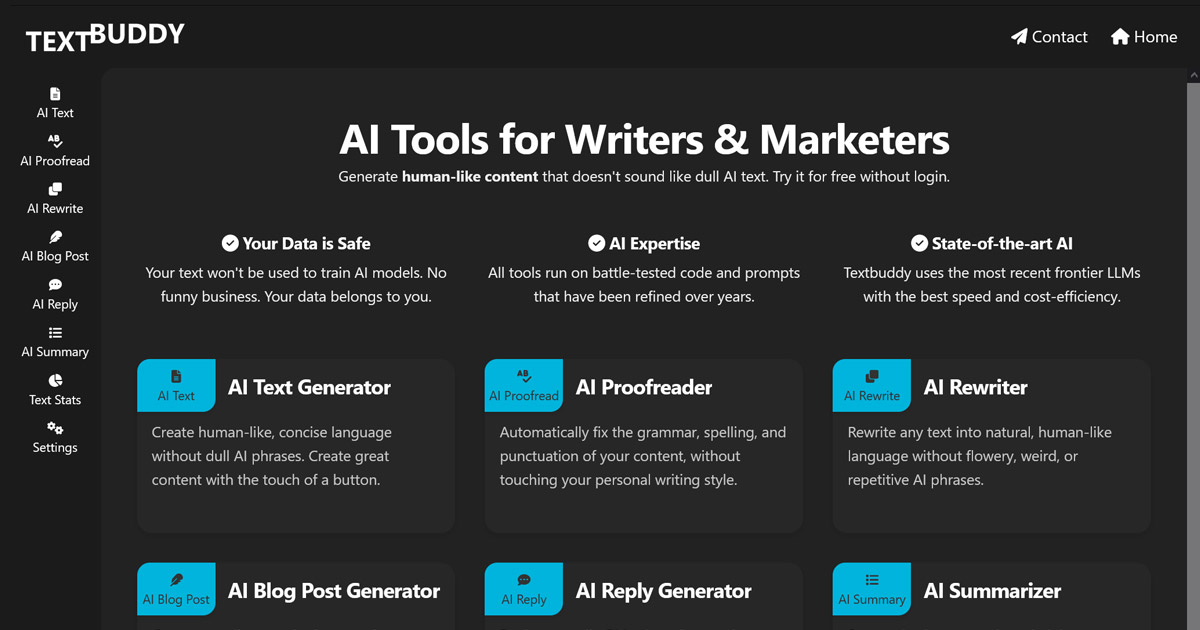
Textbuddy is an AI humanizer tool. Textbuddy bundles around a dozen focused AI writing utilities (proofreader, rewriter, humanizer, summarizer, translator, social post and hook generators, text stats and more) into one free-to-use web toolbox. A sensible pick for writers and marketers who want fast grammar and clarity passes without a heavy editor subscription.
Textbuddy is a web-based collection of small AI utilities aimed at people who write for a living or write often: bloggers, marketers, copywriters, social media managers, students and anyone who needs a draft cleaned up fast. Rather than one monolithic chatbot, it presents a menu of focused tools, each built for a single job. The lineup covers text generation, blog post generation, rewriting, proofreading, social media posts, hooks, replies, summarization, content ideas, translation across more than 50 languages, source code generation, text comparison and statistics. A separate Classic editor combines a plain language editor with flaw highlighting, stats, synonym suggestions and sentence rewriting. The grammar and proofreading angle is the strongest part of the offer. The AI Proofreader is positioned to fix grammar, spelling and punctuation without flattening the writer's personal style, which is the usual failure mode of aggressive correction tools. Text Clarity checks readability and AI scores and returns tips, the AI Text Rating tool scores writing style out of 10 with reasoning, and the AI Humanizer targets the telltale AI patterns that detectors like ZeroGPT, Grammarly or AIscan24 flag. Text Statistics counts words, sentences, paragraphs and pages, and surfaces repeated words and repetitive sentence starters, which is useful for editing your own drafts rather than relying on a model to guess. In practice the workflow is tool by tool. You paste or type text into a single-purpose page, pick options, and get output back in the same window. There is no login wall on the homepage promise, and tools can be used for free, which makes it easy to test several utilities before committing. The site states that text is not used to train AI models, that it is fully GDPR compliant and that processing runs on EU servers, claims that matter to agencies and European teams handling client material. Models are described as frontier LLMs chosen for speed and cost efficiency. The honest positioning is that Textbuddy is a utility belt, not a full document suite. It suits freelancers and small content teams who want quick grammar, rewrite and humanize passes between drafting and publishing, and who would rather not pay for a heavyweight editor. Writers expecting long-form project management, team libraries or deep style guides will find the scope narrower, and anyone needing native desktop or mobile apps will have to work through the browser.
Contact is handled through a dedicated contact page on the site. No help centre, documentation portal or live chat is referenced on the homepage.
Learn moreAround a dozen focused writing utilities: AI text, blog post, rewriter, proofreader, social media posts, hooks, replies, summarizer, content ideas, translator (50+ languages), source code generator, text comparison and statistics. Text Clarity adds readability and AI scoring with tips, the writing style rater scores text out of 10, and the AI Humanizer targets detector-flagged patterns. A Classic editor combines flaw highlighting, stats, synonyms and sentence rewriting.
 AI Angels400+ customizable AI girlfriends for NSFW chat, voice calls, and roleplay
 Candy AIExperience the future of companionship with AI friends who chat, role-play, and connect with you on a human level.
 ourdream.aiA vast AI roleplay platform with millions of characters for chat, images, video and voiceAI Angels400+ customizable AI girlfriends for NSFW chat, voice calls, and roleplayCandy AIExperience the future of companionship with AI friends who chat, role-play, and connect with you on a human level.ourdream.aiA vast AI roleplay platform with millions of characters for chat, images, video and voice