VoiceLine

Voice-first reporting and revenue intelligence for field sales teams

Beginner
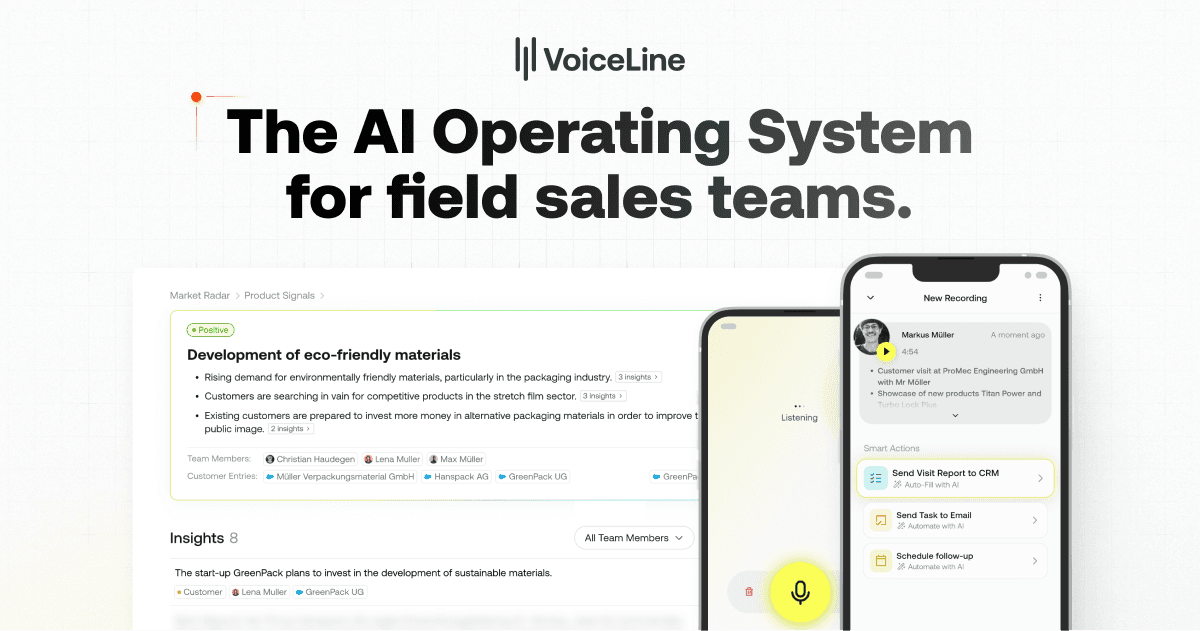
Screenshot of VoiceLine, Voice-first reporting and revenue intelligence for field sales teams

What is VoiceLine?

VoiceLine is a voice-driven AI assistant for field sales. Reps speak naturally to log visit reports, tasks and CRM data, while managers get market analytics, real-time alerts and coaching tools built on the collected interactions.

VoiceLine is an AI platform built for field sales organisations that need better data from customer visits without asking reps to type it up afterwards. The product centers on a conversational assistant that takes spoken input and turns it into structured records: visit reports, tasks, reminders, opportunities and new leads. Reps talk, the assistant asks clarifying questions, and the information lands in the right place in the CRM. The company reports 80 percent increased efficiency and 50 percent better data quality for teams using the capture workflow, alongside a claim that half of daily downtime between visits can be turned into productive work. The assistant is reachable through the app, as a phone call, and through a car steering wheel integration, which matters for people who spend their day driving between accounts. Beyond logging, it can prepare a visit by pulling relevant information from connected systems, touchpoints and documents, and it learns from corrections rather than dropping tasks. On the management side, VoiceLine analyzes the stream of interaction data to surface market insights, cluster them into trends and anomalies through an AI Market Radar, and push real-time alerts when something urgent appears. Close lost analysis combines qualitative notes with quantitative metrics to explain where deals are won and lost. The coaching layer is aimed at sales leaders. A dynamic checklist can be pushed to every rep so the AI prompts the right questions while the memory of the visit is still fresh, and leaders can compare performance across individuals, teams, regions or the whole company. Marketing claims include five more hours of active selling time per rep per week and 20 percent faster sales cycles. VoiceLine suits mid-size and large field sales forces, particularly industries where reps work on the road and CRM hygiene has historically been weak. It is a vertical revenue platform rather than a general voice note app, so teams looking for a simple transcription tool or a generic meeting recorder will find it heavier and more specialised than needed.

How do you use VoiceLine?

  1. 1Book a demo and scope your field sales use case
    Start with the demo page to walk through capture, analyze and coach with the VoiceLine team and confirm the fit for your salesforce size and territory structure.
  2. 2Sign in to the VoiceLine app
    Use the login link on the site to reach the web app at app.getvoiceline.com and access your workspace after the account has been set up.
  3. 3Capture a visit report by voice
    Talk to the AI assistant in the app, by phone call or through the car integration. It listens, asks clarifying questions and converts the conversation into a visit report, tasks and opportunities.
  4. 4Review what the assistant wrote to your CRM
    Check that the extracted fields landed in the right CRM locations, and correct anything that is off. The assistant learns from those corrections for future visits.
  5. 5Set up market trackers and alerts
    Use the Market Radar to cluster insights from across the salesforce and configure custom trackers, then rely on Market Pulse notifications to flag urgent findings.
  6. 6Roll out coaching checklists to the team
    Build a reporting standard or script as a dynamic checklist, distribute it to specific teams or regions, and track adoption and results in the coaching dashboard.

Pros and cons

Pros

  • Turns spoken visit reports into structured CRM records without manual form fillingAI
  • Assistant is available in the app, by phone call and through car steering controls, which fits life on the roadAI
  • Combines capture with analytics and coaching rather than stopping at note takingAI
  • Dynamic checklists prompt reps with clarifying questions at the moment of the visitAI
  • Market Radar clustering and real-time Market Pulse alerts give managers a cross-region viewAI

Cons

  • Sales performance figures such as 80 percent efficiency and 20 percent revenue growth come from vendor marketing and are not independently verified on the siteAI
  • No public pricing is shown on the homepage, so budget planning requires a sales conversationAI
  • Value depends heavily on CRM integration quality, and no integration list is published on the homepageAI
  • The coaching and analytics layers assume manager buy-in and process change, which adds rollout effort beyond installing an appAI
  • It is a focused field sales platform, not a general purpose voice note or transcription tool for other teamsAI

How much does VoiceLine cost?

Features

Core areas are capture, analyze and coach. Capture covers a conversational AI assistant for visit reports, CRM field filling and task creation, plus visit preparation and information retrieval. Analyze covers automatic insight detection, Market Radar clustering, Market Pulse real-time alerts and close lost analysis. Coach covers dynamic checklists, performance comparison and initiative tracking at scale.

Frequently asked questions about VoiceLine

  • How do you use VoiceLine?
    The walkthrough on this page covers 6 steps: 1. Book a demo and scope your field sales use case 2. Sign in to the VoiceLine app 3. Capture a visit report by voice 4. Review what the assistant wrote to your CRM 5. Set up market trackers and alerts 6. Roll out coaching checklists to the team.
  • What platforms does VoiceLine support?
    VoiceLine is available on Web App, iOS and Android.
  • What are the limitations of VoiceLine?
    Sales performance figures such as 80 percent efficiency and 20 percent revenue growth come from vendor marketing and are not independently verified on the site. No public pricing is shown on the homepage, so budget planning requires a sales conversation. Value depends heavily on CRM integration quality, and no integration list is published on the homepage.

Status

StatusActive
Views0
Outbound clicks0
Added10/21/2026

Platforms

Web AppiOSAndroid

Pricing

Paid