Pricing
The homepage links to a pricing page and advertises a limited-time back-to-school discount, but it does not list plan names or prices.
Learn moreResearch workspace for cited reviews, figures, posters and slides

Yila is a web research workspace that searches scholarly databases, reads full papers and drafts cited literature reviews. It also generates posters, slide decks, scientific figures and data analyses, and reformats manuscripts to journal or thesis rules.
Yila is a web-based research workspace that covers several stages of academic work in one place: finding papers, reading them, analysing data and producing the outputs a researcher ends up needing. Its search draws on scholarly sources named on the homepage, including OpenAlex, PubMed, arXiv and Wanfang, and the pitch centres on traceability, with every claim tied back to a source and verified papers returned instead of invented citations. The tool is organised around task-specific workflows. A literature search builds a quality-ranked candidate pool with abstracts, citation signals and key findings. A literature review workflow reads more than 50 full papers, compares methods, findings and evidence strength, then drafts a citation-backed review that stays editable. Other workflows turn an uploaded paper into an academic poster from a chosen template, or into an editable PowerPoint deck with speaker notes. A scientific figure generator produces mechanism or workflow diagrams from a text prompt and lets users edit them in the browser. A data analysis flow accepts CSV or XLSX files, profiles the data, picks a method suited to the question and returns charts, results and reusable code. A paper typesetting flow reformats a manuscript against a thesis guide, journal requirement, Word template, LaTeX kit or venue name. In practice, users type a request into a chat-style prompt, attach files such as a PDF or notes document, and watch the assistant read the material and return a finished file. The demos on the homepage show a conference-style poster that respects a fixed template grid and a nine-slide lab-meeting deck. The product claims to keep work private by default. Yila targets graduate students, lab groups and working researchers who would otherwise move between a paper-search engine, a reference reader, a slide tool and a figure editor. Compared with single-purpose literature assistants, its distinguishing feature is breadth across the research pipeline, from scoping through drafting and presentation. The homepage names a pricing page and mentions a limited-time back-to-school discount, but gives no plan details.

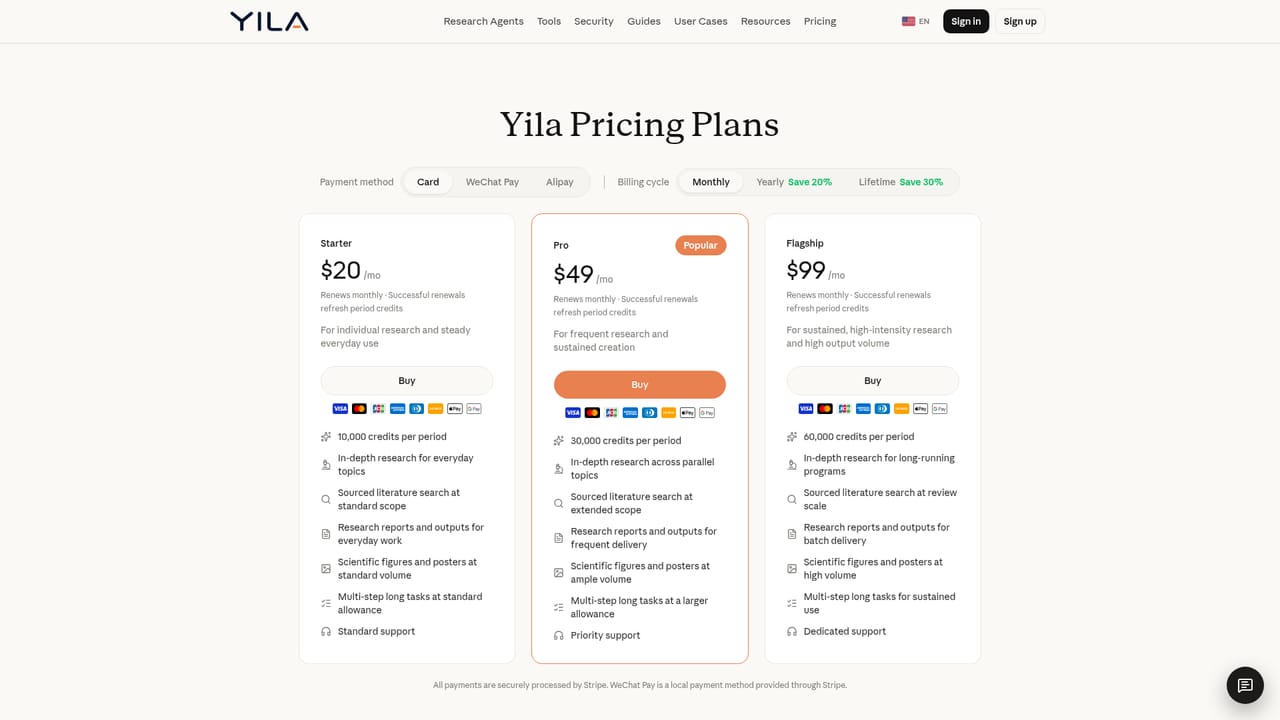
The homepage links to a pricing page and advertises a limited-time back-to-school discount, but it does not list plan names or prices.
Learn moreThe homepage names scholarly data sources (OpenAlex, PubMed, arXiv, Wanfang) and file formats such as PDF, DOCX, CSV, XLSX and PPTX, but lists no third-party app integrations.
Literature search over OpenAlex, PubMed, arXiv and Wanfang; reviews built from 50+ full papers; academic posters; paper-to-slides with editable PowerPoint; scientific figure generation; CSV/XLSX data analysis; paper typesetting; patents and more.


