Free trial
No free trial is described on the homepage. Whether a trial or free tier exists can only be confirmed on the pricing page.
Learn moreAn AI tutor that turns PDFs, lectures, and videos into notes, quizzes, and chats.

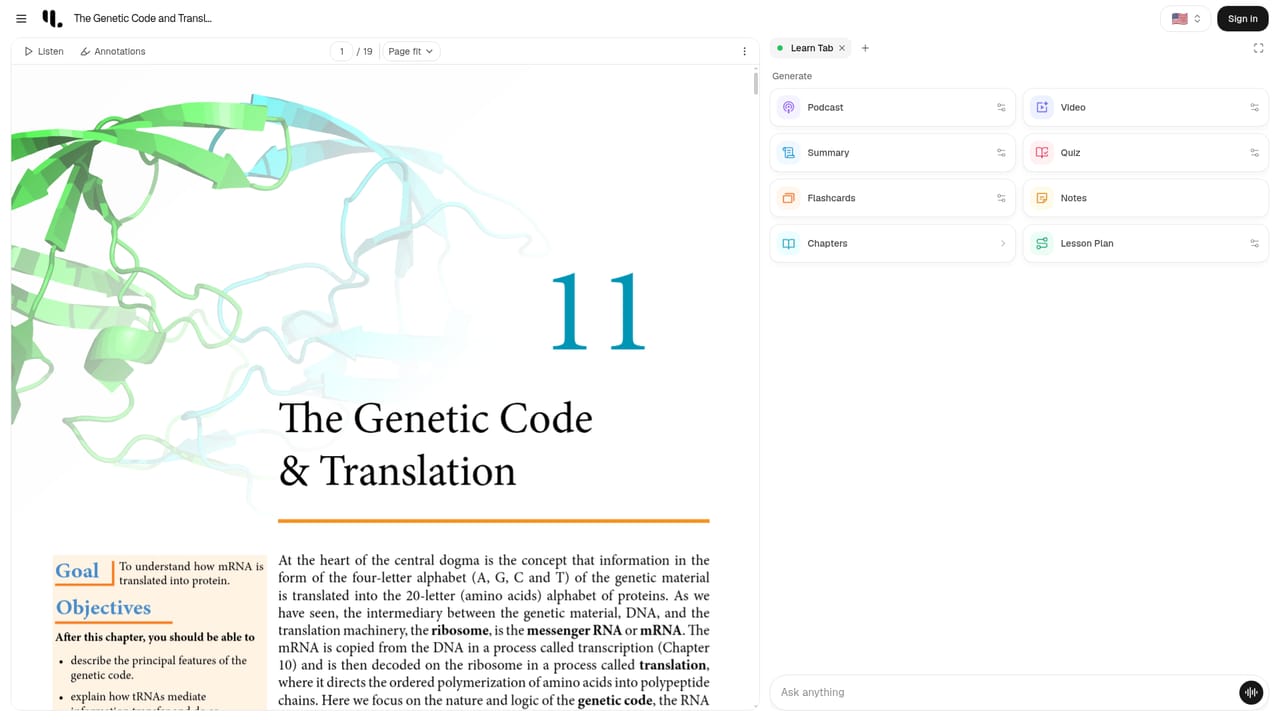
YouLearn converts PDFs, YouTube videos, slides, and recorded lectures into summaries, quizzes, practice exams, an audio podcast, and a chat tutor that answers with references to the source material. It targets students and self-directed learners, has web and mobile apps, and claims more than 2 million users.
YouLearn is an AI study platform that takes the material a learner already has (PDFs, YouTube videos, slide decks, recorded lectures) and converts it into a set of study formats: summaries, key takeaways, quizzes, practice exams, an audio podcast version, and an interactive chat that answers questions with references back to the source. The product is built around the idea that the learner supplies the content and the AI supplies the structure, so the same lecture or chapter can be reviewed as text, tested as a quiz, or heard as a podcast during a commute. The workflow is straightforward. A learner uploads a file or links a video, and YouLearn generates the study assets from it, then keeps those assets attached to the source for later revision. The AI tutor can be asked to simplify a hard passage, explain a concept, or walk through a problem, and it cites the underlying material rather than answering from general knowledge. Progress tracking and answer breakdowns on generated exams give the learner a sense of where they stand before a real test. The audience is broad: students preparing for exams, self-taught learners working through technical subjects, and instructors who want an additional way to engage students with dense material. Testimonials on the site come from a product engineer, an assistant professor, a content manager, and an indie hacker, which reflects that spread. It competes with general chat assistants used for study (ChatGPT and similar tools) and with dedicated study apps such as flashcard generators and video summarizers. YouLearn's edge is that it treats the uploaded material as the context for every feature rather than treating study aids as separate tools. The site advertises more than 2 million learners, Y Combinator backing, and native iOS and Android apps in addition to the web app. It also links to a Discord community and provides a referral and affiliate program. Detailed pricing tiers and third-party integrations are not spelled out on the homepage, so buyers should check the pricing page before committing.



No free trial is described on the homepage. Whether a trial or free tier exists can only be confirmed on the pricing page.
Learn moreThe homepage links to a pricing page but does not state specific tiers, prices, or usage limits. One FAQ asks whether YouLearn is free, but the answer is not included in the homepage text, so exact plan details should be confirmed on the pricing page.
Learn moreSupport options on the site include a Contact Us page, a Discord community, a blog, and an affiliate program. No phone, live chat, or documented response times are stated on the homepage.
Learn moreThe homepage shows YouTube as a supported content source and general file uploads, but no other integrations (LMS, note apps, calendar) are named. A Discord community link is present, but that is a community channel rather than a product integration.
Core features include summaries and key takeaways, interactive chat with the source material, generated quizzes and practice exams with answer breakdowns, progress tracking, an AI podcast version for audio review, and support for PDFs, YouTube videos, slides, and recorded lectures. The site also mentions an AI tutor that simplifies ideas and guides learners through content.
 AI Angels400+ customizable AI girlfriends for NSFW chat, voice calls, and roleplay
 Candy AIExperience the future of companionship with AI friends who chat, role-play, and connect with you on a human level.
 ourdream.aiA vast AI roleplay platform with millions of characters for chat, images, video and voiceAI Angels400+ customizable AI girlfriends for NSFW chat, voice calls, and roleplayCandy AIExperience the future of companionship with AI friends who chat, role-play, and connect with you on a human level.ourdream.aiA vast AI roleplay platform with millions of characters for chat, images, video and voice


