AI Animal Generator

Mix two ingredients into one hybrid character, then turn it into comics or coloring pages

Beginner
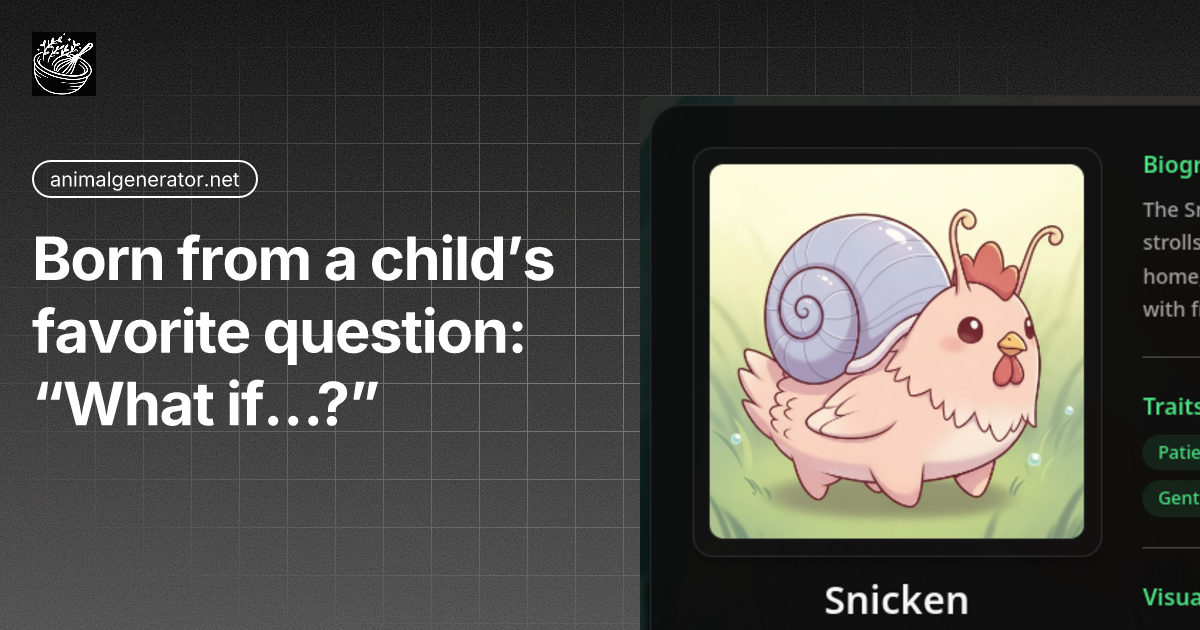
Screenshot of AI Animal Generator, Mix two ingredients into one hybrid character, then turn it into comics or coloring pages

What is AI Animal Generator?

AI Animal Generator is a coloring pages tool. A no prompt hybrid character generator that fuses two ingredients from animals, fantasy heroes and mechs, then exports the result as comic panels or printable coloring pages.

AI Animal Generator is a browser based creative toy that does one thing very specifically: it fuses two chosen ingredients into a single illustrated character. The ingredient library spans three families (animals, fantasy heroes and vehicles or mechs), and the site treats any pairing as fair game, so a fox with a tank or a lion with a cyborg knight are both valid starting points. The result is not a loose collage. The engine is described as anatomy aware, meaning it works out how the fused body would stand, balance and carry armor plating, then renders textures and mechanical details to match. The practical loop is short. A user picks two ingredients, selects a visual vibe such as vintage, funny mashup or cyberpunk, and hits generate. Output arrives in seconds with a rendered character, and the site says each hybrid also carries a name and backstory. From there the same character can be pushed into two secondary tools: a comic strip builder that keeps face shape, colors and accessories identical from panel to panel, and a coloring page maker that converts a colored render into clean black and white outlines for printing. Exports are described as high resolution and print ready. Audiences are broad on purpose. The homepage pitches teachers who want custom classroom coloring sheets, kids who want to mash animals with trucks, comic and webcomic creators who need a character that stays consistent across panels, game designers hunting quick concept art for monsters and cyborgs, and families looking for a shared activity. The no prompt design is the main differentiator against general purpose image generators: there is no text box to fight with, only ingredient selection and a style preset. The tradeoff is control. Anyone who wants precise composition, specific poses or fine adjustments will find the ingredient and vibe model narrower than a prompt driven image tool. It sits closest to novelty mashup generators, but with the continuity and print output features that those tools usually lack.

How do you use AI Animal Generator?

  1. 1Choose two ingredients
    Open the generator and pick any two items from the library. Pair within a family or cross over, for example a fox with a tank mech, or a lion with a fantasy hero.
  2. 2Set a vibe and generate
    Select a visual style such as vintage or funny mashup, then hit generate. The fusion engine returns a character with a name and backstory attached.
  3. 3Build a comic or a coloring page
    Send the character into the comic strip builder for multiple panels with matched details, or convert it to a black and white outline sheet.
  4. 4Download and print
    Export the finished image at full resolution. The site positions the files for classroom handouts, bedtime stories and general sharing.
  5. 5Remix from the gallery
    Browse featured creations on the homepage and use the remix option to start from someone else's hybrid rather than from scratch.

Pros and cons

Pros

  • Ingredient picking replaces prompt writing, so a usable character takes two clicks and a vibe choiceAI
  • Character consistency is preserved across comic panels, including colors, face shape and accessoriesAI
  • One click conversion from colored render to black and white coloring page suits classrooms and printingAI
  • Covers animals, fantasy heroes and vehicles in one library, which widens the mashup rangeAI
  • Output is described as high resolution and print ready for physical useAI

Cons

  • Creative control is limited to ingredient and vibe selection, with no visible way to specify pose or compositionAI
  • The quality claims come from marketing copy on the homepage, and no independent sample gallery or benchmark is offeredAI
  • Commercial use of generated hybrids is unclear; the FAQ raises the question but the homepage gives no answerAI
  • No pricing or plan detail appears on the homepage, so cost is unknown before trying itAI
  • Comic panel consistency is only as good as the engine's memory of a character, and there is no stated manual correction stepAI

How much does AI Animal Generator cost?

Features

Core tools are a hybrid creation engine that blends two ingredients into one coherent character, a vibe selector covering styles such as vintage and funny mashup, a comic strip builder with cross panel character consistency, a one click coloring page maker, scene adaptation for different backgrounds, and high resolution export. The site advertises generation in seconds and states that no text prompts are required.

Frequently asked questions about AI Animal Generator

  • How do you use AI Animal Generator?
    The walkthrough on this page covers 5 steps: 1. Choose two ingredients 2. Set a vibe and generate 3. Build a comic or a coloring page 4. Download and print 5. Remix from the gallery.
  • What platforms does AI Animal Generator support?
    AI Animal Generator is available on Web App.
  • What are the limitations of AI Animal Generator?
    Creative control is limited to ingredient and vibe selection, with no visible way to specify pose or composition. The quality claims come from marketing copy on the homepage, and no independent sample gallery or benchmark is offered. Commercial use of generated hybrids is unclear; the FAQ raises the question but the homepage gives no answer.

Status

StatusActive
Views0
Outbound clicks0
Added10/21/2026

Platforms

Web App

Pricing

Freemium