Free trial
A Google sign-in comes with starter credits, enough for the first few renders, including cheap draft previews.
Learn moreWrite a scene, cast AI leads, render a voiced vertical drama.

AI Dramas is an AI drama tool that writes a scene, cast AI leads, render a voiced vertical drama. A browser-based studio that turns screenplay-style scenes into short vertical drama clips with a consistent AI cast, wardrobe, props, sets and voiced dialogue.
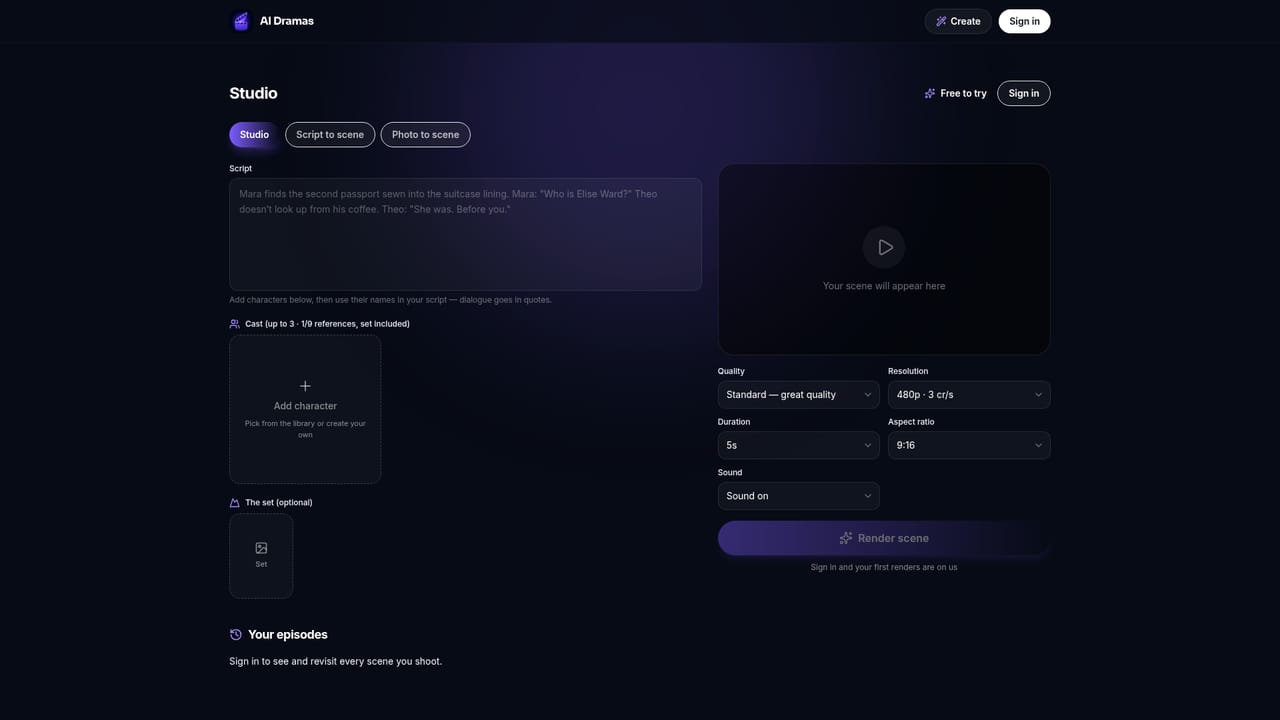
AI Dramas is a browser studio that turns a written scene into a finished drama clip. A scene is typed like a screenplay: character names are written into the action, and any line wrapped in quotation marks is performed aloud in that character's voice. The engine reads the names, stages the moment, and returns a video with spoken dialogue, synchronized sound and score, rendered in vertical 9:16 by default. Individual clips run 4 to 15 seconds, which is short by design: episodes are assembled by chaining several clips with the same cast. Continuity is the product's core claim. Leads are stored in a roster with a name, a face and a vocal signature written in plain words (age, accent, temperament), and those faces and voices carry across every render, so a run of clips reads as a season rather than a set of disconnected demos. Three leads can be cast per scene from the built-in library (Elena, Adrian, Chloe, Ren, Naomi and others), or a new character can be invented from a one-line description. Wardrobe, props and sets come from a similar library or from user uploads for garments, objects and locations, and a rewrite pass can generate any of them from a sentence. Rendering runs in two modes. A draft pass produces a quick two-second preview for roughly one credit and about thirty seconds of waiting, which is enough to test blocking and mood. The episode cut is the real take: a higher-quality clip with performed dialogue and film-grade motion, priced from three credits per second. Episodes can be saved, posted, or extended into the next scene. It suits serialized short-form creators working in vertical drama formats: mafia, historical, high school, time travel, medical, thriller and crime. The limits are firm: every face must be invented in the studio, so casting a real person from a photo is not possible, and uploaded wardrobe, prop or location images cannot contain people.
A Google sign-in comes with starter credits, enough for the first few renders, including cheap draft previews.
Learn moreCredits-based. Draft previews cost roughly 1 credit for a 2-second clip; full episode cuts start at 3 credits per second for clips up to 15 seconds. Sign-in includes starter credits, and longer work is covered by the Director and Producer plans or a Scene Pack.
Learn moreConsistent AI cast with stored faces and vocal signatures, three leads per scene, described-to-order characters, wardrobe, props and set libraries with uploads, screenplay-style scripting where quoted lines are voiced, draft and high-quality render modes, and native vertical 9:16 output.
 AI Angels400+ customizable AI girlfriends for NSFW chat, voice calls, and roleplay
 Candy AIExperience the future of companionship with AI friends who chat, role-play, and connect with you on a human level.
 ourdream.aiA vast AI roleplay platform with millions of characters for chat, images, video and voiceAI Angels400+ customizable AI girlfriends for NSFW chat, voice calls, and roleplayCandy AIExperience the future of companionship with AI friends who chat, role-play, and connect with you on a human level.ourdream.aiA vast AI roleplay platform with millions of characters for chat, images, video and voice


