AI Image Editor.info

Credit-based web editor for backgrounds, retouching, upscaling and generation

Beginner
Screenshot of AI Image Editor.info, Credit-based web editor for backgrounds, retouching, upscaling and generation

What is AI Image Editor.info?

AI Image Editor.info is a web-based tool for generating images from prompts and editing photos with AI: background removal, retouching, filters and upscaling. It uses a free tier plus paid monthly plans with credits.

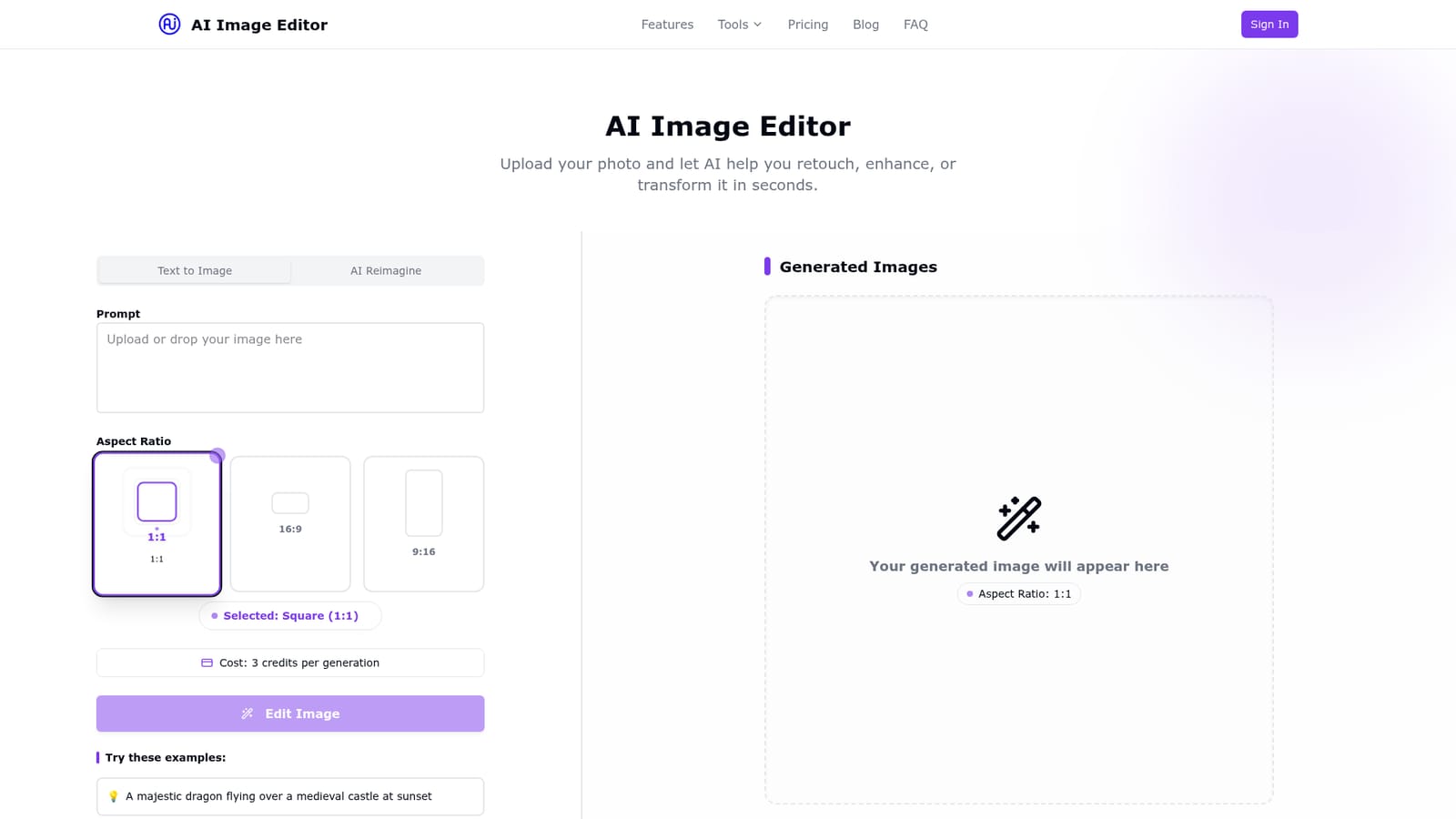
AI Image Editor.info is a browser-based photo editing and image generation tool that bundles several common tasks into one interface. The main workspace offers two modes: Text to Image, where a written prompt and an aspect ratio (square, widescreen or portrait) produce a new picture, and AI Reimagine, which transforms an uploaded photo. Generation is metered in credits, with a square generation costing 3 credits, and the page offers sample prompts to get a first result quickly. Beyond generation, the site lists four core editing capabilities: background removal or replacement, photo retouching (skin, lighting and imperfections), creative filters with color grading and artistic styles, and AI upscaling to raise resolution. A virtual outfit try-on feature is also promoted on the homepage. The workflow is deliberately short: upload or drag in an image, pick a tool, and download the result. The audience is casual creators, small sellers, social media users and anyone who wants quick cleanup or stylization without learning layer-based software. No design skills are presumed, and the free tier lets a newcomer test the tools before paying. Paid plans add higher-quality background removal, batch editing, larger credit allowances, advanced retouching and 4K export on the top tier. Among alternatives, it sits between single-purpose utilities (background removers, upscalers) and full generative platforms. Its advantage is having these functions in one place with simple monthly pricing, while heavyweight editors and specialist generators will offer more precise control. The accompanying blog is largely written around search phrases such as free, no sign-up and no filter editing, so the marketing claims there should be read as positioning rather than a description of what the product's own plans actually allow, since the pricing table shows monthly edit and credit limits.

How do you use AI Image Editor.info?

  1. 1Open the editor
    Go to the homepage, where the workspace offers Text to Image and AI Reimagine modes. Choose the mode that matches whether you are starting from a prompt or a photo.
    AI Image Editor.info — Open the editor
  2. 2Upload or describe your image
    Drag in a photo to edit, or type a prompt and pick an aspect ratio of 1:1, 16:9 or 9:16. Example prompts on the page help with a first attempt.
  3. 3Pick an editing tool
    Select background removal, retouching, filters or upscaling depending on the fix needed. Generations consume credits, so check the cost shown before running one.
  4. 4Download the result
    Review the output and save the edited image. Rerun with a different prompt or tool if the first pass is not right.
  5. 5Read the blog guides
    The blog collects articles on topics like face swapping and free editing options. Use them for ideas and context on what the tool is positioned to do.
    AI Image Editor.info — Read the blog guides

Pros and cons

Pros

  • Combines background removal, retouching, filters and upscaling in a single browser toolAI
  • Simple three-step flow of upload, choose a tool and download suits non-designersAI
  • Free plan lets new users test the tools before payingAI
  • Includes text-to-image generation and photo reimagining alongside editingAI
  • Paid tiers add batch editing and 4K export for heavier workloadsAI

Cons

  • Free plan is capped at 5 edits per month with basic background removal and limited filtersAI
  • Credit system means generations are metered, and plan credit allowances are modest (200 or 500)AI
  • Blog posts promote 'no limits' and 'no filter' editing, which conflicts with the metered pricingAI
  • Homepage gives no detail on supported file formats, privacy or data retention in the visible contentAI
  • Offers no stated desktop or mobile apps, API or integrations, so it fits only browser workflowsAI

How much does AI Image Editor.info cost?

Free trial

A free plan gives 5 edits per month with basic background removal, limited filters and image resizing, no payment stated as required.

Learn more

Pricing

Free plan at $0 per month with 5 free edits, basic background removal, limited filters and resizing. Pro is $19.99 per month with 200 credits, batch editing and full filters. Premium is $39.99 per month with 500 credits, unlimited background removal, advanced retouching and 4K export.

Learn more

Features

Text-to-image generation with 1:1, 16:9 and 9:16 ratios, AI Reimagine for photo transformation, background removal or replacement, photo retouching, creative filters, AI upscaling, image resizing, batch editing on paid plans, 4K export on Premium and an AI outfit try-on.

Frequently asked questions about AI Image Editor.info

  • How much does AI Image Editor.info cost?
    Free plan at $0 per month with 5 free edits, basic background removal, limited filters and resizing. Pro is $19.99 per month with 200 credits, batch editing and full filters. Premium is $39.99 per month with 500 credits, unlimited background removal, advanced retouching and 4K export.
  • Does AI Image Editor.info offer a free trial?
    A free plan gives 5 edits per month with basic background removal, limited filters and image resizing, no payment stated as required.
  • How do you use AI Image Editor.info?
    The walkthrough on this page covers 5 steps: 1. Open the editor 2. Upload or describe your image 3. Pick an editing tool 4. Download the result 5. Read the blog guides.
  • What platforms does AI Image Editor.info support?
    AI Image Editor.info is available on Web App.
  • What are the limitations of AI Image Editor.info?
    Free plan is capped at 5 edits per month with basic background removal and limited filters. Credit system means generations are metered, and plan credit allowances are modest (200 or 500). Blog posts promote 'no limits' and 'no filter' editing, which conflicts with the metered pricing.

Status

StatusActive
Views0
Outbound clicks0
Added10/18/2026

Platforms

Web App

Pricing

FreemiumSubscription