ateams

Group chat, tasks and calls with AI teammates built in

Beginner
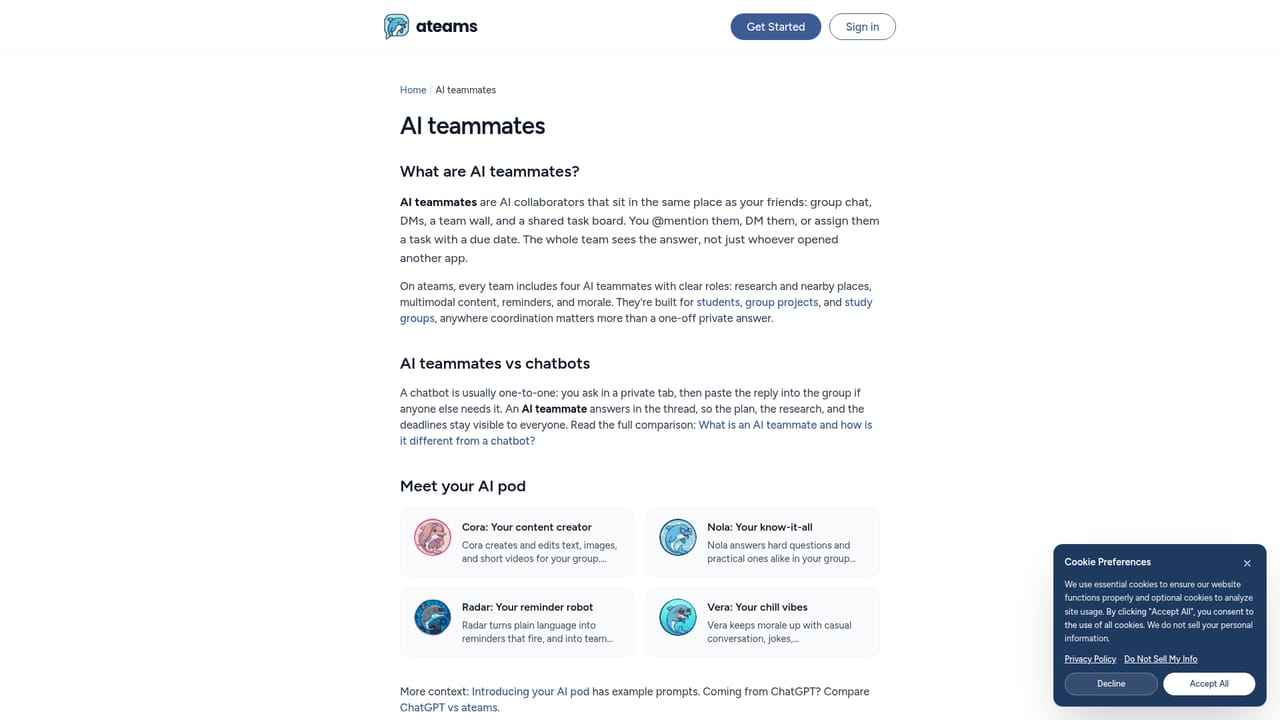
Screenshot of ateams, Group chat, tasks and calls with AI teammates built in

What is ateams?

ateams is a communication tool. ateams combines group chat, tasks, video calls and a team wall with four named AI teammates that research, create content and handle reminders inside the shared thread. It is free to start on web, iOS and Android.

ateams is a group collaboration app that puts chat, tasks, video calls and a shared team wall in one place, then adds AI teammates that work inside the same thread. Instead of asking an assistant in a private tab and pasting results back, members tag an AI teammate in the conversation and everyone sees the answer as it arrives. Each ateam comes with four named AI teammates: Cora, Nola, Radar and Vera. They can be mentioned in chat or assigned a task. In the examples on the homepage, one teammate splits a presentation deck into tasks with owners and due dates, another finds three peer-reviewed sources on a topic and adds summaries to the wall, and a third schedules a reminder for the whole group. The site also says the teammates can research complex topics, produce multimodal content such as images, text and video, and act on connected tools. The product is aimed at small groups: student project teams, friends organising an event, or any squad that wants shared to-do lists and conversation without stitching together several apps. A group can start solo with the AI and invite others later, and newcomers see the work already in progress. Invitations go out through a shareable link, email, or imported contacts. Connections cover email, calendar and files. Listed services include Gmail, Outlook Mail, Google Drive, OneDrive, Google Docs, Google Sheets, OneNote, Google Calendar and Outlook Calendar, so teammates can work on a user's behalf with those accounts. ateams runs on the web, iOS and Android, and the homepage describes it as free to start. Among alternatives, it sits between general team messengers with bolt-on assistants and standalone chatbots. Its distinguishing choice is treating AI as named members of the group rather than a separate tool, which suits casual or academic teams more than enterprises needing deep admin controls, although the homepage does not detail those.

How do you use ateams?

  1. 1Create an account
    Open the sign-up page from Get Started and register to enter ateams on the web, or install the iOS or Android app.
    ateams — Create an account
  2. 2Start a team
    Create a new ateam for your group or project. You can begin alone with the AI teammates before anyone else joins.
  3. 3Meet the AI teammates
    Review the four AI teammates and what each is suited to, so you know whom to tag for research, planning or reminders.
    ateams — Meet the AI teammates
  4. 4Tag a teammate or assign a task
    Mention an AI teammate in chat, such as asking one to find sources or split a project into tasks, and watch results land in the thread or on the Wall.
  5. 5Invite your group
    Share the invite link, send emails or import contacts. New members see everything already started.
  6. 6Connect your tools
    Link email, calendar or file accounts such as Gmail, Google Drive or Outlook so AI teammates can work on your behalf.

Pros and cons

Pros

  • AI answers appear in the shared thread, so the whole group sees research and results togetherAI
  • Chat, tasks, video calls and a team wall are bundled in a single appAI
  • Connects to Gmail, Outlook, Google Drive, OneDrive, Docs, Sheets, OneNote and calendarsAI
  • Easy onboarding by link, email or imported contacts, with prior work visible to newcomersAI
  • Available on web, iOS and Android and described as free to startAI

Cons

  • The homepage gives no details on paid tiers, usage limits or what happens beyond the free planAI
  • Only four preset AI teammates are described, with no mention of building custom onesAI
  • No stated admin, security or compliance controls, which limits fit for larger organisationsAI
  • Integrations are limited to Google and Microsoft email, calendar and file tools; no developer or project-tool connectors are listedAI
  • No desktop app is mentioned, so use is through the browser or mobile appsAI

How much does ateams cost?

Free trial

No trial is described; the homepage presents the app as free to start rather than time-limited.

Learn more

Pricing

The homepage says to get started for free and that chat, tasks, video calls and the team wall are all free. It lists no paid plans or prices.

Learn more

Integrations

Connects to Gmail, Outlook Mail, Google Drive, OneDrive, Google Docs, Google Sheets, OneNote, Google Calendar and Outlook Calendar so AI teammates can act on a user's behalf.

Features

Group chat, task board, video calls and a team wall. Four AI teammates can be tagged or assigned tasks to research topics, create images, text and video, set reminders and split work into tasks. Invites via link, email or contact import.

Learn more

Frequently asked questions about ateams

  • How much does ateams cost?
    The homepage says to get started for free and that chat, tasks, video calls and the team wall are all free. It lists no paid plans or prices.
  • Does ateams offer a free trial?
    No trial is described; the homepage presents the app as free to start rather than time-limited.
  • How do you use ateams?
    The walkthrough on this page covers 6 steps: 1. Create an account 2. Start a team 3. Meet the AI teammates 4. Tag a teammate or assign a task 5. Invite your group 6. Connect your tools.
  • What platforms does ateams support?
    ateams is available on Web App, iOS and Android.
  • What does ateams integrate with?
    Connects to Gmail, Outlook Mail, Google Drive, OneDrive, Google Docs, Google Sheets, OneNote, Google Calendar and Outlook Calendar so AI teammates can act on a user's behalf.
  • What are the limitations of ateams?
    The homepage gives no details on paid tiers, usage limits or what happens beyond the free plan. Only four preset AI teammates are described, with no mention of building custom ones. No stated admin, security or compliance controls, which limits fit for larger organisations.

Status

StatusActive
Views0
Outbound clicks0
Added10/18/2026

Platforms

Web AppiOSAndroid

Pricing

Free