BuildPress

Plug the AI client you already pay for into your WordPress site

Intermediate API

What is BuildPress?

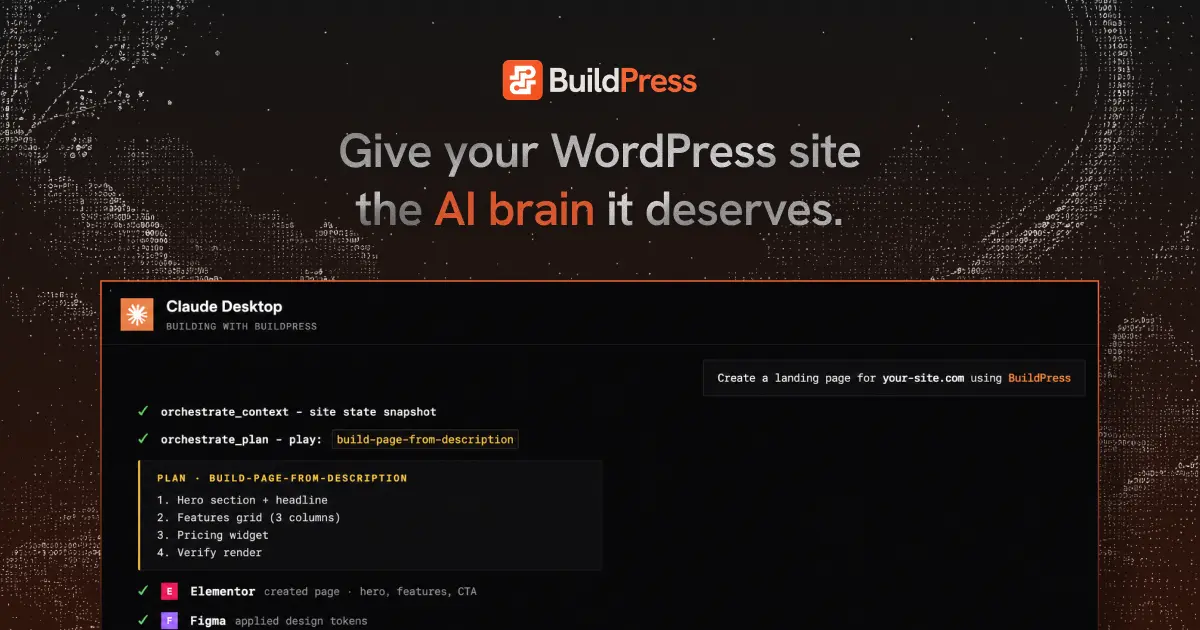
BuildPress is a WordPress plugin that connects Claude, Codex, Cursor or any MCP client to your site, so AI can build token based pages and widgets inside the dashboard. Post launch pinned feedback and an AI fix queue keep the loop running after handoff.

BuildPress is a WordPress plugin that connects your existing AI client (Claude, Codex, Cursor, Windsurf, VS Code, JetBrains, Zed, Continue, or any other MCP compatible tool) directly to a WordPress installation. Instead of asking a chatbot to write code and then pasting that code into a theme or block editor, you describe the page or content model you want and the AI creates it inside the dashboard, working with the plugins already installed on the site. The site runs on your own server rather than on BuildPress infrastructure. The product leans on guardrails rather than open ended generation. A design system is established before pages get built, and each page is assembled from reusable widgets bound to design tokens. Rules prevent token overwrites and stray code from entering the build. After each pass BuildPress loads every page and verifies HTTP status, widget presence, dynamic content and PHP errors, so the AI corrects its own mistakes before a human looks at the output. Project Memory carries brand context between sessions, so a later conversation picks up where the previous one stopped rather than starting cold. A second phase covers the work after launch. Reviewers click an element on the live page and leave a pinned comment; the screenshot, element and breakpoint are captured automatically. Comments can be assigned to a teammate or queued for BuildPress AI, which processes the queue and parks fixes in Review for a human to confirm. That makes the plugin relevant to freelancers and agencies handling client sign off, not just solo builders. Competitors in this space tend to be either standalone AI site generators that own the hosting or generic coding assistants that treat WordPress as one target among many. BuildPress sits between them: it keeps WordPress and your plugin stack, but hands the building to whichever AI client you already subscribe to. The vendor describes the plugin as beta, and pricing is bundled per number of sites rather than metered per AI call.

How do you use BuildPress?

  1. 1Install the BuildPress plugin on your WordPress site
    Download the plugin and install and activate it through your WordPress dashboard. It runs on your own server, so activation is the step that puts BuildPress in place.
  2. 2Create an App Password and connect your AI client
    Generate an App Password in WordPress, then paste the MCP URL into Claude, Codex, Cursor or whichever MCP client you use. Connection happens outside WordPress, inside the AI tool.
  3. 3Set up the project and design system
    Describe the project to the AI. It captures brand context by asking a few questions, importing from Figma or generating a palette from a brand color, and stores the result in Project Memory.
  4. 4Build pages and content through conversation
    Ask for pages, sections, layouts and content models. The AI builds them inside WordPress using your tokens and widget library, then verifies each page renders without errors.
  5. 5Leave pinned feedback on the live page
    Click the exact element that needs work and leave a comment. The screenshot, element and breakpoint are captured automatically, and the item can be assigned to a teammate or to BuildPress AI.
  6. 6Review the queued fixes and close them
    BuildPress AI works the feedback queue and parks each fix In Review. Check the changes on the site, then confirm Complete to close the loop.

Pros and cons

Pros

  • Works with the AI clients and subscriptions you already have rather than forcing a new oneAI
  • Widget and token guardrails limit how far AI builds can drift from the design systemAI
  • Automatic render verification catches PHP errors and missing widgets before reviewAI
  • Pinned feedback with screenshot, element and breakpoint capture supports client sign offAI
  • One plugin with every feature included, priced by number of sitesAI

Cons

  • Marked as beta, so stability on complex or heavily plugin dependent sites is unprovenAI
  • Requires comfort with MCP setup, App Passwords and server side plugin configurationAI
  • Feedback and edit loops are tied to a live WordPress install, so it is not a fit for static or headless stacksAI
  • No public documentation on how it coexists with page builders that bypass its widget libraryAI
  • AI quality still depends on the client and model you bring, so results vary by subscriptionAI

How much does BuildPress cost?

Pricing

One paid plugin with every feature included, priced by number of sites and billed yearly or once for lifetime. Solo covers 1 site at $49 per year, Team covers 100 sites at $129 per year, and Agency covers unlimited sites at $199 per year. Lifetime options are listed as a limited time offer.

Learn more

Support

Support is documented through the site's docs section. No support channels, response times or service level terms are stated on the homepage.

Learn more

Integrations

Connects through MCP to Claude, ChatGPT and Codex, Cursor, Windsurf, VS Code, JetBrains, Zed and Continue. Builds reuse the WordPress plugins already installed on your site.

Learn more

Features

The plugin gives AI clients MCP access to your WordPress site and supports both built in and custom abilities. Builds are widget first with render verification, backed by an unlimited widget library, AI built design systems and a premium widget library. Project Memory is unlimited, and the package adds a pinned feedback system plus the BuildPress editor.

Learn more

Frequently asked questions about BuildPress

  • How much does BuildPress cost?
    One paid plugin with every feature included, priced by number of sites and billed yearly or once for lifetime. Solo covers 1 site at $49 per year, Team covers 100 sites at $129 per year, and Agency covers unlimited sites at $199 per year. Lifetime options are listed as a limited time offer.
  • Does BuildPress have an API?
    Yes, BuildPress offers an API.
  • How do you use BuildPress?
    The walkthrough on this page covers 6 steps: 1. Install the BuildPress plugin on your WordPress site 2. Create an App Password and connect your AI client 3. Set up the project and design system 4. Build pages and content through conversation 5. Leave pinned feedback on the live page 6. Review the queued fixes and close them.
  • What platforms does BuildPress support?
    BuildPress is available on Web App.
  • What does BuildPress integrate with?
    Connects through MCP to Claude, ChatGPT and Codex, Cursor, Windsurf, VS Code, JetBrains, Zed and Continue. Builds reuse the WordPress plugins already installed on your site.
  • What are the limitations of BuildPress?
    Marked as beta, so stability on complex or heavily plugin dependent sites is unproven. Requires comfort with MCP setup, App Passwords and server side plugin configuration. Feedback and edit loops are tied to a live WordPress install, so it is not a fit for static or headless stacks.