Free trial
No timed trial is needed: the free plan allows daily song and instrumental generation on the V1.0 model at no cost.
Learn moreText to finished song, lyrics, vocals and MP3 export in any language

CancionIA is a death metal generator tool. A browser based AI song generator that turns text or user written lyrics into finished tracks with vocals in any language, with style presets, vocal separation, audio to MIDI and MP3/WAV export.
CancionIA is a browser based song generator that takes a written idea and returns a complete track with lyrics, melody, instrumental arrangement and synthesized vocals. The generator runs on a tiered model system: version 1.0 is the free entry point for basic work, version 2.0 improves prompt interpretation and stretches tracks to eight minutes, and version 3.0 targets studio grade vocals with accurate pronunciation across languages and is tied to annual subscriptions. Users pick between Simple Mode, where a short description drives the whole composition, and Custom Mode, which accepts up to 3,000 characters of user written lyrics alongside genre, mood, voice, instrument and tempo selections drawn from preset lists. The style controls are unusually granular for this class of tool. The genre list covers more than 40 styles including reggaeton, corridos tumbados, cumbia, bachata, trap, lo-fi and rock, and the mood, vocal and instrument pickers let you specify things like operatic vocals, scat singing, bagpipes or a very fast tempo. Vocal direction inside Custom Mode works through bracketed tags at the start of each lyric section, which is how duets and gender switching between verses are handled. A separate lyrics generator drafts text from a short idea when the user has no words of their own. The audience is broad: hobbyists making birthday and anniversary songs (the public discovery feed is full of Spanish, Portuguese and Polish dedications), content creators needing background instrumentals for video and podcasts, and small businesses that want original music they can monetize. The commercial angle is supported by a downloadable PDF license per generated track, plus a music video maker that pairs one audio file with one image to produce a captioned lyric video without a watermark. Compared with text-to-music services built around pure instrumental generation, CancionIA leans hard on vocals and lyrics, and its post generation toolkit (vocal and instrumental separation, audio to MIDI, LRC and SRT lyric exports) is closer to a light production suite than a one click toy. The tradeoffs are real: the best model sits behind the annual plan, and generation fails when artist or band names appear in a prompt.
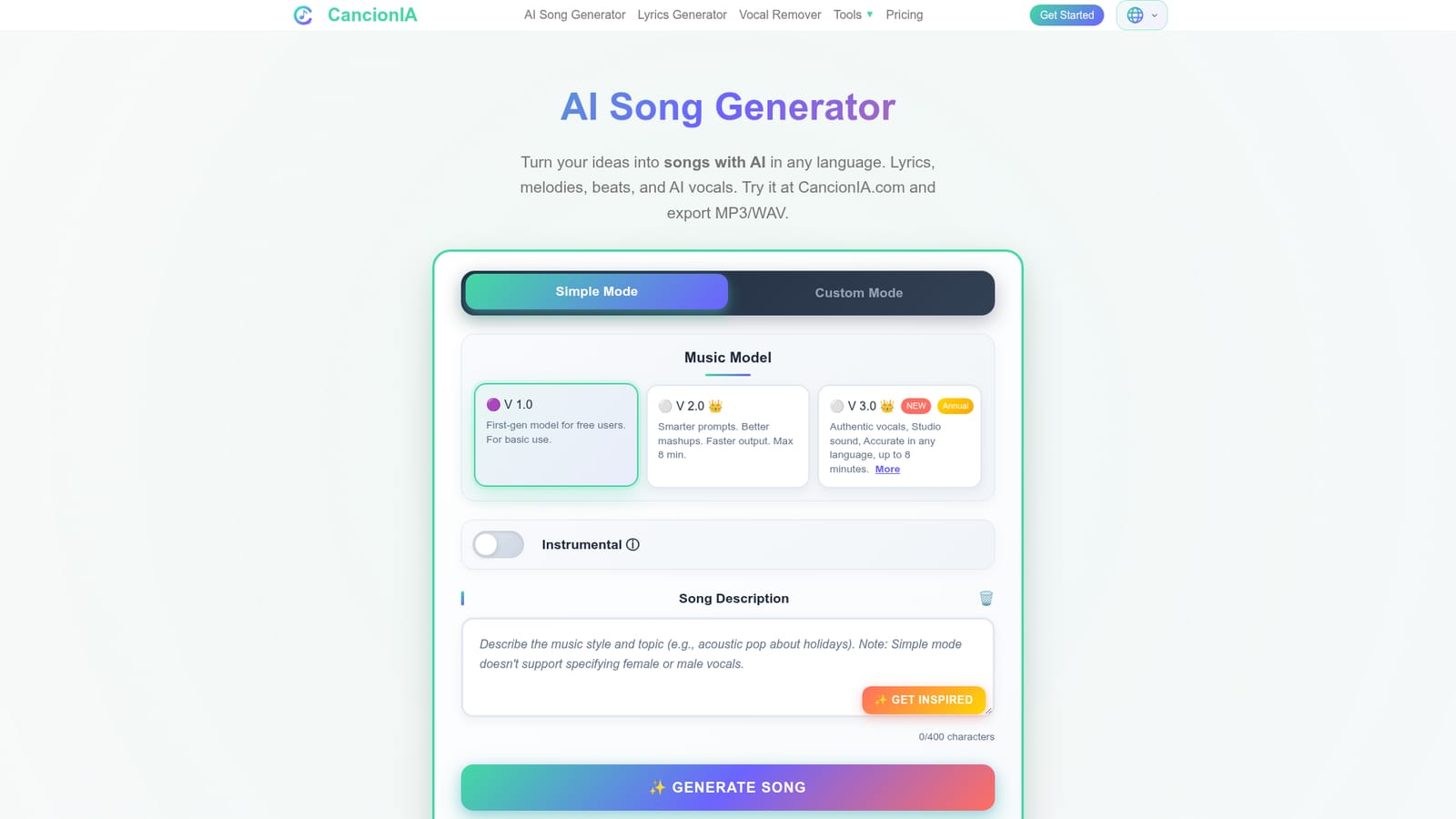
No timed trial is needed: the free plan allows daily song and instrumental generation on the V1.0 model at no cost.
Learn moreA free tier covers daily generation on model V1.0. Paid tiers unlock models V2.0 and V3.0, longer tracks, more monthly songs, unlimited MP3/WAV downloads and commercial licensing. Annual plans include V3.0 access and are advertised at over 50% below monthly billing. Subscribers can also buy one-time lifetime credits that do not expire and involve no auto-renewal.
Learn moreSimple and Custom generation modes, a lyrics generator, 40+ genre presets with mood, voice, instrument and tempo controls, instrumental only output, tracks up to eight minutes on premium models, song extension, vocal and instrumental separation with a premium HQ mode, audio to MIDI conversion, cover upload, MP3/WAV export, LRC and SRT lyric downloads, PDF commercial license and a captioned music video maker.
 AI Angels400+ customizable AI girlfriends for NSFW chat, voice calls, and roleplay
 Candy AIExperience the future of companionship with AI friends who chat, role-play, and connect with you on a human level.
 ourdream.aiA vast AI roleplay platform with millions of characters for chat, images, video and voiceAI Angels400+ customizable AI girlfriends for NSFW chat, voice calls, and roleplayCandy AIExperience the future of companionship with AI friends who chat, role-play, and connect with you on a human level.ourdream.aiA vast AI roleplay platform with millions of characters for chat, images, video and voice


