Captions Generator

Browser-based auto captions, translation and SRT export, no watermark
Beginner
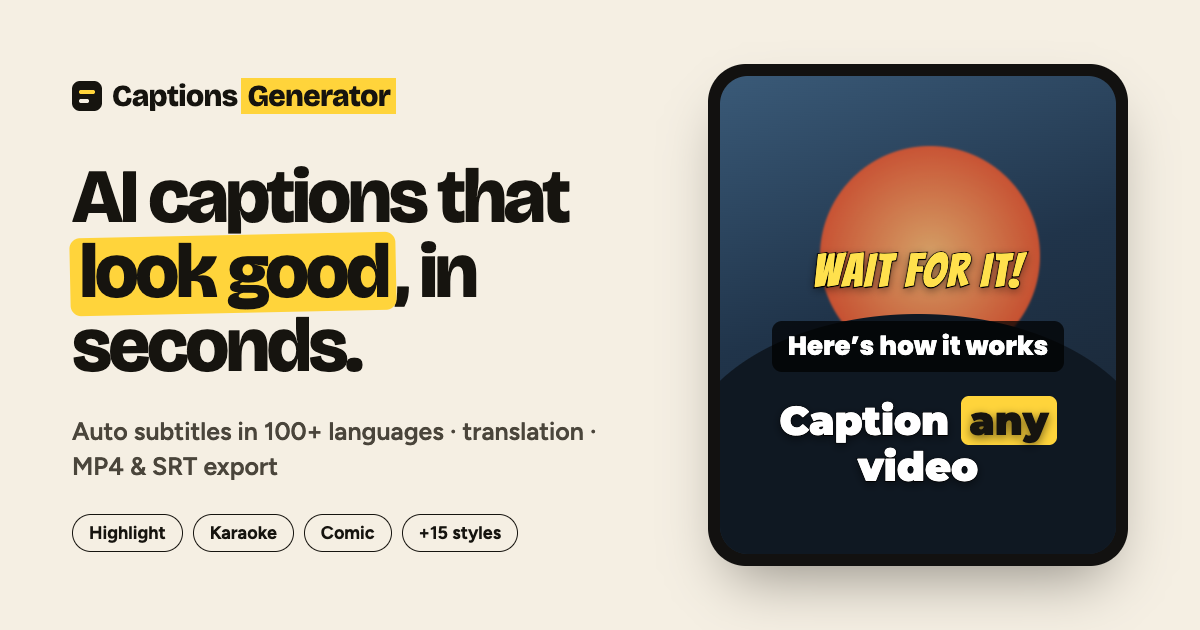
Screenshot of Captions Generator, Browser-based auto captions, translation and SRT export, no watermark

What is Captions Generator?

Captions Generator is a browser-based AI subtitle tool that transcribes video or audio in 100 languages, lets you edit and style captions, and exports a watermark-free MP4 or SRT, VTT and TXT files.

Captions Generator is a browser-based tool that turns the speech in a video or audio file into timed, styled subtitles. Transcription covers 100 languages with automatic language detection, and each word is aligned to the audio so captions appear at the moment they are spoken. It can even handle English and Chinese mixed within a single sentence, which is uncommon among caption tools. The workflow has three stages. A user drops in an MP4, MOV, MKV, MP3, WAV or SRT file, edits any misheard word in the transcript, then picks a caption style and exports. Output options include a captioned MP4 with the text burned in, or separate SRT, VTT and TXT files for YouTube, Premiere, CapCut and other editors. Existing SRT or VTT files can be imported, restyled and burned into a video, or converted to another format. Captions render at the size of the source video, so vertical 9:16 clips for TikTok, Reels and Shorts work the same way as landscape footage, and captions can be dragged anywhere in the frame. Privacy is handled by rendering in the browser: the video stays on the device and only the audio track is sent for transcription, which the site says is not stored. Translation into more than 100 languages is free, including right-to-left scripts such as Arabic and Hebrew. The tool suits short-form creators, YouTubers, educators and teams that need accessible video without installing an editor. The free plan allows editing videos up to 90 minutes and exporting up to 3 minutes at 1080p without a watermark, with 30 minutes of captions a month. The paid Pro plan adds unlimited AI captions, 4K export, bilingual captions, keyword highlights, karaoke-style word animation and custom fonts. Compared with full video editors that bundle captioning, this is a narrower, faster single-purpose option.

How do you use Captions Generator?

  1. 1Upload a file
    Drop an MP4, MOV, MKV, MP3, WAV or SRT file onto the homepage. The AI transcribes the speech and detects the language automatically.
  2. 2Review the transcript
    Read through the timed transcript and correct any misheard word. An existing SRT can be imported instead of transcribing.
  3. 3Choose a caption style
    Pick one of the ready-made styles, such as Highlight, Boxed or Neon. The preview matches what gets exported.
  4. 4Translate if needed
    Translate the captions into another language in one click. Bilingual two-line captions are available on Pro.
  5. 5Export the result
    Download the captioned MP4 with burned-in text, or save SRT, VTT or TXT files for use in other editors.

Pros and cons

Pros

  • Free plan exports 1080p MP4 with no watermark and includes SRT, VTT and TXT downloadsAI
  • Transcription in 100 languages with automatic detection and word-level timingAI
  • Runs in the browser, and the video itself stays on the device during renderingAI
  • Free translation into 100+ languages, including right-to-left scriptsAI
  • Imports existing SRT or VTT files for restyling, editing or format conversionAI

Cons

  • Free exports are capped at 3 minutes per video, which limits longer contentAI
  • Free tier allows only 30 minutes of captions per monthAI
  • Karaoke, word highlight, bilingual captions and keyword highlights require ProAI
  • Only 8 of the 22 caption styles are free, and custom fonts are Pro onlyAI
  • Captions are tied to a browser workflow, with no desktop or mobile apps listedAI

How much does Captions Generator cost?

Free trial

A permanent free plan with a free account: edit videos up to 90 minutes, export up to 3 minutes at 1080p with no watermark, and 30 minutes of captions a month.

Learn more

Pricing

Free plan at $0 with a free account: 30 minutes of captions a month, exports up to 3 minutes, 8 styles. Pro is $4.92/month billed $59 yearly, with unlimited AI captions, 4K export and all 22 styles. Cancel anytime.

Learn more

Integrations

No formal integrations are listed. Exported SRT, VTT and TXT files work with YouTube, Premiere, CapCut and other editors.

Features

Transcription in 100 languages, word-level timing, transcript editing, 8 free and 22 Pro caption styles, free translation, bilingual captions, burned-in MP4 export up to 4K, SRT/VTT/TXT downloads, SRT import and audio upload.

Learn more

Frequently asked questions about Captions Generator

  • How much does Captions Generator cost?
    Free plan at $0 with a free account: 30 minutes of captions a month, exports up to 3 minutes, 8 styles. Pro is $4.92/month billed $59 yearly, with unlimited AI captions, 4K export and all 22 styles. Cancel anytime.
  • Does Captions Generator offer a free trial?
    A permanent free plan with a free account: edit videos up to 90 minutes, export up to 3 minutes at 1080p with no watermark, and 30 minutes of captions a month.
  • How do you use Captions Generator?
    The walkthrough on this page covers 5 steps: 1. Upload a file 2. Review the transcript 3. Choose a caption style 4. Translate if needed 5. Export the result.
  • What platforms does Captions Generator support?
    Captions Generator is available on Web App.
  • What does Captions Generator integrate with?
    No formal integrations are listed. Exported SRT, VTT and TXT files work with YouTube, Premiere, CapCut and other editors.
  • What are the limitations of Captions Generator?
    Free exports are capped at 3 minutes per video, which limits longer content. Free tier allows only 30 minutes of captions per month. Karaoke, word highlight, bilingual captions and keyword highlights require Pro.

Status

StatusActive
Views0
Outbound clicks0
Added10/6/2026

Platforms

Web App

Pricing

FreemiumSubscription