Free trial
The homepage promotes a free trial through the plans page, allowing the animation toolset to be evaluated before choosing a paid plan. Exact trial length and limits are not stated on the homepage.
Learn moreAI-assisted 3D character animation with physics and keyframe tools

Cascadeur is a 3D animation application for character work, combining AI inbetweening, AutoPosing, ragdoll physics, rigging and retargeting for humanoids and quadrupeds, plus mocap cleanup and motion generation, with a live link to Unreal Engine.
Cascadeur is a 3D character animation package built around a physics-aware keyframe workflow. Instead of posing a skeleton frame by frame and eyeballing balance, animators set a few key poses and let the software fill the gaps. AI inbetweening generates the motion between those keys, AutoPosing produces natural poses from a handful of control points, and AutoPhysics corrects a character's double so the result reads as physically plausible: weight, inertia and secondary motion can be tuned without hand-keying every joint. The toolset extends well past interpolation. A procedural ragdoll system makes characters react to impacts and simulate falls and collisions. Rigging is drag and drop for humanoids and quadruped animals such as cats, dogs and horses, and retargeting copies animation between characters with different skeletal structures and proportions. Full-body motion generation covers runs, jumps, combat, acrobatics and idle loops, which is useful for previz and prototyping before committing to a final pass. Mocap cleanup is a first-class workflow: correct foot sliding, knee pops and geometry penetration, lock contact points to the ground, then refine with animation layers. The audience is working animators rather than prompt writers. Indie game developers, studios handling mocap data, and film or previz teams all appear in the published use cases, alongside 2D artists moving into 3D and solo developers shipping full games. Because the AI runs locally, there are no token or credit limits on iteration, which suits people who refine until the motion feels right. Cascadeur sits alongside Blender, Maya, 3ds Max, Cinema 4D, Houdini and Unreal Engine rather than replacing them, with a live link that streams animation into Unreal Engine and updates in real time. Recent releases added animation layers and easing for non-destructive editing. The learning curve is real: this is a professional animation environment, and the physics-first approach rewards animators who already understand timing and weight.
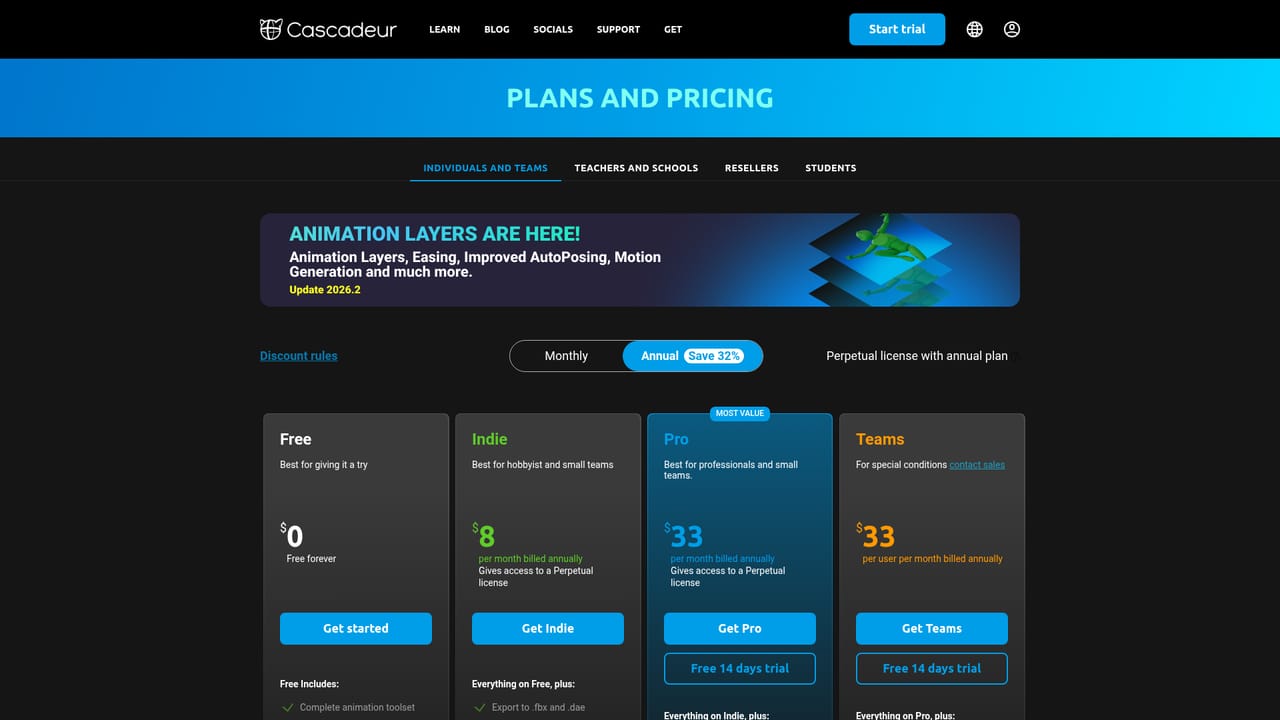
The homepage promotes a free trial through the plans page, allowing the animation toolset to be evaluated before choosing a paid plan. Exact trial length and limits are not stated on the homepage.
Learn moreAnnounced for Unreal Engine, Unity, Daz 3D, 3ds Max, Maya, Mixamo, Blender, Houdini and Cinema 4D. A live link streams animation into Unreal Engine with real-time updates. Detailed integration documentation is not summarized on the homepage.
Cascadeur covers AI inbetweening, AutoPosing from fewer control points, AutoPhysics with a physically accurate character double, ragdoll impacts and collisions, AI motion generation for runs, jumps, combat, acrobatics and idles, drag-and-drop rigging and one-click retargeting for humanoids and quadrupeds, plus mocap cleanup and animation layers.
 AI Angels400+ customizable AI girlfriends for NSFW chat, voice calls, and roleplay
 Candy AIExperience the future of companionship with AI friends who chat, role-play, and connect with you on a human level.
 ourdream.aiA vast AI roleplay platform with millions of characters for chat, images, video and voiceAI Angels400+ customizable AI girlfriends for NSFW chat, voice calls, and roleplayCandy AIExperience the future of companionship with AI friends who chat, role-play, and connect with you on a human level.ourdream.aiA vast AI roleplay platform with millions of characters for chat, images, video and voice


