Cat Scanner

Point your phone at a cat and get a breed guess in seconds

Beginner
Screenshot of Cat Scanner, Point your phone at a cat and get a breed guess in seconds

What is Cat Scanner?

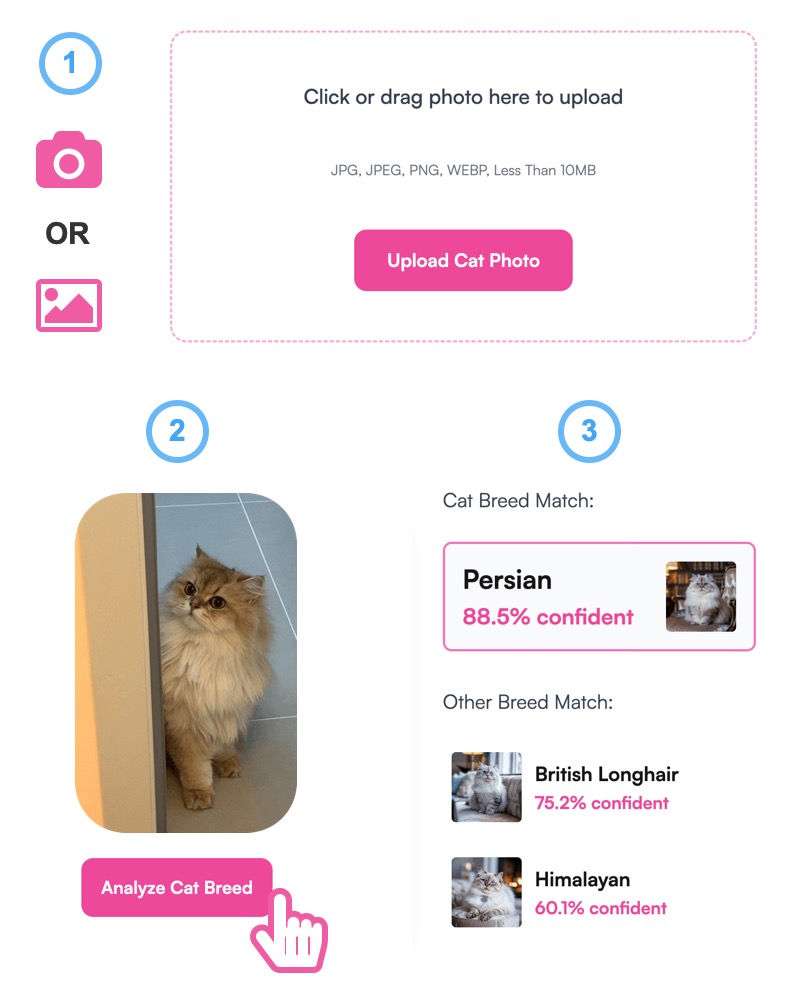
Cat Scanner is a cat breed identification tool. A free Android and iOS app that identifies around 60 cat breeds from a photo or video, breaks down mixed breeds, and adds a breed-catching game and community feed on top.

Cat Scanner is a mobile app from Siwalu Software that identifies cat breeds from a photo or video. The camera opens with pinch to zoom and tap to focus, and a scan returns a result within a few seconds. Photos already sitting in the phone gallery can be uploaded instead of shooting live. The app currently covers roughly 60 breeds, a set that includes every breed officially recognised by the Fédération Internationale Féline plus some unofficial ones. Mixed breed cats are handled with a breakdown rather than a single label: the result screen shows which breeds appear to have been combined, along with reference facts about each. The breed database is browsable without scanning anything, so the app doubles as a small illustrated encyclopedia of cats. A playful second mode scans people, including selfies and photos of friends and family, and reports which cat they most resemble. Two newer layers sit on top of the core scanner. A gamification system treats breeds like a collection, with scans of new breeds, challenges, virtual treats and a ranking list against other users. A social feed lets users post cat photos, browse other profiles, like and comment, and filter posts by date or popularity. Users can flag whether a prediction was right, and that feedback is fed back into the model. This is a consumer app, not a veterinary or pedigree tool. The site itself frames results as educated predictions and says outright that no system gets every individual cat right. Against a paid DNA test it is the cheap first opinion; against generic image recognition models it wins on the breed database and the mixed breed breakdown. It suits cat owners, curious bystanders and people who want a light social game around cats more than anyone needing certified identification. Premium removes ads, speeds up results, adds configurable speed versus accuracy and allows offline scanning.

How do you use Cat Scanner?

  1. 1Install the app on iOS or Android
    Download Cat Scanner free from the Apple App Store or Google Play using the store links on the site. The install is small, and the breed database is usable straight away without creating an account.
  2. 2Open the camera or pick a gallery photo
    Launch a scan and either frame the cat with the built in camera, using pinch to zoom and tap to focus, or upload an existing picture from your gallery.
  3. 3Read the breed result and any mix breakdown
    Wait a few seconds for the app to analyse the image. The result names the likely breed, and for mixed cats shows a pie chart style split of the breeds detected.
  4. 4Browse the breed database for background
    Use the breed list to read profiles and see pictures of recognised and unofficial breeds, whether or not you have scanned a cat of that type.
  5. 5Confirm or correct the prediction
    Tell the app whether the identification was right. A correction lets you supply the actual breed, and the feedback is used to improve later results.
  6. 6Share to the feed or upgrade to premium
    Post results to the community feed to compare with other users, or buy the premium upgrade to remove ads, scan offline and choose between faster or more accurate scans.

Pros and cons

Pros

  • Fast results from a camera shot or gallery upload, usually within secondsAI
  • Mixed breed scans return a breakdown of contributing breeds instead of one labelAI
  • Breed database covers FIFe-recognised breeds and can be browsed without scanningAI
  • Offline scanning available with premium, useful away from reliable signalAI
  • Feedback on wrong predictions feeds back into the model and helps future accuracyAI

Cons

  • Results are educated guesses, and the site concedes it cannot identify every individual cat correctlyAI
  • Accuracy depends heavily on photo quality, so old or blurry images often produce weak matchesAI
  • Offline mode, ad removal and the speed versus accuracy setting are locked behind premiumAI
  • No stated price, subscription length or cancellation terms on the homepageAI
  • The human scanning mode and feed are diversion features, not reasons to rely on it for real identificationAI

How much does Cat Scanner cost?

Pricing

The app is free to download and use, with an optional in-app purchase for the premium version. Premium removes ads, delivers results faster, adds a setting to choose faster or more accurate scanning, and enables offline identification. The homepage does not list a price for premium.

Learn more

Support

Feedback is collected inside the app: users can flag incorrect identifications, receive tips for better scans and suggest or vote on breeds to add. The site also points to Instagram, Facebook and Twitter accounts for updates.

Features

Breed identification from camera or gallery, support for roughly 60 breeds including all FIFe recognised ones, mixed breed breakdowns, a browsable breed database, human to cat matching, gamified breed collecting with challenges and rankings, and a social feed with likes, comments and filters.

Frequently asked questions about Cat Scanner

  • How much does Cat Scanner cost?
    The app is free to download and use, with an optional in-app purchase for the premium version. Premium removes ads, delivers results faster, adds a setting to choose faster or more accurate scanning, and enables offline identification. The homepage does not list a price for premium.
  • How do you use Cat Scanner?
    The walkthrough on this page covers 6 steps: 1. Install the app on iOS or Android 2. Open the camera or pick a gallery photo 3. Read the breed result and any mix breakdown 4. Browse the breed database for background 5. Confirm or correct the prediction 6. Share to the feed or upgrade to premium.
  • What platforms does Cat Scanner support?
    Cat Scanner is available on iOS and Android.
  • What are the limitations of Cat Scanner?
    Results are educated guesses, and the site concedes it cannot identify every individual cat correctly. Accuracy depends heavily on photo quality, so old or blurry images often produce weak matches. Offline mode, ad removal and the speed versus accuracy setting are locked behind premium.

Status

StatusActive
Views0
Outbound clicks0
Added10/21/2026

Platforms

iOSAndroid

Pricing

FreeFreemium