Pricing
The homepage describes the tool as 100 percent free, with uploads, results, and sharing available at no cost. No paid tiers or subscription options are listed.
Learn moreUpload a cat photo, get three likely breed matches with traits and care tips.
Own WhatBreedIsMyCat? Verify ownership to get a dofollow link
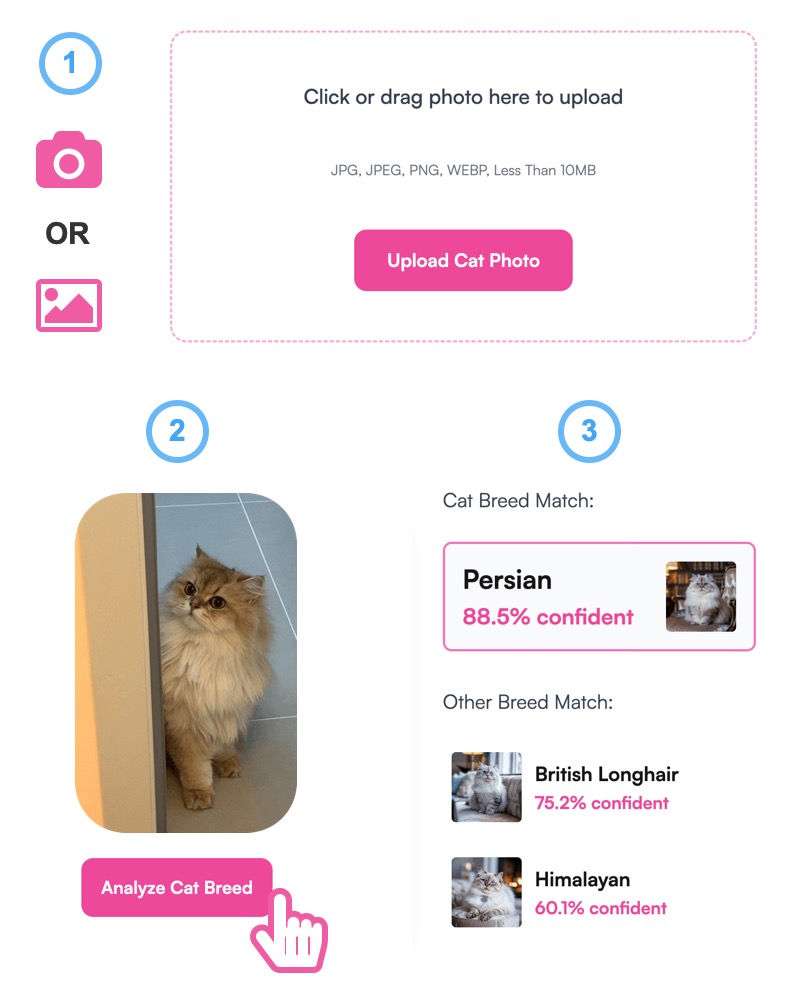
WhatBreedIsMyCat analyzes a cat photo to return three likely breed matches with confidence percentages, visual traits, behavior notes, and care tips. The free web tool uses TICA breed standards for comparison, deletes uploaded photos after analysis, and lets users download or share result cards.
WhatBreedIsMyCat is a free web tool that uses AI to suggest possible cat breeds from a single photo. It is built for owners who adopted a cat without papers, took in a stray, or are simply curious about the big ears or thick coat their pet has. The tool also suits people who want a quick, shareable answer when friends ask about a cat's background. The process is intentionally simple. Users drag a JPG, PNG, or WEBP image (up to 10MB) into the upload area, and the AI scans it automatically, with no extra button to press. According to the site, the scan takes about five seconds. The output lists three candidate breeds, each with a match percentage, visual traits, behavior notes, and basic care tips. Results can be downloaded or shared as a card. For users without a photo ready, the site offers sample images of popular breeds. The model is trained on breed standards from The International Cat Association (TICA), so it compares visible features such as face shape, ear size, and coat type against known patterns. The site is candid about limits: most cats are mixed, and a photo only captures so much. It positions itself as a quick, entertaining starting point rather than a diagnostic tool, and it points to DNA testing services like Basepaws and Wisdom Panel for definitive answers. Privacy is a stated priority. Photos are deleted right after analysis and no data is stored, which lowers the barrier for casual use. The tool is free, requires no account, and runs in a browser. It does not replace a veterinarian or a genetic test, but it gives curious owners a fast, low stakes way to explore their cat's possible ancestry.
The homepage describes the tool as 100 percent free, with uploads, results, and sharing available at no cost. No paid tiers or subscription options are listed.
Learn moreAI breed identification from a single cat photo, with three candidate breeds per scan. Each result includes a match percentage, breed features, behavior notes, and care tips. The model is trained on TICA breed standards. Uploads support JPG, PNG, and WEBP up to 10MB, and analysis completes in about five seconds. Photos are deleted after analysis, and results can be downloaded or shared as a card.
 AI Angels400+ customizable AI girlfriends for NSFW chat, voice calls, and roleplay
 Candy AIExperience the future of companionship with AI friends who chat, role-play, and connect with you on a human level.
 ourdream.aiA vast AI roleplay platform with millions of characters for chat, images, video and voiceAI Angels400+ customizable AI girlfriends for NSFW chat, voice calls, and roleplayCandy AIExperience the future of companionship with AI friends who chat, role-play, and connect with you on a human level.ourdream.aiA vast AI roleplay platform with millions of characters for chat, images, video and voice


