Create Story

AI turns a child's uploaded photo into the illustrated hero of their own storybook.

Beginner
Screenshot of Create Story, AI turns a child's uploaded photo into the illustrated hero of their own storybook

What is Create Story?

Create Story is a books tool. CreateStory.ai generates personalized children's storybooks by transforming an uploaded photo of a child into consistent illustrations of them as the story's hero, delivered as a downloadable PDF or printed A5 book on a monthly subscription.

CreateStory.ai builds personalized children's books by placing a child's own likeness, generated from an uploaded photo, into an illustrated story where they play the lead role. Parents upload a clear photo, pick a theme such as a space adventure, underwater world, or enchanted forest, and the service writes an age-appropriate story while generating matching illustrations that carry the child's face across every page. The product is aimed at parents and grandparents looking for a keepsake gift rather than a throwaway toy purchase. The homepage highlights use cases like birthday gifts and long-distance grandparents reading a personalized book over video calls with a young child. Because the site also hosts more than a thousand free, non-personalized stories organized by age, length, character, holiday, and genre, families can browse and pick a favorite tale before deciding whether to turn it into a custom book starring their own child. In practice, the workflow is short: upload a photo, choose a theme, wait for the AI to generate text and matching illustrations (the homepage cites about 15 minutes for generation), then read the result online, download it as a PDF, or order a printed A5 copy. Every plan bundles a set number of stories per month, a fixed 16-page format, and a handful of text regenerations if the story does not read well on the first pass. Within the broader personalized-gift and AI storybook space, CreateStory.ai positions itself as a subscription product rather than a one-off purchase, competing on photo-likeness quality and print options rather than on story length or genre breadth, both of which are currently limited compared to what a parent might expect from a traditional children's book service.

How do you use Create Story?

  1. 1Upload a photo of your child
    Provide a clear, well-lit, front-facing photo so the AI can build a recognizable character profile of your child.
    Create Story — Upload a photo of your child
  2. 2Choose a story theme
    Pick from themes such as space adventures, underwater worlds, or enchanted forests to set the story's setting and tone.
  3. 3Let the AI generate the story and illustrations
    The system writes an age-appropriate adventure and creates matching illustrations that place your child's likeness on every page.
  4. 4Select a subscription plan
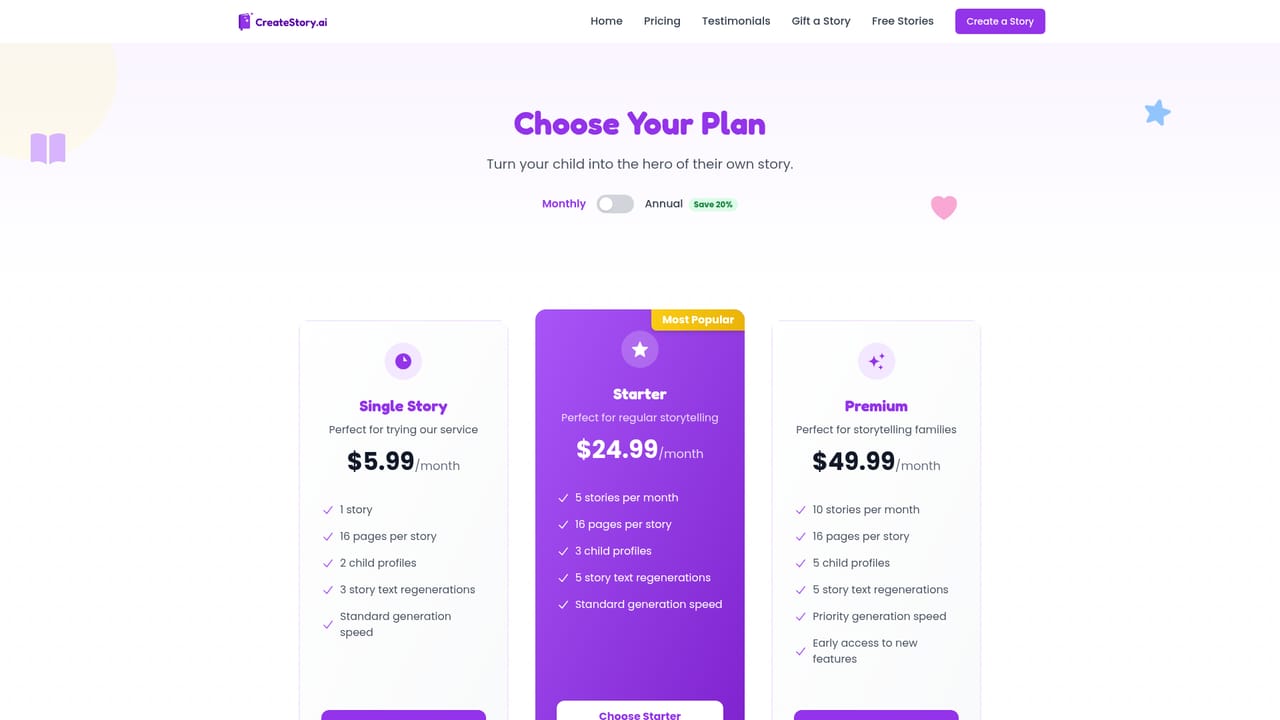
    Choose between Single Story, Starter, or Premium plans depending on how many stories and child profiles you need per month.
    Create Story — Select a subscription plan
  5. 5Read, download, or print the finished book
    Read the storybook online, download the PDF, or order a printed A5 copy to keep as a physical keepsake.

Pros and cons

Pros

  • Uploaded photo becomes a consistent illustrated character throughout the entire storyAI
  • Over 1,000 free stories available to preview before paying for a personalized versionAI
  • Plans support multiple child profiles, useful for families with more than one kidAI
  • Every tier includes a digital PDF plus the option to order a printed copyAI
  • Monthly subscriptions can be canceled anytime with no long-term lock-inAI

Cons

  • Every plan is capped at a fixed 16-page story with no option to create longer booksAI
  • A tester noted wanting more genre and theme options than what is currently offeredAI
  • Story generation takes around 15 minutes according to the homepage, which is not instantAI
  • No free trial is mentioned, so first-time buyers pay before seeing a finished resultAI
  • No API, mobile app, or platform beyond the web browser is mentioned on the homepageAI

How much does Create Story cost?

Pricing

Single Story starts at $5.99/month for one 16-page book and two child profiles. Starter is $24.99/month for five stories and three profiles. Premium is $49.99/month for ten stories and five profiles. Annual billing saves 20%, and plans can be canceled anytime.

Learn more

Support

Support is handled by email at support@createstory.ai, and the site links out to Trustpilot for customer reviews.

Features

AI transforms an uploaded child photo into consistent storybook illustrations, pairs them with an age-appropriate custom story across selectable themes, and delivers the result as an online read, PDF download, or printed A5 book.

Frequently asked questions about Create Story

  • How much does Create Story cost?
    Single Story starts at $5.99/month for one 16-page book and two child profiles. Starter is $24.99/month for five stories and three profiles. Premium is $49.99/month for ten stories and five profiles. Annual billing saves 20%, and plans can be canceled anytime.
  • How do you use Create Story?
    The walkthrough on this page covers 5 steps: 1. Upload a photo of your child 2. Choose a story theme 3. Let the AI generate the story and illustrations 4. Select a subscription plan 5. Read, download, or print the finished book.
  • What platforms does Create Story support?
    Create Story is available on Web App.
  • What are the limitations of Create Story?
    Every plan is capped at a fixed 16-page story with no option to create longer books. A tester noted wanting more genre and theme options than what is currently offered. Story generation takes around 15 minutes according to the homepage, which is not instant.

Status

StatusActive
Views0
Outbound clicks0
Added9/17/2026

Platforms

Web App

Pricing

SubscriptionFreemium