FacelessReels.video

Type a topic, get a finished faceless short video with voice and captions

Beginner
Screenshot of FacelessReels.video, Type a topic, get a finished faceless short video with voice and captions

What is FacelessReels.video?

FacelessReels.video turns a typed topic into a finished vertical short with AI script, voiceover, captions, visuals and music. Credit-based plans start at $39/month, with free signup credits and no card required.

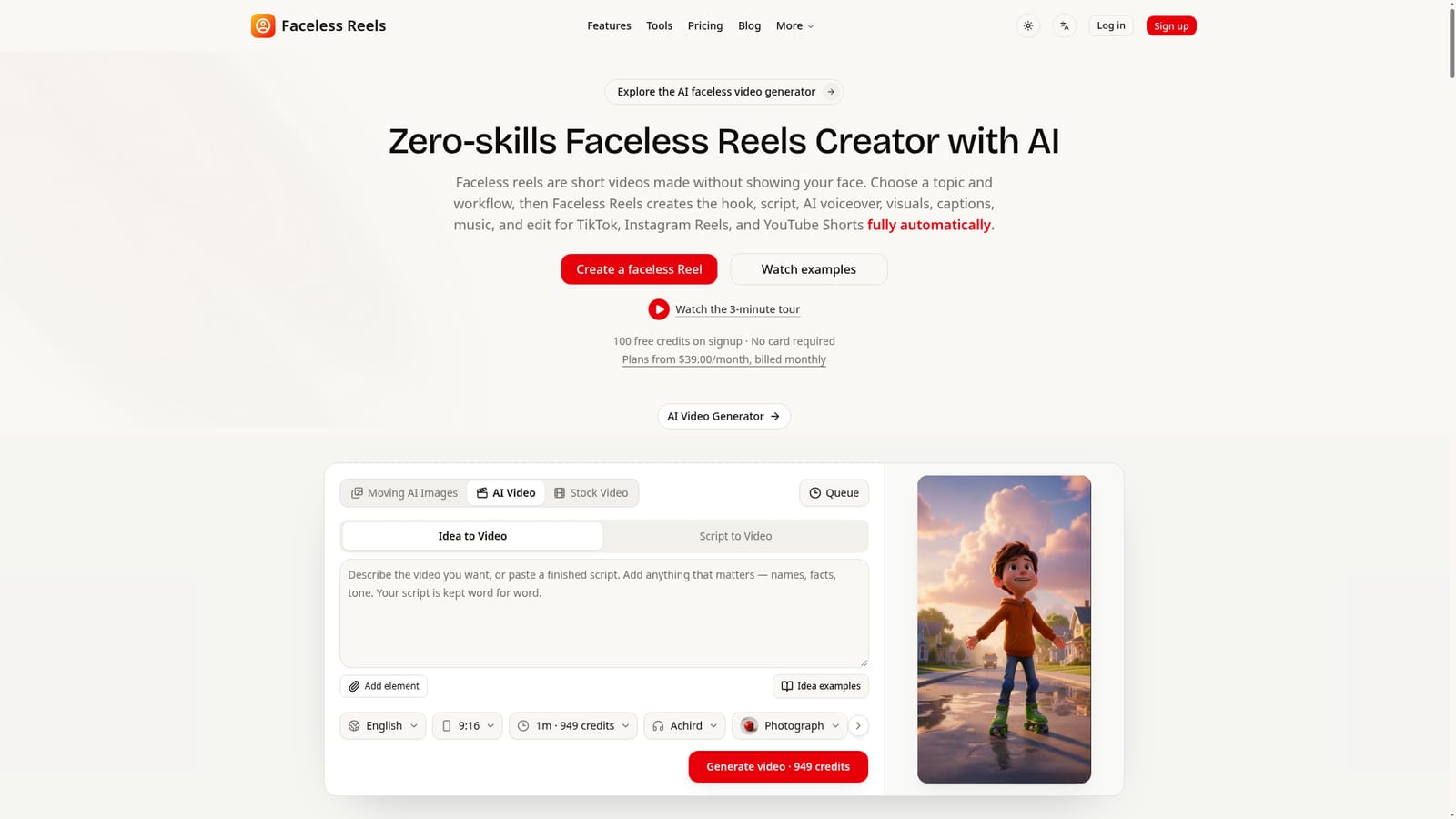
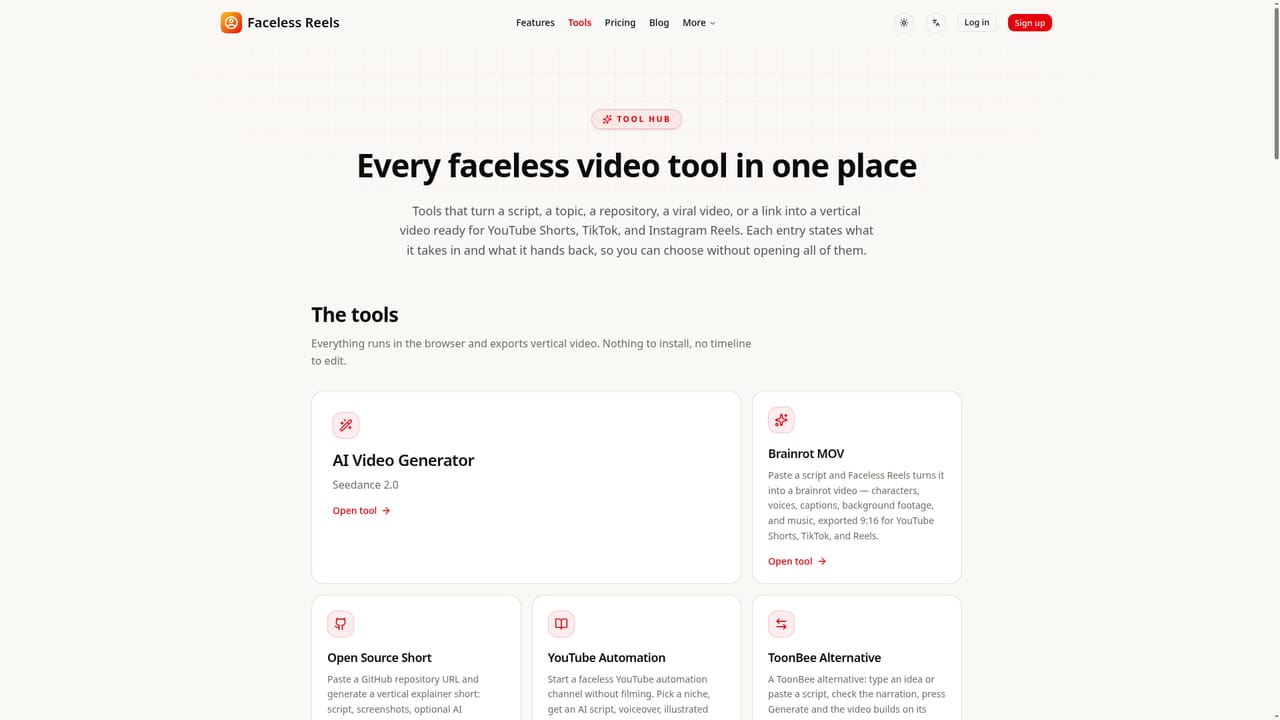
FacelessReels.video is a web-based generator for short vertical videos that never show the creator's face. The user picks a topic or types an idea, chooses a workflow, and the system produces the hook, script, AI voiceover, visuals, captions, music and edit in a single pass, ready for TikTok, Instagram Reels, YouTube Shorts and similar feeds. The product is organised around guided workflows rather than a blank timeline. The site lists nine tools, including an AI explainer video (doodle style), a stickman animation maker, a YouTube automation flow for storytelling, an AI video script generator, MoneyPrinterTurbo and Hypit style options, two brainrot formats and a Facebook Reels downloader. Inside the main generator, the user selects a video type (moving AI images, AI video or stock video), whether to start from an idea or an existing script, a language, aspect ratio, visual style, caption style and music, then sees the credit cost before generating. The scripted opening hook, narration and scenes can be reviewed before the video is exported. Pricing runs on credits. New accounts receive a one-time batch of free signup credits without a card, and the homepage advertises the first video as free. Paid plans are monthly or yearly, with every tool included and tiers differing only by credit allowance, watermark removal and support priority. Extra credit packs that never expire can be bought separately. The interface is offered in 13 languages, which helps creators targeting non-English audiences. In the wider market, it sits between general AI video generators and full editors such as CapCut or Descript. It trades fine-grained control for speed: the site quotes roughly five minutes to a video draft, which suits creators running several faceless channels, marketers testing hooks, and anyone who wants volume without filming or editing skills. People who need frame-level editing, brand-specific templates or a single long-form production will likely still need a separate editor. The operator states that views and revenue are never guaranteed, which is a fair caution for anyone treating it as a channel-automation shortcut.
How do you use FacelessReels.video?

  1. 1Create an account
    Register on the site to receive the one-time free signup credits. No card is required at this stage.
    FacelessReels.video — Create an account
  2. 2Pick a workflow
    Browse the guided tools such as AI Explainer Video, Stickman Animation or YouTube Automation, and choose the format that matches the channel.
    FacelessReels.video — Pick a workflow
  3. 3Describe the idea
    In the video generator, choose a video type, enter a topic or script, and set language, aspect ratio, visual style, captions and music.
    FacelessReels.video — Describe the idea
  4. 4Generate and review
    Check the credit cost, start generation, then review the hook, narration, scenes and captions before finalising the video.
  5. 5Export and post
    Download the vertical video and upload it to TikTok, Instagram Reels or YouTube Shorts, then compare plans if more credits are needed.
    FacelessReels.video — Export and post

Pros and cons

Pros

  • Produces script, voiceover, captions, music and edit from one topic, so no timeline editing or recording is neededAI
  • Nine guided workflows (explainer, stickman, storytelling, brainrot and more) avoid starting from a blank editorAI
  • Free signup credits with no card required let buyers test output before payingAI
  • All tools are included on every plan, so tiers differ only by credits, watermark and supportAI
  • Interface available in 13 languages and exports for TikTok, Reels, Shorts and other vertical feedsAI

Cons

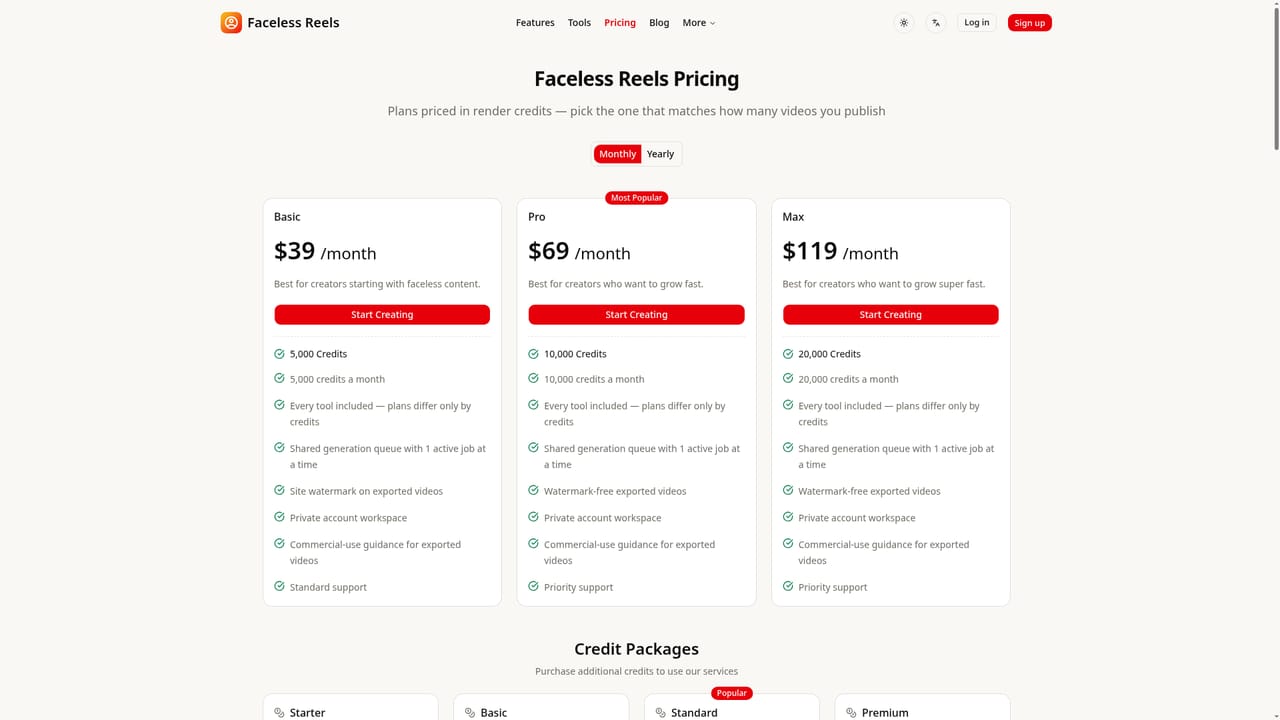
  • Entry plan Basic exports with a site watermark, and only Pro and Max remove itAI
  • Each plan allows only one active generation job at a time in a shared queue, which slows batch productionAI
  • A single video costs hundreds of credits (the demo shows 949), so the 5,000-credit Basic plan covers only a handful of videosAI
  • Automated assembly offers less frame-level control than a conventional editor for brand-specific polishAI
  • Monthly plans start at $39, which is steep for hobbyists, and no free plan is listed beyond one-time creditsAI

How much does FacelessReels.video cost?

Free trial

New accounts get 100 free credits on signup with no card required, and the first video is advertised as free.

Learn more

Pricing

Basic is $39/month for 5,000 credits (watermarked exports), Pro is $69/month for 10,000 and Max is $119/month for 20,000, both watermark-free. Non-expiring credit packs run from 2,000 credits for $29 to 30,000 for $249. Yearly billing is also offered.

Learn more

Support

Standard support on Basic and priority support on Pro and Max. Questions can be emailed to support@facelessreels.video, and a FAQ and 3-minute walkthrough video are on the site.

Integrations

No third-party integrations are listed. Videos are exported for manual upload to TikTok, Instagram Reels, YouTube Shorts, Facebook, X and LinkedIn.

Features

AI hook and script writing, AI voiceover, dynamic captions, music, visuals (AI images, AI video or stock), idea-to-video and script-to-video modes, nine guided tools, vertical export for major short-video platforms, 13 interface languages.

Learn more

Frequently asked questions about FacelessReels.video

  • How much does FacelessReels.video cost?
    Basic is $39/month for 5,000 credits (watermarked exports), Pro is $69/month for 10,000 and Max is $119/month for 20,000, both watermark-free. Non-expiring credit packs run from 2,000 credits for $29 to 30,000 for $249. Yearly billing is also offered.
  • Does FacelessReels.video offer a free trial?
    New accounts get 100 free credits on signup with no card required, and the first video is advertised as free.
  • How do you use FacelessReels.video?
    The walkthrough on this page covers 5 steps: 1. Create an account 2. Pick a workflow 3. Describe the idea 4. Generate and review 5. Export and post.
  • What platforms does FacelessReels.video support?
    FacelessReels.video is available on Web App.
  • What does FacelessReels.video integrate with?
    No third-party integrations are listed. Videos are exported for manual upload to TikTok, Instagram Reels, YouTube Shorts, Facebook, X and LinkedIn.
  • What are the limitations of FacelessReels.video?
    Entry plan Basic exports with a site watermark, and only Pro and Max remove it. Each plan allows only one active generation job at a time in a shared queue, which slows batch production. A single video costs hundreds of credits (the demo shows 949), so the 5,000-credit Basic plan covers only a handful of videos.

Status

StatusActive
Views0
Outbound clicks0
Added10/18/2026

Platforms

Web App

Pricing

FreemiumSubscription