Support
Beta testers share feedback directly with the product team, and RoomSketcher publishes a newsletter for product and FloorCapture updates.
Learn moreScan a property with LiDAR and get an editable floor plan in minutes
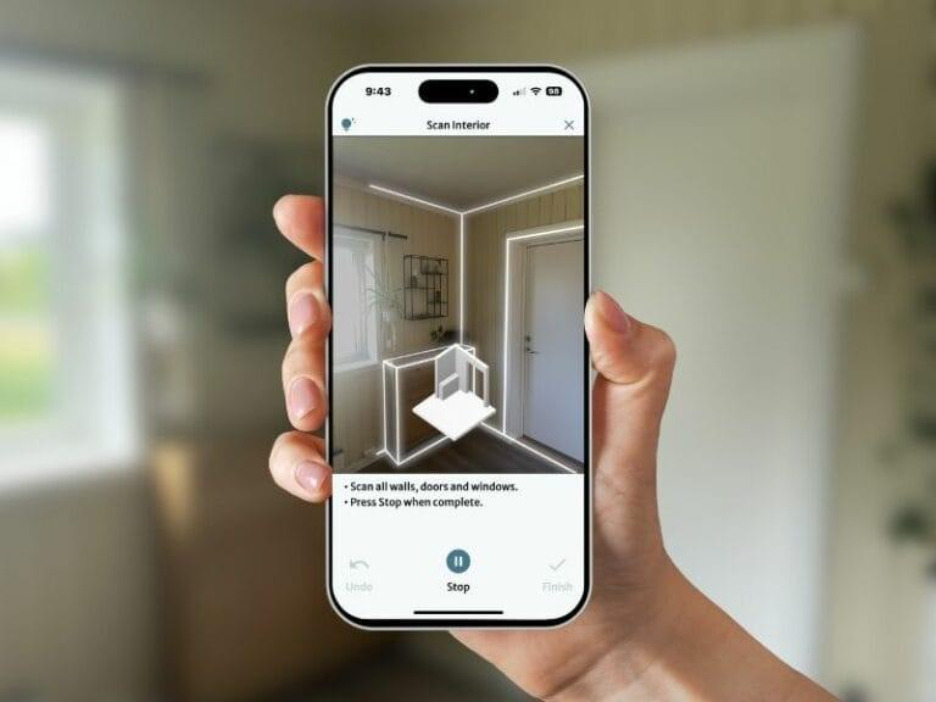
FloorCapture is RoomSketcher's LiDAR and AI scanning tool for iPhone and iPad. Walk a property, capture each room, and get an editable RoomSketcher floor plan on the device, then refine it and export 2D and 3D plans. Currently offered through a selective early access beta.
FloorCapture is a RoomSketcher tool that turns an on-site walkthrough into a digital floor plan. Using the LiDAR sensor built into newer iPhones and iPad Pro models, the app scans each room and processes the capture with AI directly on the device. When the scan is finished, the result is a floor plan that opens as an editable RoomSketcher project rather than a locked image, so the geometry can be corrected, extended and styled in the existing RoomSketcher workspace. The workflow is aimed at people who already measure properties for a living: real estate agents, real estate photographers, appraisers, property managers, general contractors and home improvement specialists. The company's own early access criteria point the same way, asking for professionals who work with existing properties, produce floor plans as part of their job and already use the RoomSketcher app on a computer or tablet. Capture work is done on a phone or tablet in the field, and the finishing work happens in RoomSketcher afterwards. In practice a medium sized property is captured in roughly five to ten minutes according to RoomSketcher. Each level is scanned separately, and multiple levels can be added to one project. Once capture ends, the app converts the scan into RoomSketcher geometry, after which the user adjusts layout, adds furniture and measurements, and exports finished 2D and 3D floor plans. Against dedicated scanning hardware or photogrammetry apps, the appeal is the direct handoff into a floor plan editor plus a hard device requirement. FloorCapture is not a general purpose tool: it only runs on LiDAR equipped Apple hardware and only makes sense if RoomSketcher is part of the workflow. It is currently in a selective beta, so availability rather than price is the main gate. It competes with other LiDAR scanning apps on speed and on the fact that the output is already an editable plan.
Beta testers share feedback directly with the product team, and RoomSketcher publishes a newsletter for product and FloorCapture updates.
Learn moreCaptured floor plans open directly in the RoomSketcher app as editable projects, which is the only integration described.
FloorCapture scans rooms with LiDAR on iPhone and iPad and uses AI to convert the capture into an editable RoomSketcher project. It handles multi-level properties by capturing each level separately, produces geometry immediately when a capture ends, and hands off to RoomSketcher for layout changes, furniture, measurements and finished 2D and 3D floor plan exports. Projects appear on a dashboard with thumbnails and last updated dates.
 AI Angels400+ customizable AI girlfriends for NSFW chat, voice calls, and roleplay
 Candy AIExperience the future of companionship with AI friends who chat, role-play, and connect with you on a human level.
 ourdream.aiA vast AI roleplay platform with millions of characters for chat, images, video and voiceAI Angels400+ customizable AI girlfriends for NSFW chat, voice calls, and roleplayCandy AIExperience the future of companionship with AI friends who chat, role-play, and connect with you on a human level.ourdream.aiA vast AI roleplay platform with millions of characters for chat, images, video and voice