TranslateImage

Translate image text into 130+ languages while keeping fonts, colors and layout

Beginner
Screenshot of TranslateImage, Translate image text into 130+ languages while keeping fonts, colors and layout

What is TranslateImage?

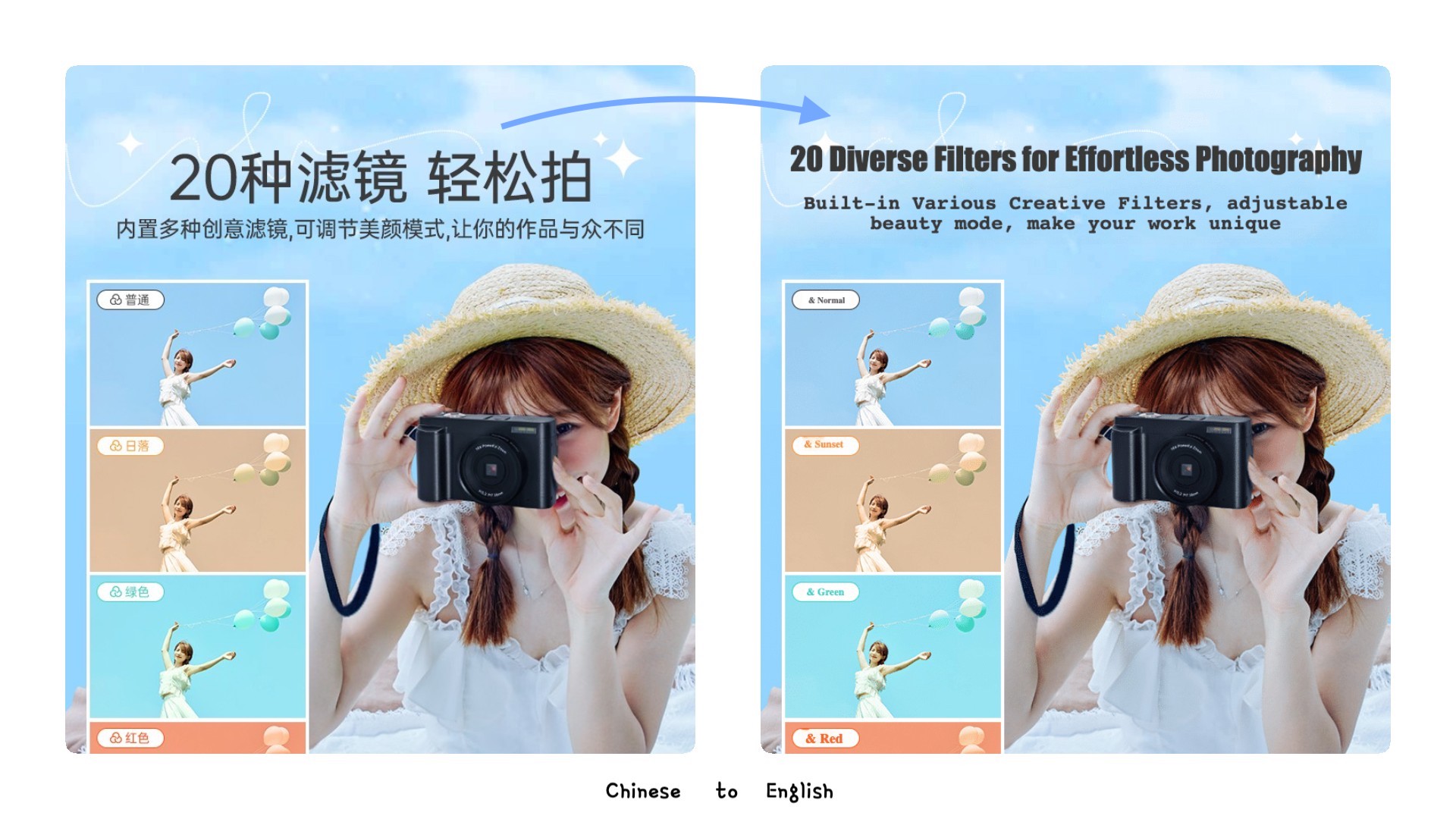
TranslateImage is an image scanning tool that translates image text into 130+ languages while keeping fonts, colors and layout. TranslateImage uses AI OCR to pull text out of photos, screenshots and documents, erase it, and re-render a translation in 130+ languages with the original fonts, colors and layout preserved.

TranslateImage is a web based AI translation tool built around a specific problem: what happens to an image once its text is translated. Most translation services hand back plain text, which is useless when the words are baked into a product photo, a screenshot, a banner or a diagram. This tool runs OCR over the uploaded image, extracts the text, translates it, erases the original lettering, and then re-renders the translated copy in roughly the same place with the same font style, size, color and alignment. Backgrounds left behind by the removed text are reconstructed with AI inpainting so the result does not look patched. The workflow suits people who ship visual assets across markets: e-commerce sellers localizing catalog and marketplace photos, app teams translating interface screenshots for store listings, marketers adapting banners and social graphics, and technical or support teams working through diagrams, manuals and guides. Screenshots, product shots, photos and document scans in JPG, PNG and GIF are all accepted, with the site claiming 130+ source and target languages and a 99% OCR accuracy figure. In practice the process is three stages: upload and pick a language, let OCR and translation run (the site quotes 1 to 3 minutes), then open the built in editor. That editor matters more than the marketing suggests, because machine translation of image text is imperfect and the site says so openly. Users can rewrite translated strings, adjust typography and restore words that should never have been translated, such as brand names and abbreviations. Finished files download as PNG or JPG at original resolution, and bulk processing is available for larger image sets. Pricing is credit based rather than a flat software fee. One time packs run from a single image at US$ 0.99 up to 500 images at US$ 0.20 each, and monthly plans start around US$ 0.20 per image at 100 images and fall to US$ 0.10 per image at 1000. That model competes with generic OCR and translation utilities that output text only, and with manual design work in an image editor, which remains more precise but far slower. Teams with occasional needs will find per image packs cheaper than committing to a subscription.

How do you use TranslateImage?

  1. 1Create an account and sign in
    Open the sign in page and register or log in. The translation workspace and credits are tied to this account.
  2. 2Upload an image and pick the target language
    In the playground, upload a JPG, PNG or GIF and select the target language from the supported list to start OCR translation.
  3. 3Let OCR and translation finish
    The system extracts the text, translates it, erases the original lettering and rebuilds the background. The site quotes 1 to 3 minutes for this pass.
  4. 4Correct the translation in the editor
    Review each translated string, fix wording, adjust font family, size, color and alignment, and restore any brand names that must stay in the original language.
  5. 5Export and reuse the workspace
    Download the finished image as a PNG or JPG at original resolution. Saved editor workspaces can be reopened later for further changes.

Pros and cons

Pros

  • Keeps font style, size, color and alignment close to the source, which generic OCR tools do not attemptAI
  • Background inpainting removes the original text without leaving obvious smudgesAI
  • Editor allows correcting machine translation and locking brand names or abbreviations that should stay untranslatedAI
  • One time image packs start at US$ 0.99, so low volume users avoid a recurring commitmentAI
  • Bulk upload and editing cover large product catalogs and manual setsAI

Cons

  • The site itself states AI translation is not fully accurate, so every image needs a manual review pass in the editorAI
  • Per image credits mean high volume localization can cost more than a flat subscription translation toolAI
  • Only JPG, PNG and GIF are listed as inputs, with no mention of PDF, SVG or layered design filesAI
  • No public API or integration information on the homepage, which blocks automated pipelinesAI
  • Quality of inpainting on busy or textured backgrounds is not documented or benchmarkedAI

How much does TranslateImage cost?

Pricing

Credit based, paid through Stripe. One time packs: 10 images at US$ 0.99 each (US$ 9.9), 50 at US$ 0.60, 100 at US$ 0.50, 500 at US$ 0.20. Monthly plans: 100 images at US$ 0.20 per image (US$ 19.9 per month), 200 at US$ 0.15, 1000 at US$ 0.10. Both tiers include editing, bulk processing and email support.

Learn more

Support

Dedicated email support with a stated 1 to 2 business day response is listed on both the one time and monthly plans.

Features

AI OCR extracts text from images, then translation covers 130+ languages. Original font family, size, color, weight and alignment are inferred and reapplied, with smart text placement and background inpainting to erase the source lettering. An editor supports correction of mistranslations and protection of brand names, and results export as PNG or JPG at original resolution. Bulk translation and saved workspaces are included.

Frequently asked questions about TranslateImage

  • How much does TranslateImage cost?
    Credit based, paid through Stripe. One time packs: 10 images at US$ 0.99 each (US$ 9.9), 50 at US$ 0.60, 100 at US$ 0.50, 500 at US$ 0.20. Monthly plans: 100 images at US$ 0.20 per image (US$ 19.9 per month), 200 at US$ 0.15, 1000 at US$ 0.10. Both tiers include editing, bulk processing and email support.
  • How do you use TranslateImage?
    The walkthrough on this page covers 5 steps: 1. Create an account and sign in 2. Upload an image and pick the target language 3. Let OCR and translation finish 4. Correct the translation in the editor 5. Export and reuse the workspace.
  • What platforms does TranslateImage support?
    TranslateImage is available on Web App.
  • What are the limitations of TranslateImage?
    The site itself states AI translation is not fully accurate, so every image needs a manual review pass in the editor. Per image credits mean high volume localization can cost more than a flat subscription translation tool. Only JPG, PNG and GIF are listed as inputs, with no mention of PDF, SVG or layered design files.

Status

StatusActive
Views0
Outbound clicks0
Added10/21/2026

Platforms

Web App

Pricing

Paid